이 번역 페이지는 최신 내용을 담고 있지 않습니다. 최신 내용을 영문으로 보려면 여기를 클릭하십시오.
2차원 영상 표시하기
R2026a단일 영상 또는 여러 영상을 나란히 표시하고, 필요에 따라 일반적인 영상 처리 작업을 대화형 방식으로 수행
이 툴박스는 영상 데이터를 표시하는 여러 함수를 제공합니다. 툴박스의 모든 영상 표시 기능을 알아보려면 Choose Approach to Display 2-D and 3-D Images 항목을 참조하십시오.
영상 뷰어 앱을 사용하여 영상을 표시하고 탐색할 수 있습니다. 영상 뷰어에는 영상 픽셀을 자세히 검토하고, 영상을 자르고, 영상 대비를 조정하고, 컬러맵을 적용하고, 픽셀 간 거리 또는 다각형 영역의 면적을 측정하는 데 사용할 수 있는 툴이 포함되어 있습니다. 자세한 내용은 Get Started with Image Viewer App 항목을 참조하십시오.
함수
속성
| Viewer Properties | Viewer for 2-D and 3-D image display (R2022b 이후) |
| Image Properties | Image appearance in 2-D Viewer (R2024b 이후) |
도움말 항목
영상을 Figure 창에 표시하기
- Figure 창에 영상 표시하기
Figure 창에 회색조, RGB, 인덱스 및 이진 영상을 표시합니다. - 여러 개의 영상 표시하기
여러 개의 영상을 별도의 Figure 창마다 표시하거나 하나의 Figure 창에 개별적으로 표시합니다. 더 손쉽게 비교하기 위해 두 영상의 합성본을 생성할 수도 있습니다. - Display Different Image Types
Display truecolor, grayscale, binary, and indexed images in a figure window or in the interactive Image Viewer app. - Display and Explore Blocked Images
This example shows how to visualize and explore large and multiresolution images stored asblockedImageobjects. (R2024b 이후) - Print Images
Print images to use them in a word processing program or graphics editor. - Manage Display Settings
View and edit settings to control how images are displayed on your screen by default.
영상을 탐색하고 상호 작용하기
- Get Started with Image Viewer App
Display, explore, and process images interactively with Image Viewer app. - 영상 뷰어 앱에서 픽셀 정보 가져오기
개별 픽셀의 위치와 값 정보를 표시하거나 해당 픽셀 값의 이웃을 봅니다. - Crop Image Using Image Viewer App
Extract, or crop, a rectangular region of the image. You can fine tune the size and position of the crop region. - 영상 뷰어 앱을 사용하여 거리와 면적 측정하기
두 픽셀 사이에 그려진 선분의 길이 또는 그려진 다각형의 면적을 측정합니다. - Adjust Image Contrast in Image Viewer App
Adjust image contrast and brightness by using the Adjust Contrast tool or the Window/Level tool.
영상 시퀀스 표시하기
- View Image Sequences in Video Viewer
Animate image sequences using the Video Viewer app. Explore the image sequence with playback, panning, and zooming controls. - Convert Multiframe Image to Movie
Create a movie from an image sequence of truecolor or indexed images. Movies can be played in the MATLAB® environment or written to a video file.
추천 예제
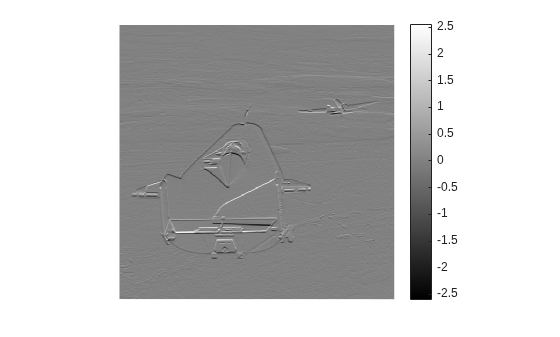
표시된 회색조 영상에 컬러바 추가하기
이 예제에서는 데이터 값과 색 간의 매핑을 나타내는 컬러바와 함께 회색조 영상을 표시하는 방법을 보여줍니다. 특히 일반적이지 않은 범위 데이터를 영상으로 표시하는 경우 데이터 값과 색 간의 대응 관계를 컬러바로 확인하는 것이 유용합니다.
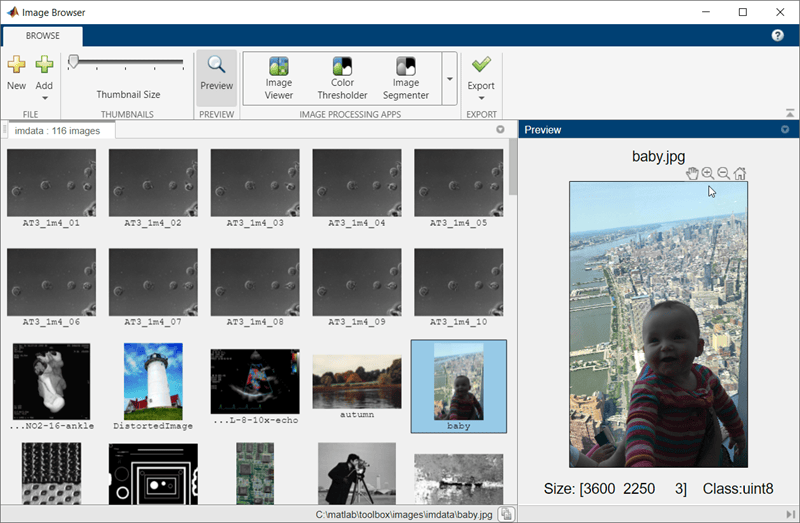
View and Edit Collection of Images in Folder or Datastore
Use the Image Browser app to view a collection of images, inspect and select images to send to another app, and export a subset of the collection to an image datastore.

