주요 콘텐츠

viewangle

Reposition viewer camera using azimuth and elevation

Since R2026a

    Description

    viewangle(viewer,az,el) updates the camera properties of the Viewer object viewer according to the specified azimuth and elevation angles.

    example

    Examples

    collapse all

    Load a grayscale volume into the workspace and display it by using the volshow function.

    load("spiralVol.mat")
    h = volshow(spiralVol);
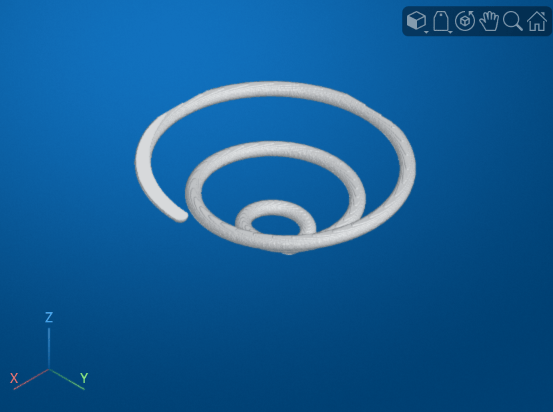
    volshow display of a grayscale spiral volume with the default camera view

    View the volume using an azimuth of 90 degrees and an elevation of 0 degrees. The updated line of sight points along the x-axis.

    viewer = h.Parent;
    viewangle(viewer,90,0);
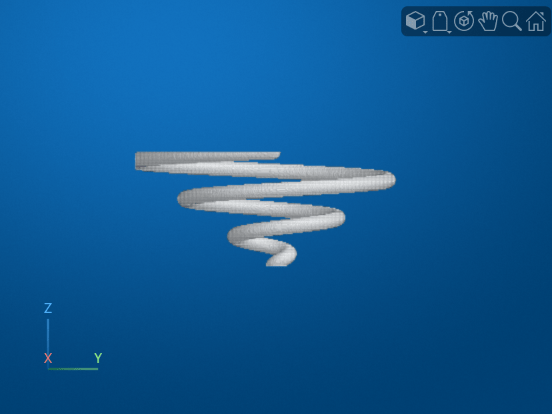
    Updated volshow display with a line of sight pointing along the x-axis, viewing the yz plane

    Input Arguments

    collapse all

    Viewer to update, specified as a Viewer object. For example, you can specify a Viewer object created by the viewer3d function, or the parent of the object returned by the volshow function.

    The viewangle function updates the camera properties of the specified Viewer object. See Viewer Properties for detailed descriptions of the camera properties.

    Azimuth, specified as a numeric scalar angle in degrees from the negative y-axis. Increasing this angle corresponds to counterclockwise rotation about the z-axis when viewing the xy-plane from above.

    The azimuth is typically between –180 and 180 degrees. If you specify a value outside this range, the function wraps the value, such that 0 and 360 result in the same view.

    Data Types: single | double | int8 | int16 | int32 | int64 | uint8 | uint16 | uint32 | uint64

    Elevation, specified as a numeric scalar angle in degrees between the line of sight and the xy-plane. Increasing the elevation from -90 to 90 degrees corresponds to a rotation from the negative z-axis to the positive z-axis. The function sets values less than -90 to -90 and values greater than 90 to 90.

    Data Types: single | double | int8 | int16 | int32 | int64 | uint8 | uint16 | uint32 | uint64

    Version History

    Introduced in R2026a