ROS 2 Custom Message Support
R2026bCustom Message Overview
Custom messages are user-defined messages that you can use to extend the set of message
types currently supported in ROS Toolbox. If you are sending and receiving supported message types, you do not need
to use custom messages. To see a list of supported message types, call ros2 msg
list in the MATLAB® Command Window.
To create custom messages, you need valid ROS 2 packages from the ROS Wiki at ROS 2 Packages. Call the ros2genmsg
function with the file path to the location containing the custom message package
folders to generate the necessary MATLAB code to use custom messages.
The ros2genmsg
function also supports generating custom ROS 2 message, service, and action types
directly from ROS 2 IDL (.idl) files. For details on mapping between
ROS interface types and DDS IDL types, see ROS Interface
Types and DDS IDL Types Mapping.
For an example on how to generate a ROS 2 custom message in MATLAB, see Create Shareable ROS 2 Custom Message Package.
If you are generating ROS 2 custom messages for the first time, see ROS Toolbox System Requirements for prerequisites.
Custom Message Contents
ROS 2 custom messages are specified in ROS package folders that contains
msg, srv, and action directories.
Note
ROS Toolbox supports multiple custom messages folders on the MATLAB path at any given time. These folders can contain multiple custom message packages.
The msg folder contains all your custom message type
definitions (.msg or .idl). You must also add all
custom service type definitions (.srv or .idl) to
the srv folder and add all custom action type definitions
(.action or .idl) to the
action folder. The package ros2CustomMessages
has this folder and file structure.
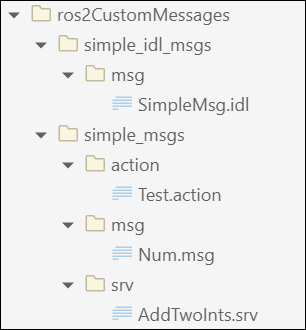
The package contains one custom message type in Num.msg, one custom
service type in AddTwoInts.srv, one custom action type in
Test.action, and one custom IDL message type in
SimpleMsg.idl. MATLAB uses these files to generate the necessary files for using the custom
messages contained in the package. For more information on creating
msg and srv files, see Creating ROS 2 msg and srv on ROS 2 documentation.
Note
The custom message libraries generated for ROS 2 are user-created files that integrate into the internal ROS workflow. To safeguard these files from unauthorized access and to maintain system integrity, set appropriate directory permissions to restrict access to only intended user accounts.
Custom Message Creation Workflow
Once you have your custom message structure set up as described in the previous section, you
can create the code needed to use these custom messages. First, you call ros2genmsg
with your known path to the custom message files to create MATLAB code.
The ros2genmsg
function takes your custom message files (.msg,
.srv, and .action) and converts each message
type to working MATLAB code. The software looks for .msg or
.idl files in the msg folder,
.srv or .idl files in the
srv folder, and .action or
.idl files in the action folder and converts
each message type to working MATLAB code. This code is a group of functions that define the message properties
when you create new custom messages. It then creates the required MATLAB M-files for the different message functions.
After the ros2genmsg
function creates these files, you must add the function files to the MATLAB path. These steps are given as prompts in the MATLAB Command Window. Use ros2 msg
listros2message
function to verify that the new custom messages are available.
For an example of this procedure, see Create Shareable ROS 2 Custom Message Package. This example uses sample custom message files to create custom messages in MATLAB.
You need to complete this procedure only once for a specific set of custom messages. After that, you can use the new custom messages like any other ROS message in MATLAB and take advantage of the full ROS functionality that ROS Toolbox provides. Repeat this generation procedure when you would like to update or create new message types.
You must maintain the MATLAB path that contain the files directories.
Code Generation with Custom messages
You can use custom message, service, and action types, including ROS 2 IDL interface types
with ROS 2 Simulink® blocks and MATLAB functions to generate C++ code for a standalone ROS 2 node. The
generated code (.tgz archive) includes the custom message
definitions and the ROS 2 custom message packages. When you build the generated code
in the destination Linux system, the custom message packages are automatically
available in the colcon workspace.
If you change the custom message definitions in MATLAB for your application, you must delete the custom message package on the destination Linux System, regenerate the C++ code, and redeploy it.
Replacing Definitions of Built-In Messages With Custom Definitions
MATLAB provides a lot of built-in ROS 2 message types. You can replace the
definitions of those message types with new definitions using the same custom
message creation workflow detailed above. When you are replacing the definitions of
a built-in message package, you must ensure that the custom message package folder
contains new definitions (.msg or .idl files)
for all the message types in the corresponding built-in message package.

