주요 콘텐츠

uavScenario

Generate UAV simulation scenario

    Description

    The uavScenario object generates a UAV simulation scenario. Use the addMesh object function to add static meshes to the scene to represent buildings, terrain, and other obstacles. To add a UAV platform to the scene, use the uavPlatform object. To attach a sensor to the UAV platform, use the uavSensor object.

    Creation

    Description

    scene = uavScenario creates an empty UAV scenario with default property values.

    example

    scene = uavScenario(Name=Value) sets writable properties using one or more name-value arguments. For example, StopTime=20 generates a UAV scenario that stops simulating after 20 seconds.

    Name-Value Arguments

    expand all

    Specify optional pairs of arguments as Name1=Value1,...,NameN=ValueN, where Name is the argument name and Value is the corresponding value. Name-value arguments must appear after other arguments, but the order of the pairs does not matter.

    Scenario update rate, specified as a positive scalar in Hz.

    The advance object function advances the scenario by one time step, with a step size equal to the inverse of the update rate.

    This argument specifies the UpdateRate property.

    Data Types: double

    Scenario stop time, specified as a nonnegative scalar in seconds. A scenario stops advancing when the scenario time reaches the stop time.

    This argument specifies the StopTime property.

    Data Types: double

    Maximum number of stored UAV platform poses, specified as a positive integer greater than 1.

    At each time step, the scenario stores the UAV platform poses. Once it contains the maximum number of stored UAV platform poses, the scenario stops storing additional UAV poses.

    This argument specifies the HistoryBufferSize property.

    Data Types: double

    Scenario origin in geodetic coordinates, specified as a vector of the form [latitude longitude altitude]. The values of latitude and longitude specify the geodetic location of the origin in degrees, and altitude specifies the height of the origin above the WGS84 reference ellipsoid in meters.

    This argument specifies the ReferenceLocation property.

    Data Types: double

    Maximum number of frames in the scenario, specified as a positive integer. The combined number of inertial, UAV platform, and sensor frames in the scenario must be less than or equal to the maximum number of frames.

    This argument specifies the MaxNumFrames property.

    Data Types: double

    Properties

    expand all

    This property is read-only after object creation.

    Scenario update rate, represented as a positive scalar in Hz.

    Data Types: double

    This property is read-only after object creation.

    Scenario stop time, represented as a nonnegative scalar in seconds.

    Data Types: double

    This property is read-only after object creation.

    Maximum number of stored UAV platform poses, represented as a positive integer greater than 1.

    Data Types: double

    This property is read-only after object creation.

    Scenario origin in geodetic coordinates, represented as a vector of the form [latitude longitude altitude]. latitude and longitude are in degrees, and altitude is in meters.

    Data Types: double

    This property is read-only after object creation.

    Maximum number of frames in the scenario, represented as a positive integer.

    Data Types: double

    This property is read-only.

    Current scenario time, represented as a nonnegative scalar.

    Data Types: double

    This property is read-only.

    Scenario activity state, represented as a logical 1 (true) or 0 (false). A value of. true indicates that the scenario is running and has not yet reached the scenario stop time, and that the scenario is running. A value of false indicates that the scenario is not running.

    Data Types: logical

    This property is read-only.

    Scenario frames transformation tree, represented as a transformTree object. The transform tree contains the transformation information between the inertial, platform, and sensor frames in the scenario.

    This property is read-only.

    Names of the inertial frames in the scenario, represented as a vector of strings.

    By default, the inertial frame names are "ENU" and "NED", which correspond to inertial frames with the east-north-up and north-east-down orientations, respectively. To add a new inertial frame to the scenario, use the addInertialFrame function.

    Data Types: string

    This property is read-only.

    UAV platforms in the scenario, represented as an array of uavPlatform objects. To add a UAV platform to the scenario, create a uavPlatform object.

    This property is read-only.

    Static meshes in the scenario, represented as a cell array of extendedObjectMesh objects.

    Each extendedObjectMesh represents a static mesh in the scenario. To add a mesh to the UAV scenario, use the addMesh function.

    Object Functions

    setupPrepare UAV scenario for simulation
    addCustomTerrainAdd custom terrain data
    addMeshAdd new static mesh to UAV scenario
    addInertialFrameDefine new inertial frame in UAV scenario
    advanceAdvance UAV scenario simulation by one time step
    copyCopy UAV scenario
    updateSensorsUpdate sensor readings in UAV scenario
    removeCustomTerrainRemove custom terrain data
    restartReset simulation of UAV scenario
    showVisualize UAV scenario in 2-D
    show3DVisualize UAV scenario in 3-D
    terrainHeightReturns terrain height in UAV scenarios
    targetPosesFind positions, orientations, velocities, angular velocities, and accelerations of targets relative to ego UAV platform

    Examples

    collapse all

    Create a UAV scenario, and specify the update rate, stop time, and reference location.

    scene = uavScenario(UpdateRate=200,StopTime=2,ReferenceLocation=[46, 42, 0]); 

    Add an inertial frame MAP to the scenario.

    addInertialFrame(scene,"ENU","MAP",trvec2tform([1 0 0])); 

    Add one ground mesh and two cylindrical obstacle meshes to the scenario.

    addMesh(scene,"Polygon",{[-100 0; 100 0; 100 100; -100 100],[-5 0]},[0.3 0.3 0.3]);
    addMesh(scene,"Cylinder",{[20 10 10],[0 30]},[0 1 0]); 
    addMesh(scene,"Cylinder",{[46 42 5],[0 20]},[0 1 0],UseLatLon=true); 

    Add a UAV platform with a specified waypoint trajectory to the scenario.

    traj = waypointTrajectory(Waypoints=[0 -20 -5; 20 -20 -5; 20 0 -5],TimeOfArrival=[0 1 2]); 
    uavPlat = uavPlatform("UAV",scene,Trajectory=traj); 

    Add a mesh to the UAV platform.

    updateMesh(uavPlat,"quadrotor",{4},[1 0 0],eul2tform([0 0 pi])); 
    addGeoFence(uavPlat,"Polygon",{[-50 0;50 0;50 50;-50 50],[0 100]},true,ReferenceFrame="ENU"); 

    Attach an INS sensor to the UAV platform.

    insModel = insSensor; 
    ins = uavSensor("INS",uavPlat,insModel,MountingLocation=[4 0 0]); 

    Visualize the scenario in 3D.

    ax = show3D(scene); 
    axis(ax,"equal"); 

    Set up and start the scenario.

    % Set up scenario
    setup(scene); 
    
    % Start scenario
    while advance(scene) 
        % Update sensor readings 
        updateSensors(scene); 
        
        % Visualize the scenario 
        show3D(scene,"Parent",ax,"FastUpdate",true); 
        drawnow limitrate 
    end 
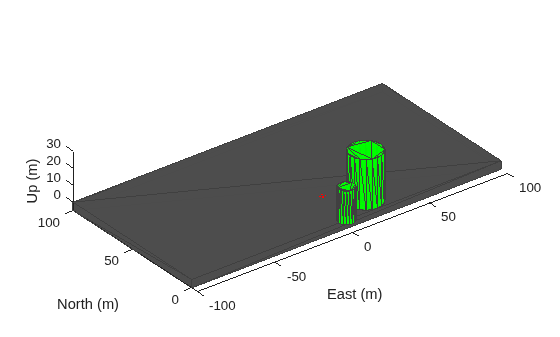
    Figure contains an axes object. The axes object with xlabel East (m), ylabel North (m) contains 4 objects of type patch.

    Add Terrain Mesh to UAV Scenario

    Create a UAV scenario with a specified reference location.

    scenario = uavScenario(ReferenceLocation=[39.5 -105.5 0]);

    Add custom terrain data from the n39_w106_3arc_v2.dt1 DTED file.

    addCustomTerrain("CustomTerrain","n39_w106_3arc_v2.dt1");

    Add the terrain mesh to the UAV scenario.

    addMesh(scenario,"terrain",{"CustomTerrain",[-200 200],[-200 200]},[0.6 0.6 0.6]);

    Show the UAV scenario.

    show3D(scenario);
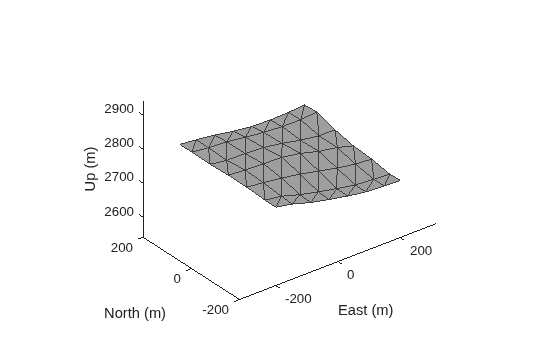
    Figure contains an axes object. The axes object with xlabel East (m), ylabel North (m) contains an object of type patch.

    Add Building Mesh to UAV Scenario

    Specify the building mesh centers, heights, and boundaries.

    Tip: Use the terrainHeight function to obtain ground height for each build base.

    buildingCenters = [-50 -50;100 100];
    buildingHeights = [30 100];
    buildingBoundary = [-25 -25; -25 50; 50 50; 50 -25];

    Add the building mesh to the UAV scenario.

    for idx = 1:size(buildingCenters,1)
        buildingVertices = buildingBoundary+buildingCenters(idx,:);
        buildingBase = min(terrainHeight(scenario,buildingVertices(:,1),buildingVertices(:,2)));
        addMesh(scenario,"polygon",{buildingVertices,buildingBase+[0 buildingHeights(idx)]},[0.3922 0.8314 0.0745]);
    end

    Show the UAV scenario.

    show3D(scenario);
    view([0 15])
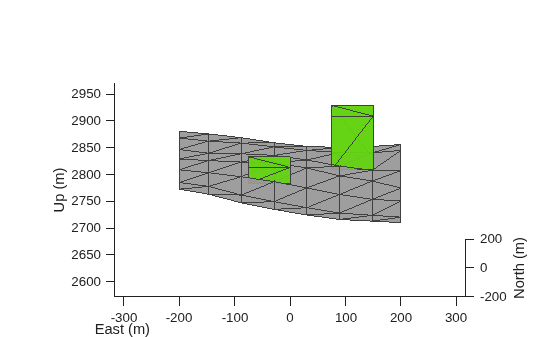
    Figure contains an axes object. The axes object with xlabel East (m), ylabel North (m) contains 3 objects of type patch.

    Remove Custom Terrain

    Remove the custom terrain that was imported.

    removeCustomTerrain("CustomTerrain")

    Version History

    Introduced in R2020b