시뮬레이션 데이터 가져오기, 내보내기 및 공유하기
R2026b파일 및 작업 공간에서 시뮬레이션 데이터 인스펙터로 데이터를 가져오고 시뮬레이션 및 분석 결과를 저장 및 공유
파일 또는 MATLAB 작업 공간에서 시뮬레이션 데이터 인스펙터로 데이터를 가져와서 기록된 시뮬레이션 결과와 함께 데이터를 시각화, 비교 및 분석할 수 있습니다. 시뮬레이션 데이터 인스펙터는 CSV 파일, Microsoft® Excel® 파일, MDF 파일, MLDATX 파일, Parquet 파일 (R2026b 이후)과 같은 파일에서의 가져오기를 지원합니다. 또한 사용자 지정 파일 리더 및 작업 공간 리더를 작성하여 다른 형식의 데이터를 가져올 수도 있습니다.
데이터 및 분석 결과를 저장하고 공유하려면 실행 데이터와 신호 데이터를 MAT 파일, Microsoft Excel 파일, Parquet 파일 (R2026a 이후), CSV 파일 (R2026b 이후) 또는 VCD 파일 (R2026b 이후)로 내보내십시오. 또한 시뮬레이션 데이터 인스펙터 세션을 저장하고 불러와서 데이터와 플롯 모양을 모두 그대로 유지할 수도 있습니다.
MATLAB이 없는 공동 작업자와 결과를 공유하려면 시뮬레이션 데이터 인스펙터 리포트를 생성하십시오. 리포트를 보려면 웹 브라우저만 있으면 됩니다. 비교 결과의 경우, 대화형 방식의 비교 리포트를 생성하여 시뮬레이션 데이터 인스펙터에서와 유사한 방식으로 비교 결과를 분석할 수도 있습니다.
툴
함수
객체
matlab.io.datastore.MLDATXSignalDatastore | Datastore for data saved in MLDATX file (R2026a 이후) |
mldatx.io.File | Reference to runs in MLDATX file (R2026a 이후) |
mldatx.io.Signal | Reference to signal in MLDATX file (R2026a 이후) |
io.reader | Base class used to define custom variable or file reader for Simulation Data Inspector |
matlab.io.datastore.sdidatastore | Datastore for Simulation Data Inspector signals |
Simulink.sdi.DatasetRef | Access data in Simulation Data Inspector repository |
Simulink.HMI.InstrumentedSignals | Save and restore signal logging specification |
Simulink.sdi.WorkerRun | Access simulation data from parallel workers |
도움말 항목
시뮬레이션 데이터 인스펙터로 데이터 가져오기
- 데이터를 작업 공간 또는 파일에서 시뮬레이션 데이터 인스펙터로 가져오기
데이터를 기본 작업 공간 또는 파일에서 시뮬레이션 데이터 인스펙터로 가져올 수 있습니다. - Import Data Using Custom File Reader
Write a custom file reader to import data from a file saved using a proprietary data or file format. - Import Workspace Variables Using a Custom Data Reader
Write a custom reader to import workspace data in a proprietary format. - Incrementally Read Data Too Large to Fit into Memory from MLDATX File to Workspace
Read data that is too large to fit into memory from an MLDATX file into the workspace incrementally.
시뮬레이션 데이터 인스펙터에서 데이터 내보내기
- Save and Share Simulation Data Inspector Data and Views
Share exported data, Simulation Data Inspector sessions and views, and plot images and figures. - Export Data From Simulation Data Inspector to Workspace or File
Export a selection of runs and signals from the Simulation Data Inspector to the workspace or a MAT, Microsoft Excel, Parquet, CSV, or VCD file. - Create Interactive Comparison Reports
Save and share Simulation Data Inspector comparison results in an interactive web report. - Export Data from Simulation Data Inspector to Parquet File
Interactively or programmatically export big data from Simulation Data Inspector to a Parquet file. (R2026a 이후)
파일 기록 형식
- Microsoft Excel 가져오기, 내보내기 및 기록 형식
시뮬레이션 데이터 인스펙터, Record 블록 및 Simulink® Test™에서 사용되는 Microsoft Excel 파일 형식에 대해 알아봅니다. - Parquet File Format for Simulation Data
Format used when importing and exporting simulation data as Parquet files. (R2026a 이후) - CSV File Format for Simulation Data
Format requirements for importing and exporting simulation data as CSV files. (R2026b 이후) - VCD File Format for Exported Simulation Data
How simulation data maps to VCD file structure. (R2026b 이후)
관련 정보
추천 예제
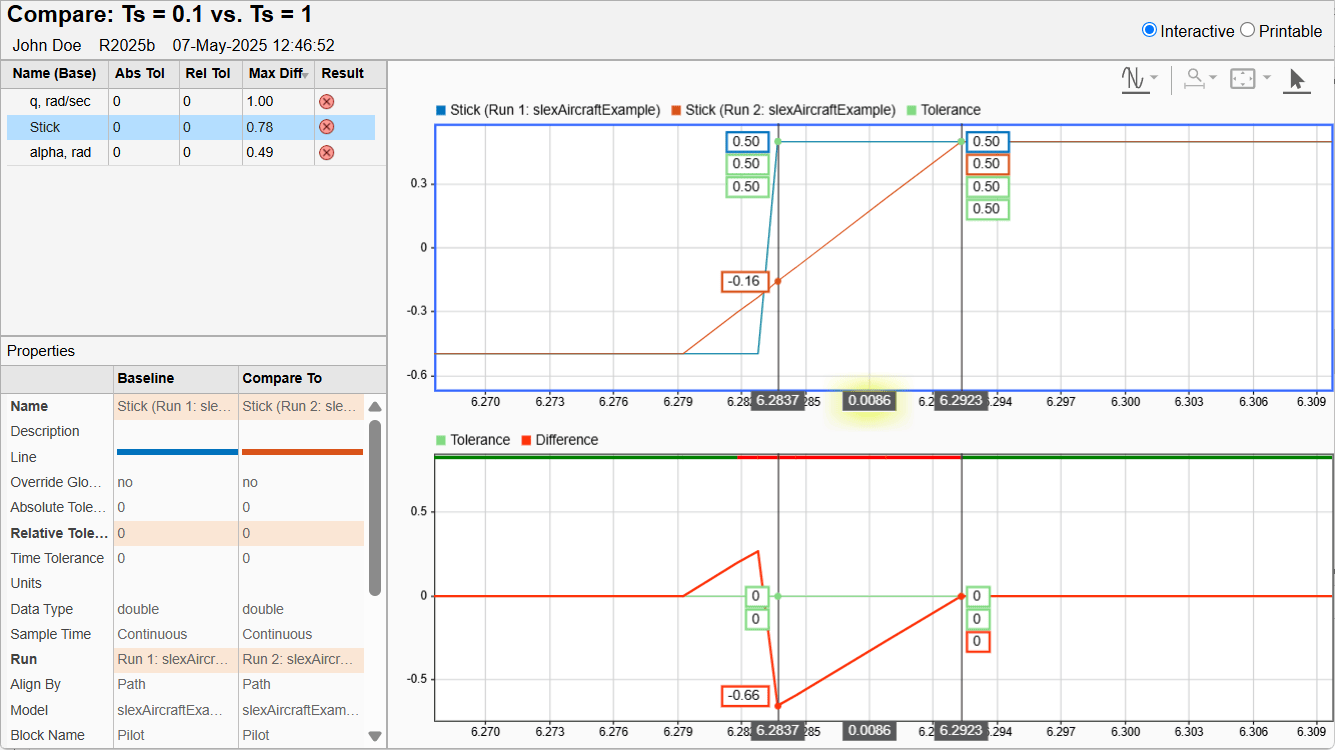
Create Interactive Comparison Reports
Save and share Simulation Data Inspector comparison results in an interactive web report.

