Call ROS Service in Simulink
R2026bUse the Call Service block to call a service on the ROS service server.
Connect to a ROS network.
rosinit
The value of the ROS_MASTER_URI environment variable, http://172.23.70.93:56568, will be used to connect to the ROS master.
Initializing global node /matlab_global_node_69845 with NodeURI http://172.23.70.93:40895/ and MasterURI http://172.23.70.93:56568.
Set up a roscpp_tutorials/TwoInts service server message type and specify an example helper callback function. The call back function provided sums the A and B elements of a roscpp_tutorials/TwoIntsRequest message. The service server must be set up before you can call a service client.
sumserver = rossvcserver('/sum','roscpp_tutorials/TwoInts',@exampleHelperROSSumCallback);
Open a Simulink® model with the Call Service block. Use the Blank Message block to output a request message with the roscpp_tutorials/TwoIntsRequest message type. Populate the bus with two values to sum together.
open_system('ros_twoint_service_simulink_example.slx')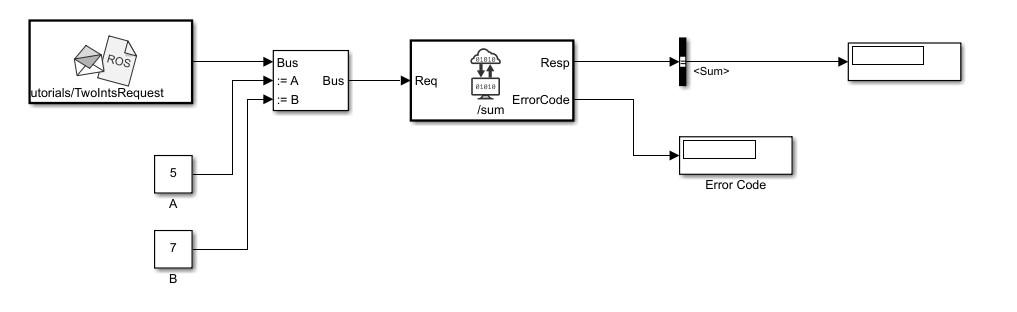
Run the model. The service call should return 0 in the Resp output as part of the response message. An error code of 0 indicates the service call was successful. You can ignore warnings about converting data types.
sim('ros_twoint_service_simulink_example.slx')Shut down the ROS network to disconnect.
rosshutdown
Shutting down global node /matlab_global_node_69845 with NodeURI http://172.23.70.93:40895/ and MasterURI http://172.23.70.93:56568.

