surfaceshow
R2026bDescription
s = surfaceshow(___,Name=Value)
Examples
Read a 3-D labeled volume, and create a binary volume for the label 1.
datadir = fullfile(toolboxdir("images"),"imdata","BrainMRILabeled");
load(fullfile(datadir,"labels","label_001.mat"));
mask1 = (label == 1);
Display the binary data as a surface in a 3-D scene.
surf1 = surfaceshow(mask1,Color="r",Alpha=0.4);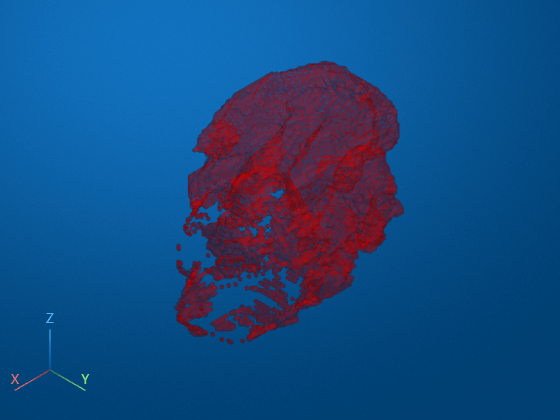
Input Arguments
Name-Value Arguments
Specify optional pairs of arguments as
Name1=Value1,...,NameN=ValueN, where Name is
the argument name and Value is the corresponding value.
Name-value arguments must appear after other arguments, but the order of the
pairs does not matter.
Example: s = surfaceshow(data,Alpha=0.5) creates a
Surface object with a transparency of
0.5.
Parent of the Surface object, specified as a Viewer
object. To create a Viewer object configured for 3-D display, use the
viewer3d
function. When you call surfaceshow without specifying a parent,
the function creates a new Viewer object and sets that object as the
parent.
Specifying the Parent name-value argument is equivalent to
specifying the viewer input argument.
Surface is visible in the 3-D scene, specified as
Picking state of the surface, specified as one of the strings in the table.
| Value | Description |
|---|---|
"visible" | The viewer can pick the surface if it is visible in the scene, and cannot pick the surface if it is not visible. Control the
visibility of the surface by using the |
"on" | The viewer can pick the surface. |
"off" | The viewer cannot pick the surface. |
Transformation applied to the surface in the 3-D scene, specified as an affinetform3d, rigidtform3d, simtform3d,
or transltform3d object. Use the
Transformationaffinetform3d object that performs an identity
transformation.
Transparency of the surface, specified as a number in the range [0, 1]. Fully
opaque surfaces render most quickly, and specifying a value other than
1.0 (the default) can increase rendering time.
Color of the surface, specified as one of these values.
RGB triplet, color name, short color name, or hexadecimal color code — Use the same color for all the vertices on the surface.
n-by-3 numeric matrix representing n RGB triplets — Use a different color for each vertex on the surface. Each row of the matrix defines one color. The number of rows must equal the number of vertices.
For a custom color, specify an RGB triplet or a hexadecimal color code.
An RGB triplet is a three-element row vector whose elements specify the intensities of the red, green, and blue components of the color. The intensities must be in the range
[0,1], for example,[0.4 0.6 0.7].A hexadecimal color code is a string scalar or character vector that starts with a hash symbol (
#) followed by three or six hexadecimal digits, which can range from0toF. The values are not case sensitive. Therefore, the color codes"#FF8800","#ff8800","#F80", and"#f80"are equivalent.
Alternatively, you can specify some common colors by name. This table lists the named color options, the equivalent RGB triplets, and the hexadecimal color codes.
| Color Name | Short Name | RGB Triplet | Hexadecimal Color Code | Appearance |
|---|---|---|---|---|
"red" | "r" | [1 0 0] | "#FF0000" |
|
"green" | "g" | [0 1 0] | "#00FF00" |
|
"blue" | "b" | [0 0 1] | "#0000FF" |
|
"cyan"
| "c" | [0 1 1] | "#00FFFF" |
|
"magenta" | "m" | [1 0 1] | "#FF00FF" |
|
"yellow" | "y" | [1 1 0] | "#FFFF00" |
|
"black" | "k" | [0 0 0] | "#000000" |
|
"white" | "w" | [1 1 1] | "#FFFFFF" |
|








This table lists the default color palettes for plots in the light and dark themes.
| Palette | Palette Colors |
|---|---|
Before R2025a: Most plots use these colors by default. |
|
|
|


You can get the RGB triplets and hexadecimal color codes for these palettes using the
orderedcolors
and rgb2hex
functions. For example, get the RGB triplets for the "gem" palette and
convert them to hexadecimal color
codes.
RGB = orderedcolors("gem");
H = rgb2hex(RGB);
Example: Color="r"
Example: Color="green"
Example: Color=[0 0.4470 0.7410]
Example: Color="#00FFFF"
Clipping planes applied locally to the object, specified as an N-by-4 matrix where each row corresponds to the equation for a clipping plane. The maximum number of clipping planes N is six. Each clipping plane is specified as a 1-by-4 vector, in world coordinates, following the Hessian normal form where the first three values represent the normal vector of the plane and the fourth value is the signed distance from the origin to the plane.
Display surface as wireframe mesh, specified as
When this value is "on", the surface is rendered as a wireframe
mesh. When this value is "off", the faces are rendered according to
the color and transparency of the object.
Output Arguments
Version History
Introduced in R2026b

