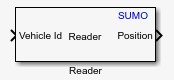
Reader
Libraries:
Automated Driving Toolbox Interface for Eclipse SUMO Traffic Simulator
Description
Add-On Required: This feature requires the Automated Driving Toolbox Interface for Eclipse SUMO Traffic Simulator add-on.
The Reader block reads the selected topic from the SUMO™ scenario. Use the Topic Category parameter to select which data to read from the scenario.
You can set the Topic Category parameter to
Simulation, Vehicle, or
Visualization. When you select the
Simulation topic, the block returns the details of vehicles
included in the scenario, such as the number of arrived and departed vehicles at each
simulation time step. When you select the Vehicle topic, the block
returns the attributes of a specified vehicle, such as its position, speed, and angle, at
each time step. When you select the Visualization topic, the block
returns the status of the specified view of the SUMO
interface, such as its zoom factor and schema.
Examples
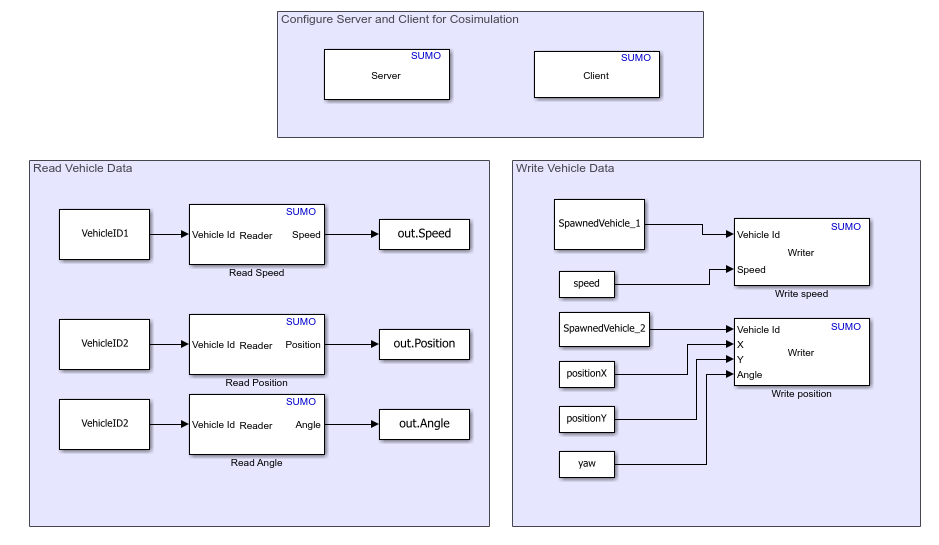
Read and Write Vehicle Data in SUMO Scenario Using Cosimulation with Simulink
Read and write vehicle data in Eclipse™ SUMO scenario.
Ports
Input
ID of the vehicle for which to read information, specified as a string scalar.
Example: "ActorID_1"
Dependencies
To enable this port, set Topic Category parameter to
Vehicle.
Data Types: string
ID of the simulation visualization in the SUMO interface for which to read information, specified as a string scalar.
Example: "View#0"
Dependencies
To enable this port, set Topic Category to
Visualization.
Data Types: string
Output
IDs of the vehicles in the SUMO scenario, returned as a vector of strings. The block returns different information depending on the value of the Simulation Topic parameter:
ID list— IDs of the vehicles present in the scenario.Arrived list— IDs of the vehicles that have arrived at their destinations and been removed from the scenario.Departed list— IDs of the vehicles that have departed from their sources and been added to the scenario.
Dependencies
To enable this port:
Set Topic Category to
Simulation.Set Simulation Topic to
ID list,Arrived list, orDeparted list.
Number of vehicles in the SUMO scenario, returned as a numeric scalar.
Dependencies
To enable this port:
Set Topic Category to
Simulation.Set Simulation Topic to
ID count.
Acceleration of the vehicle, in meters per second squared, returned as a real-valued scalar.
Dependencies
To enable this port:
Set Topic Category to
Vehicle.Set Vehicle Topic to
Acceleration.
Speed values of the vehicle, in meters per second, returned as a real-valued scalar. The block returns a different speed value depending on the value of the Vehicle Topic parameter:
Max allowed speed— Maximum allowed speed of the lane the vehicle is on.Lateral speed— Lateral speed of the vehicle.Speed— Speed of the vehicle.
Dependencies
To enable this port:
Set Topic Category to
Vehicle.Set Vehicle Topic to
Max allowed speed,Lateral speed, orSpeed
Angle or yaw of the vehicle, in degrees, returned as a real-valued scalar.
Dependencies
To enable this port:
Set Topic Category to
Vehicle.Set Vehicle Topic to
Angle.
Distance of the vehicle from starting point, in meters, returned as a real-valued scalar.
Dependencies
To enable this port, set these parameter in this order:
Set Topic Category to
Vehicle.Set Vehicle Topic to
Distance to starting point.
Position of the vehicle, in meters, returned as a real-valued vector.
The format of the vector depends on the value of the Vehicle Topic parameter:
Position— Represents the 2D position of the vehicle as a 1-by-2 real-valued vector of the form [x y].Position3D— Represents the 3D position of the vehicle as a 1-by-3 real-valued vector of the form [x y z].
Dependencies
To enable this port:
Set Topic Category to
Vehicle.Set Vehicle Topic to
PositionorPosition3D
Slope of the vehicle at its current position, in degrees, returned as a real-valued scalar.
Dependencies
To enable this port:
Set Topic Category to
Vehicle.Set Vehicle Topic to
Slope.
Speed mode of the vehicle, returned as an integer in the range [0, 127]. Each bit of the binary equivalent of the returned integer represents whether a specific speed mode is enabled. For example, if the block returns the value 73, this corresponds to the binary pattern 1001001, which indicates that speed modes 1, 4, and 7 are enabled.
Dependencies
To enable this port:
Set Topic Category to
Vehicle.Set Vehicle Topic to
Speed mode.
ID of the SUMO class of the vehicle, returned as a string scalar.
Dependencies
To enable this port:
Set Topic Category to
Vehicle.Set Vehicle Topic to
Vehicle profile.
Schema of the simulation visualization in the SUMO interface, returned as a string scalar.
Dependencies
To enable this port:
Set Topic Category to
Visualization.Set Visualization Topic to
Schema.
Zoom factor of the simulation visualization in the SUMO interface, returned as a real-valued scalar.
Dependencies
To enable this port:
Set Topic Category to
Visualization.Set Visualization Topic to
Zoom factor.
View IDs of the simulation visualizations open in the SUMO interface, returned as a vector of string.
Dependencies
To enable this port:
Set Topic Category to
Visualization.Set Visualization Topic to
View IDs.
Version of the SUMO application, returned as a string scalar.
Dependencies
To enable this port:
Set Topic Category to
Visualization.Set Visualization Topic to
SUMO version.
Traffic control interface (TraCI) in the SUMO interface, returned as a string scalar.
Dependencies
To enable this port:
Set Topic Category to
Visualization.Set Visualization Topic to
SUMO version.
Parameters
Specify the topic category from which to read data as one of these options:
Vehicle— Reads vehicle data from the SUMO scenarioSimulation— Reads simulation data from the SUMO scenarioVisualization— Reads visualization data from the SUMO scenario
Specify the simulation data to read from the SUMO scenario at the current simulation step as one of these values:
ID count— Number of vehicles in the scenario.ID list— IDs of the vehicles in the scenario.Arrived list— IDs of the vehicles that have arrived their destinations and been removed from the scenario.Departed list— IDs of the vehicles that have departed from their sources and been added to the scenario.
Dependencies
To enable this parameter, set Topic Category to
Simulation.
Specify the vehicle data to read from the SUMO scenario as one of these options:
Position— 2D position of the vehicle in the scenario.Acceleration— Acceleration of the vehicle.Max allowed speed— Maximum allowed speed of the lane the vehicle is on.Angle— Angle or yaw of the vehicle.Distance to starting point— Distance of the vehicle from the starting point.Lateral speed— Lateral speed of the vehicle.Position3D— 3D position of the vehicle in the scenario.Slope— Slope of the vehicle at its current position in the scenario.Speed— Speed of the vehicle.Speed mode— Speed mode of the vehicle.Vehicle profile— ID of the SUMO class of the vehicle.
Dependencies
To enable this parameter, set Topic Category to
Vehicle.
Specify the simulation visualization data to read from the SUMO interface as one of these options:
Schema— Schema of the simulation visualization.Zoom factor— Zoom factor of the simulation visualization.View IDs— View IDs of the open simulation visualizations.SUMO version— SUMO application version and traffic control interface data.
Dependencies
To enable this parameter, set Topic Category to
Visualization.
Specify the sample time of the simulation, in seconds, as a positive real scalar.
Version History
Introduced in R2026a
MATLAB Command
You clicked a link that corresponds to this MATLAB command:
Run the command by entering it in the MATLAB Command Window. Web browsers do not support MATLAB commands.
웹사이트 선택
번역된 콘텐츠를 보고 지역별 이벤트와 혜택을 살펴보려면 웹사이트를 선택하십시오. 현재 계신 지역에 따라 다음 웹사이트를 권장합니다:
또한 다음 목록에서 웹사이트를 선택하실 수도 있습니다.
사이트 성능 최적화 방법
최고의 사이트 성능을 위해 중국 사이트(중국어 또는 영어)를 선택하십시오. 현재 계신 지역에서는 다른 국가의 MathWorks 사이트 방문이 최적화되지 않았습니다.
미주
- América Latina (Español)
- Canada (English)
- United States (English)
유럽
- Belgium (English)
- Denmark (English)
- Deutschland (Deutsch)
- España (Español)
- Finland (English)
- France (Français)
- Ireland (English)
- Italia (Italiano)
- Luxembourg (English)
- Netherlands (English)
- Norway (English)
- Österreich (Deutsch)
- Portugal (English)
- Sweden (English)
- Switzerland
- United Kingdom (English)