Actor
R2026bActor block
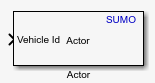
To add a block to a model, double-click the canvas and start typing the block name. Then, select the block from the list.
Libraries:
Automated Driving Toolbox Interface for Eclipse SUMO Traffic Simulator
Description
Add-On Required: This feature requires the Automated Driving Toolbox Interface for Eclipse SUMO Traffic Simulator add-on.
The Actor block enables you to add or remove vehicle actors within a SUMO™ scenario during cosimulation. Use this block to add vehicles at a specified lane or position on the road network within a SUMO scenario. When adding a vehicle, you can use the parameters of this block to specify additional vehicle attributes, such as times at which it enters and exits the scenario, its speed, and the number of seats. This block enables you to model complex traffic scenarios and analyze the impact of dynamically changing traffic conditions within the SUMO environment.
Examples
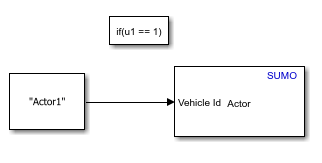
Add Vehicle in SUMO Scenario Using Cosimulation with Simulink
Add vehicle to Eclipse™ SUMO scenario.
Ports
Input
ID of the actor to add or remove from the SUMO scenario, specified as a string scalar.
Data Types: string
Reason to remove the vehicle, specified as a positive integer in the range [0, 7].
Dependencies
To enable this port, set Functionality to
Remove.
Data Types: uint8
Parameters
The Actor block supports adding and removing only vehicle actors from a SUMO scenario.
Specifies whether the block adds the actor to or removes them from the SUMO scenario.
Add— Add the actor to the SUMO scenario.Remove— Remove the actor from the SUMO scenario.
The block adds the actor to the SUMO scenario using the specified method:
Lane— Add the actor on a specified lane of the road network within the SUMO scenario.Position— Add the actor at a specified position on the road network within the SUMO scenario.
Dependencies
To enable this parameter, set Functionality to
Add.
Select this parameter to enable the Route ID parameter, which you can use to specify the ID of the route on which you want to add the actor.
Dependencies
To enable this parameter:
Set Functionality to
Add.Set Spawning method to
Lane.
Specify the ID of the route on which you want to add the actor as a valid route ID.
Dependencies
To enable this parameter:
Set Functionality to
Add.Set Spawning method to
Lane.Select the Use Route ID.
Data Types: string
Depart time is the simulation time step at which the actor enters the road network. The block determines actor depart time using as one of these options:
now— The vehicle departs as soon as the Actor block adds the vehicle to the scenario.triggered— The vehicle departs when a person enters it.containerTriggered— The vehicle departs once a container attached to it has been loaded. A container represents a unit used to simulate the storage or transport of goods, materials, or items such as tank containers, bulk materials, food items, or animals.
Dependencies
To enable this parameter:
Set Functionality to
Add.Set Spawning method to
Lane.
The depart lane is the lane onto which the actor enters the scenario. The block determines the depart lane of the actor using one of these options:
first— The rightmost lane available for the vehicle to use.random— A random lane that the vehicle can traverse.free— The most free or least occupied lane the vehicle can traverse.allowed— The most free or least occupied lane the vehicle can traverse that enables it continue to the next route edge.best— The most free or least occupied lane the vehicle can traverse that requires the fewest lane changes.
Dependencies
To enable this parameter:
Set Functionality to
Add.Set Spawning method to
Lane.
Depart position is the location on the depart lane at which the actor enters the scenario. The block determines the depart position of the actor using one of these options:
random— Random position on the lane.free— Any available position on the lane.random_free— The block tries to position the vehicle at 10 random positions on the depart lane. If this operation fails, the block positions the vehicle at any available position on the depart lane.base— The block positions the vehicle with its rear at the start of the lane.last— The block positions the vehicle as close as possible to the rear of the last vehicle on the lane, or at the end of the lane if it is empty.stop— If a vehicle has a stop, it departs from the end position of the stop. Otherwise, the block positions the vehicle with its rear at the start of the lane.
Dependencies
To enable this parameter:
Set Functionality to
Add.Set Spawning method to
Lane.
Depart speed is the speed at which the actor enters the scenario. The block determines the depart speed of the actor using one of these options:
random— The actor enters with a random speed between 0 and the maximum depart speed of the vehicle. After entering, the vehicle adjusts its speed to ensure a safe distance to the leader vehicle, or upon approaching an intersection. The maximum depart speed of the vehicle depends on its type and speed factor.max— The actor enters at the maximum depart speed of the vehicle. After entering, the vehicle adjusts its speed to ensure a safe distance to the leader vehicle, or upon approaching an intersection. The maximum depart speed limit of the vehicle depends on its type and speed factor.desired— The maximum depart speed of the vehicle. If that speed is unsafe, departure is delayed.speedLimit— The actor attempts to enter at the speed limit of the depart lane. If that speed is unsafe, the actor delays departure.last— The actor enters at the current speed of the last vehicle in the departure lane. If the lane is empty, then the actor attempts to enter at the maximum depart speed. If that speed is unsafe, the actor delays departure.avg— The actor enters at the average speed of the vehicles already moving in the departure lane. If the lane is empty, the actor uses the lower value between the speed limit of the lane and the maximum departure speed of the vehicle. If that speed is unsafe, the actor delays departure.
Dependencies
To enable this parameter:
Set Functionality to
Add.Set Spawning method to
Lane.
The arrival lane is the lane from which the actor leaves the road network. The block determines the arrival lane of the actor using one of these options:
current— The actor does not change its current lane when nearing arrival, and uses the most convenient lane to reach its arrival position.random— The actor selects a random, viable lane on its arrival edge, and changes lanes to arrive there only if necessary.first— The actor arrives on the rightmost viable lane.
Dependencies
To enable this parameter:
Set Functionality parameter
Add.Set Spawning method parameter
Lane.
The arrival position is the position from which the actor leaves the scenario. The block determines the arrival position of the actor using one of these options:
max— The actor leaves upon reaching the end of its final lane.random— The actor leaves from a random position selected upon its departure. If you reroute the actor, then it selects a new random position from which to leave.
Dependencies
To enable this parameter:
Set Functionality to
Add.Set Spawning method to
Lane.
The vehicle does not change its speed when nearing arrival, maintaining its maximum possible safe speed.
Dependencies
To enable this parameter:
Set Functionality to
Add.Set Spawning method to
Lane.
Select this parameter to enable the Line parameter, which enables you to specify the ID of the public transportation line on which to add the vehicle. You can select this parameter while adding vehicles carrying people. Selecting this parameter does not restrict you from specifying Person capacity and Person number values greater than 0.
Dependencies
To enable this parameter:
Set Functionality to
Add.Set Spawning method to
Lane.
Specify the ID of public transportation line on which you want to add the actor as a valid line ID.
Dependencies
To enable this parameter:
Set Functionality to
Add.Set Spawning method to
Lane.Select the Use Line ID parameter.
Data Types: string
Specify the number of seats available in the vehicle actor as a positive integer.
Dependencies
To enable this parameter:
Set Functionality to
Add.Set Spawning method to
Lane.
Data Types: uint8
Specify the number of occupied seats in the vehicle actor, at the time it enters the scenario as a positive integer.
Dependencies
To enable this parameter:
Set Functionality to
Add.Set Spawning method to
Lane.
Data Types: uint8
Selecting this parameter enables you to specify the IDs of the source TAZ from which the vehicle departs and the destination TAZ at which it arrives by using the From TAZ and To TAZ, respectively.
Dependencies
To enable this parameter:
Set Functionality to
Add.Set Spawning method to
Lane.
Specify the name of the TAZ from which the vehicle departs as a string.
Dependencies
To enable this parameter:
Set Functionality to
Add.Set Spawning method to
Lane.Select the Use Traffic Assignment Zones (TAZ) parameter.
Data Types: string
Specify the name of the TAZ at which the vehicle arrives as a string.
Dependencies
To enable this parameter:
Set Functionality to
Add.Set Spawning method to
Lane.Select the Use Traffic Assignment Zones (TAZ) parameter.
Data Types: string
Specify the position at which to insert the actor into the road network as 1-by-3 real-valued vector.
Dependencies
To enable this parameter, set these parameter in this order:
Set Functionality to
Add.Set Spawning method to
Position.
Data Types: double
Specify the sample time of the simulation, in seconds, as a positive real scalar.
Version History
Introduced in R2026a
MATLAB Command
You clicked a link that corresponds to this MATLAB command:
Run the command by entering it in the MATLAB Command Window. Web browsers do not support MATLAB commands.


웹사이트 선택
번역된 콘텐츠를 보고 지역별 이벤트와 혜택을 살펴보려면 웹사이트를 선택하십시오. 현재 계신 지역에 따라 다음 웹사이트를 권장합니다:
또한 다음 목록에서 웹사이트를 선택하실 수도 있습니다.
사이트 성능 최적화 방법
최고의 사이트 성능을 위해 중국 사이트(중국어 또는 영어)를 선택하십시오. 현재 계신 지역에서는 다른 국가의 MathWorks 사이트 방문이 최적화되지 않았습니다.
미주
- América Latina (Español)
- Canada (English)
- United States (English)
유럽
- Belgium (English)
- Denmark (English)
- Deutschland (Deutsch)
- España (Español)
- Finland (English)
- France (Français)
- Ireland (English)
- Italia (Italiano)
- Luxembourg (English)
- Netherlands (English)
- Norway (English)
- Österreich (Deutsch)
- Portugal (English)
- Sweden (English)
- Switzerland
- United Kingdom (English)