주요 콘텐츠

visionhdl.ImageFilter

R2026b

2-D FIR filtering

Description

The visionhdl.ImageFilter System object™ performs two-dimensional finite-impulse-response (FIR) filtering on a pixel stream. It supports the use of programmable filter coefficients.

The filter can implement an internal line buffer, or accept inputs from an external line buffer such as the visionhdl.LineBuffer System object. An external line buffer allows you to share the line buffer with other operations in your system. To support sharing a line buffer between filters with different kernel sizes, you must manipulate the line buffer output to extract the smaller neighborhoods. For an example of this manipulation in a Simulink® design, see . (since R2026b)

To filter a pixel stream:

  1. Create the visionhdl.ImageFilter object and set its properties.

  2. Call the object with arguments, as if it were a function.

To learn more about how System objects work, see What Are System Objects?

Creation

Description

F = visionhdl.ImageFilter(PropertyName=Value) returns a 2-D FIR filter System object that filters a pixel stream. Set properties using one or more name-value pairs. Enclose each property name in single quotes.

F = visionhdl.ImageFilter(coeff,lineSize,PropertyName=Value) returns a 2-D FIR filter System object, with the Coefficients property set to coeff, the LineBufferSize property set to lineSize, and additional options specified by one or more name-value arguments.

example

Properties

expand all

Unless otherwise indicated, properties are nontunable, which means you cannot change their values after calling the object. Objects lock when you call them, and the release function unlocks them.

If a property is tunable, you can change its value at any time.

For more information on changing property values, see System Design in MATLAB Using System Objects.

Source of the filter coefficients, specified as one of these values.

  • 'Property' — The object uses the filter coefficients specified in the Coefficients property.

  • 'Input port' — The object uses the filter coefficients from the coeff argument.

You can use either coefficient source with an internal or external line buffer.

Coefficients of the filter, specified as a matrix. Each dimension of the matrix must have at least 2 elements and no more than 64 elements.

The software supports double and single data types for simulation, but not for HDL code generation.

Dependencies

This property applies when you set CoefficientsSource to 'Property'.

Since R2026b

Source of the neighborhood pixels, specified as one of these values:

  • 'Internal' (default) — The object implements an internal line buffer.

  • 'External' — The object accepts neighborhood pixels by using the nhoodColumn and shiftEnable input arguments. Connect these arguments to a visionhdl.LineBuffer System object.

You can use either buffer source with programmable or fixed coefficients.

Methods for padding the boundary of the input image, specified as one of these values.

  • 'Constant' — Interpret pixels outside the image frame as having a constant value.

  • 'Replicate' — Repeat the value of pixels at the edge of the image.

  • 'Symmetric' — Set the value of the padding pixels to mirror the edge of the image.

  • 'Reflection' — Set the value of the padding pixels to reflect around the pixel at the edge of the image.

  • 'None' — Exclude padding logic. The object does not set the pixels outside the image frame to any particular value. This option reduces the hardware resources that are used by the object and reduces the blanking that is required between frames. However, this option affects the accuracy of the output pixels at the edges of the frame. To maintain pixel stream timing, the output frame is the same size as the input frame. To avoid using pixels calculated from undefined padding values, mask off the n/2 pixels around the edge of the frame for downstream operations. n is the size of the operation kernel. For more details, see Increase Throughput by Omitting Padding.

For more information about these methods, see Edge Padding.

Dependencies

This property applies when you set LineBufferSource to 'Internal'.

Value used to pad the boundary of the input image, specified as an integer. The object casts this value to the same data type as the input pixel.

Dependencies

This property applies when you set LineBufferSource to 'Internal' and PaddingMethod to 'Constant'.

Size of the line memory buffer, specified as a positive integer. Choose a power of two that accommodates the number of active pixels in a horizontal line. If you specify a value that is not a power of two, the buffer uses the next largest power of two.

The object allocates (coefficient rows – 1)-by-LineBufferSize memory locations to store the pixels.

Dependencies

This property applies when you set LineBufferSource to 'Internal'.

Method for determining the data type of the filter coefficients, specified as one of these values.

  • 'Same as first input' — Sets the data type of the coefficients to match the data type of the pixelin argument.

  • 'Custom' — Sets the data type of the coefficients to match the data type defined in the CustomCoefficientsDataType property.

When converting the coefficients to the specified data type, the object rounds to the nearest representable value and saturates on overflow.

Dependencies

This property applies when you set CoefficientsSource to 'Property'.

Data type for the filter coefficients, specified as numerictype(S,WL,FL), where S is 1 (true) for signed and 0 (false) for unsigned, WL is the word length, and FL is the fraction length in bits.

Dependencies

This property applies when you set CoefficientsDataType to 'Custom'.

Method for determining the data type of the output pixels, specified as one of these values.

  • 'Same as first input' — Sets the data type of the output pixels to match the data type of the pixelin argument.

  • 'Full precision' — Computes internal and output data types using full precision rules. These rules provide accurate fixed-point numerics and prevent quantization in the filter. The object adds bits as needed to prevent rounding and overflow.

  • 'Custom' — Sets the data type of the output pixels to match the data type in the CustomOutputDataType property.

Data type for the output pixels, specified as numerictype(S,WL,FL), where S is 1 (true) for signed and 0 (false) for unsigned, WL is the word length, and FL is the fraction length in bits.

Dependencies

This property applies only when you set OutputDataType to 'Custom'.

When the input is any integer or fixed-point data type, the algorithm uses fixed-point arithmetic for internal calculations. This property does not apply when the input data type is single or double.

When the input is any integer or fixed-point data type, the algorithm uses fixed-point arithmetic for internal calculations. This property does not apply when the input data type is single or double.

Usage

Description

[pixelout,ctrlout] = F(pixelin,ctrlin) returns the next pixel, pixelout, of the filtered image resulting from applying the coefficients in the Coefficients property to the image described by the input pixel stream, pixelin. This syntax applies when you set LineBufferSource to 'Internal'.

example

[pixelout,ctrlout] = F(pixelin,ctrlin,coeff) returns the next pixel, pixelout, of the filtered image resulting from applying the coefficients in the coeff argument to the image described by the input pixel stream, pixelin. The object samples the values from the coeff argument only at the start of a frame and ignores any changes during a frame. To enable this syntax, set the CoefficientsSource property to 'Input port'.

[pixelout,ctrlout] = F(nhoodColumn,ctrlin,shiftEnable) returns the next pixel, pixelout, of the filtered image resulting from applying the coefficients in the Coefficients property to the current neighborhood. This syntax applies when you set LineBufferSource to 'External', and the nhoodColumn and shiftEnable arguments represent a neighborhood selected by an external line buffer, such as the visionhdl.LineBuffer System object.

example

[pixelout,ctrlout] = F(nhoodColumn,ctrlin,shiftEnable,coeff) implements a filter that has programmable coefficients and uses an external line buffer. This syntax applies when you set the LineBufferSource property to 'External' and the CoefficientsSource property to 'Input port'.

example

This object uses a streaming pixel interface with a structure for frame control signals. This interface enables the object to operate independently of image size and format and to connect with other Vision HDL Toolbox™ objects. When configured with an internal line buffer, the filter accepts and returns a scalar pixel value and control signals as a structure containing five signals. The control signals indicate the validity of each pixel and its location in the frame. When configured with an external line buffer, one set of input control signals applies to all the values in the nhoodColumn input vector, and the filter returns a scalar value and accompanying control signals. To convert a pixel matrix into a pixel stream and control signals, use the visionhdl.FrameToPixels object. For a description of the interface, see Streaming Pixel Interface.

Input Arguments

expand all

Single pixel, specified as a scalar value.

The software supports double and single data types for simulation, but not for HDL code generation.

You can simulate System objects with a multipixel streaming interface, but you cannot generate HDL code for System objects that use multipixel streams. To generate HDL code for multipixel algorithms, use the equivalent Simulink blocks.

Dependencies

This argument applies when you set LineBufferSource to 'Internal'.

Data Types: uint | int | fi | double | single

Since R2026b

Column of neighborhood pixel values, specified as a H-by-M matrix, where H is the vertical size of the neighborhood and M is the number of input pixels per cycle. Connect this argument to a visionhdl.LineBuffer System object.

Dependencies

This argument applies when you set LineBufferSource to 'External'.

Data Types: uint | int | fi | double | single

Since R2026b

Valid signal for neighborhood columns, specified as a logical scalar. Connect this argument to a visionhdl.LineBuffer System object. This value is true (1) for a neighborhood column that contains valid image pixels or a column that was added for edge padding.

Dependencies

This argument applies when you set LineBufferSource to 'External'.

Data Types: logical

Control signals accompanying the input pixel stream, specified as a pixelcontrol structure containing five logical data type signals. The signals describe the validity of the pixel and its location in the frame. For more details, see Pixel Control Structure.

Data Types: struct

Filter coefficients, specified as a matrix. Each dimension of the matrix must have at least 2 elements and no more than 16 elements. The object samples the values from the coeff argument only at the start of a frame and ignores any changes during a frame.

Dependencies

To enable this argument, set the CoefficientsSource property to 'Input port'.

Data Types: uint | int | fi | double | single

Output Arguments

expand all

Single filtered pixel, returned as a scalar value.

Configure the data type of the output pixel by using the OutputDataType and CustomOutputDataType properties.

Data Types: uint | int | fi | double | single

Control signals accompanying the output pixel stream, returned as a pixelcontrol structure containing five logical data type signals. The signals describe the validity of the pixel and its location in the frame. For more details, see Pixel Control Structure.

Data Types: struct

Object Functions

To use an object function, specify the System object as the first input argument. For example, to release system resources of a System object named obj, use this syntax:

release(obj)

expand all

stepRun System object algorithm
releaseRelease resources and allow changes to System object property values and input characteristics
resetReset internal states of System object

Examples

collapse all

This example implements a 2-D blur filter on a thumbnail image.

Load the source image from a file. Select a portion of the image matching the desired test size.

frmOrig = imread('rice.png');
frmActivePixels = 64;
frmActiveLines = 48;
frmInput = frmOrig(1:frmActiveLines,1:frmActivePixels);
figure
imshow(frmInput)
title 'Input Image'
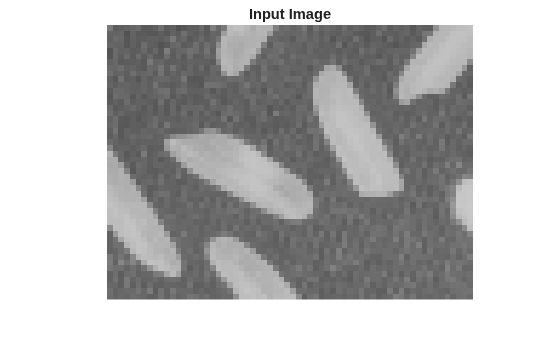
Figure contains an axes object. The hidden axes object with title Input Image contains an object of type image.

Create a serializer object and specify the size of the inactive pixel regions.

frm2pix = visionhdl.FrameToPixels( ...
    'NumComponents',1, ...
    'VideoFormat','custom', ...
    'ActivePixelsPerLine',frmActivePixels, ...
    'ActiveVideoLines',frmActiveLines, ...
    'TotalPixelsPerLine',frmActivePixels+10, ...
    'TotalVideoLines',frmActiveLines+10, ...
    'StartingActiveLine',6, ...
    'FrontPorch',5);

Create a filter object.

filt2d = visionhdl.ImageFilter( ...
    'Coefficients',ones(2,2)/4, ...
    'CoefficientsDataType','Custom', ...
    'CustomCoefficientsDataType',numerictype(0,1,2), ...
    'PaddingMethod','Symmetric');

Serialize the test image by calling the serializer object. pixIn is a vector of intensity values. ctrlIn is a vector of control signal structures.

[pixIn,ctrlIn] = frm2pix(frmInput);

Prepare to process pixels by preallocating output vectors.

[~,~,numPixelsPerFrame] = getparamfromfrm2pix(frm2pix);
pixOut = zeros(numPixelsPerFrame,1,'uint8');
ctrlOut  = repmat(pixelcontrolstruct,numPixelsPerFrame,1);

For each pixel in the padded frame, compute the filtered value. Monitor the control signals to determine the latency of the object. The latency of a filter configuration depends on:

  • The number of active pixels in a line.

  • The size of the filter kernel.

  • Optimization of symmetric or duplicate coefficients.

latency = getLatency(filt2d, pixIn(1));
for p = 1:numPixelsPerFrame
    [pixOut(p),ctrlOut(p)] = filt2d(pixIn(p),ctrlIn(p));
end
fprintf('object latency is %i line(s) and %i pixels',latency.Lines,latency.Pixels);
object latency is 1 line(s) and 27 pixels

Create a deserializer object with a format that matches the format of the serializer. Convert the pixel stream to an image frame by calling the deserializer object. Display the resulting image.

pix2frm = visionhdl.PixelsToFrame( ...
    'NumComponents',1, ...
    'VideoFormat','custom', ...
    'ActivePixelsPerLine',frmActivePixels, ...
    'ActiveVideoLines',frmActiveLines, ...
    'TotalPixelsPerLine',frmActivePixels+10);
[frmOutput,frmValid] = pix2frm(pixOut,ctrlOut);
if frmValid
    figure
    imshow(frmOutput)
    title 'Output Image'
end
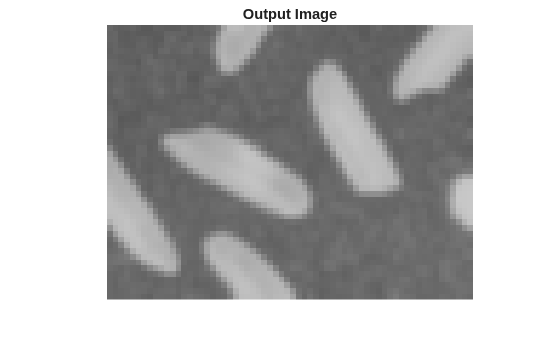
Figure contains an axes object. The hidden axes object with title Output Image contains an object of type image.

Algorithms

This System object implements the algorithms described on the Image Filter block reference page.

Extended Capabilities

expand all

Version History

Introduced in R2015a

expand all

See Also

| (Image Processing Toolbox) |