Descriptor State-Space
R2026bModel continuous linear system as system of implicit state-space equations
Descriptor State-Space block

To add a block to a model, double-click the canvas and start typing the block name. Then, select the block from the list.
Libraries:
Simulink /
Continuous
Description
The Descriptor State-Space block models a continuous linear system as a system of differential equations expressed in the implicit form:
where:
x is the state vector.
u is the input vector.
y is the output vector.
The matrices E, A, B, C, and D contain the coefficients of the terms in the system equations.
You can use the Descriptor State-Space block to model both time invariant and time variant linear implicit systems.
To model time-invariant systems, specify the E, A, B, C, and D parameters as constant matrices.
To model time-variant systems, tune the A, B, C, D, and E parameters during simulation. (since R2026a)
Specify System Matrices
To model a system, specify the system matrices using the E, A, B, C, and D parameters. You can specify either sparse or full matrices. By default, MATLAB® creates full matrices.
For more information, see Constructing Sparse Matrices.
The number of states, inputs, and outputs in the system determine the dimensions of the system matrices. For a system with n states, m inputs, and r outputs, the dimensions are:
E — n-by-n
A — n-by-n
B — n-by-m
C — r-by-n
D — r-by-m
Examples
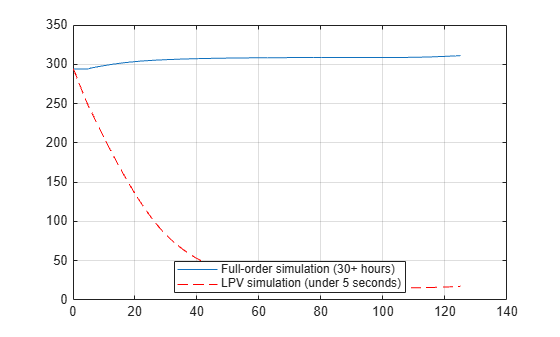
Create Low-Order LPV Model of CPU and Heat Sink Model
Obtain a low-order linear parameter-varying (LPV) surrogate for the high-fidelity finite element model of the heat sink.
(Control System Toolbox)
- Since R2024a
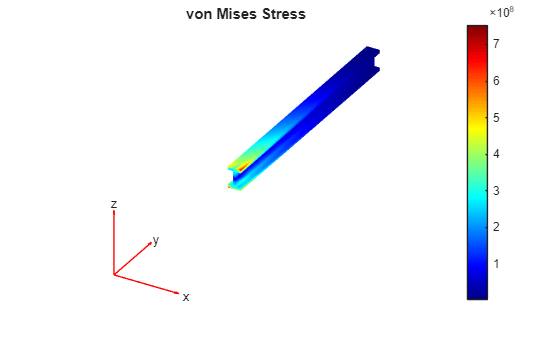
Reduced-Order Modeling Technique for System-Level Simulation of Aircraft Wing Spar
Run system-level simulations by using the Descriptor State-Space block to implement a reduced-order model of the I-beam in an aircraft wing spar.
(Partial Differential Equation Toolbox)
Ports
Input
Input values must be real. The dimensions of the input signal must match the number of system inputs.
When the system has one input, connect a scalar signal.
When the system has multiple inputs, connect a vector signal that contains an element for each system input.
This port has direct feedthrough when:
You set the Direct Feedthrough parameter to
True.You set the Direct Feedthrough parameter to
Autoand the software determines that the block has direct feedthrough.
Data Types: double
Output
The dimensions of the output signal match the number of system outputs.
When the system has one output, the block produces a scalar signal.
When the system has multiple outputs, the block produces a vector signal that contains an element for each system output.
Data Types: double
Parameters
Specify a matrix that:
Contains only real values.
Has dimensions n-by-n, where n is the number of states in the system.
The mass matrix can be singular or nonsingular.
When the mass matrix is singular, model the system using the Descriptor State-Space block. Because the mass matrix is not invertible, you cannot express the system equations in the explicit form.
When the mass matrix is nonsingular, you can model the system using either the Descriptor State-Space block or the State-Space block. Because the mass matrix is invertible, you can express the system equations in the explicit form, .
Programmatic Use
To set the block parameter value programmatically, use
the set_param function.
To get the block parameter value
programmatically, use the get_param function.
| Parameter: | E |
| Values: | '1' (default) | scalar | matrix |
| Data Types: | string | char |
Example: set_param("MyModel/Descriptor State-Space",E="[1
2;3 4]")
Specify a matrix that:
Contains only real values.
Has dimensions n-by-n, where n is the number of states in the system.
Programmatic Use
To set the block parameter value programmatically, use
the set_param function.
To get the block parameter value
programmatically, use the get_param function.
| Parameter: | A |
| Values: | '1' (default) | scalar | vector | matrix |
| Data Types: | string | char |
Example: set_param("MyModel/Descriptor State-Space",A="[1
2;3 4]")
Specify a matrix that:
Contains only real values.
Has dimensions n-by-m, where n is the number of states in the system, and m is the number of system inputs.
Programmatic Use
To set the block parameter value programmatically, use
the set_param function.
To get the block parameter value
programmatically, use the get_param function.
| Parameter: | B |
| Values: | '1' (default) | scalar | vector | matrix |
| Data Types: | string | char |
Example: set_param("MyModel/Descriptor State-Space",B="[1
2]")
Specify a matrix that:
Contains only real values.
Has dimensions r-by-n, where r is the number of system outputs, and n is the number of states in the system.
Programmatic Use
To set the block parameter value programmatically, use
the set_param function.
To get the block parameter value
programmatically, use the get_param function.
| Parameter: | C |
| Values: | '1' (default) | scalar | vector | matrix |
| Data Types: | string | char |
Example: set_param("MyModel/Descriptor State-Space",C="[3
4]")
Specify a matrix that:
Contains only real values.
Has dimensions r-by-m, where r is the number of system outputs, and m is the number of system inputs.
Programmatic Use
To set the block parameter value programmatically, use
the set_param function.
To get the block parameter value
programmatically, use the get_param function.
| Parameter: | D |
| Values: | '1' (default) | scalar | vector | matrix |
| Data Types: | string | char |
Example: set_param("MyModel/Descriptor
State-Space",D="5")
To initialize the system, specify the initial values of states in the
system. States cannot have Inf or NaN
values.
Programmatic Use
To set the block parameter value programmatically, use
the set_param function.
To get the block parameter value
programmatically, use the get_param function.
This parameter has two names: InitialCondition and
X0. You can use either name to set or get the
parameter value.
| Parameter: | InitialCondition |
| Values: | '0' (default) | scalar | vector | matrix |
| Data Types: | string | char |
Example: set_param("MyModel/Descriptor
State-Space",InitialCondition="[2 3]")
Example: set_param("MyModel/Descriptor State-Space",X0="[2
3])
When the block implements a system with more than 500 continuous states, specifying this parameter can speed up block execution during simulation. A system has direct feedthrough if the value of at least one output signal directly depends on at least one input signal value. By default, the software assumes that the system has direct feedthrough.
True— The system has direct feedthrough.False— The system does not have direct feedthrough.Auto— The software determines whether the system has direct feedthrough based on the characteristics of the specified matrices.
Programmatic Use
To set the block parameter value programmatically, use
the set_param function.
To get the block parameter value
programmatically, use the get_param function.
| Parameter: | DirectFeedthrough |
| Values: | 'True' (default) | "False" | "Auto" |
Example: set_param("MyModel/Descriptor
State-Space",DirectFeedthrough="False")
This parameter specifies how the software linearizes the system when you linearize the model that contains the block.
on— System linearized to sparse systemoff— System linearized to nonsparse explicit state-space system
Programmatic Use
To set the block parameter value programmatically, use
the set_param function.
To get the block parameter value
programmatically, use the get_param function.
| Parameter: | LinearizeToSparse |
| Values: | 'off' (default) | "on" |
Example: set_param("MyModel/Descriptor
State-Space",LinearizeToSparse="on")
To model time-variant systems, you can tune the system matrix parameters during simulation. This parameter specifies the level of parameter tunability during simulation. The parameter value determines how the software represents the system matrix parameters in the compiled model for normal mode simulations and the simulation target for accelerator and rapid accelerator simulations. The choice involves a tradeoff between flexibility and performance.
Auto— The software chooses the level of parameter tunability by analyzing the system matrices.Optimized— This option improves performance but places additional restrictions on the values you can specify when you tune the system matrix parameters during simulation.Unconstrained— This option provides the most flexibility, with the fewest restrictions on the values you can specify when you tune the system matrix parameters during simulation.
In all cases, the pattern of the mass matrix must remain fixed. When you tune the E parameter during simulation, only elements that have nonzero values in the initial matrix are tunable.
The values you can specify when you tune the A,
B, C, and
D parameters depend on whether you specify the
initial value as a sparse or full matrix and the value
of this parameter.
| Initial Matrix Parameter Value | Optimized Parameter
Tunability | Unconstrained Parameter
Tunability |
|---|---|---|
| Sparse matrix | Matrix pattern is fixed. Only elements with nonzero values in the initial matrix are tunable. | The matrix pattern can change, but the number of nonzero elements in the matrix cannot increase. |
| Full matrix | The matrix pattern can change, but the number of nonzero elements in the matrix cannot increase. | All elements of the matrix can change. |
Dependencies
To tune the system matrices using the Parameter Writer block, specify the parameters as full matrices.
Programmatic Use
To set the block parameter value programmatically, use
the set_param function.
To get the block parameter value
programmatically, use the get_param function.
| Parameter: | ParameterTunability |
| Values: | 'Auto' (default) | "Optimized" | "Unconstrained" |
Example: set_param("MyModel/Descriptor
State-Space",ParameterTunability="Optimized")
Variable-step solvers use absolute and relative tolerances to determine whether the error in state calculations is acceptable when choosing the step size. This parameter specifies the absolute tolerance to use for states in the system implemented by this block.
autoor-1— Inherit the absolute tolerance from the Absolute tolerance configuration parameter.Real, positive scalar — Specify an absolute tolerance for all states.
Real, positive vector — Specify an absolute tolerance for each state. The number of elements in the vector must be the same as the number of states in the system.
Programmatic Use
To set the block parameter value programmatically, use
the set_param function.
To get the block parameter value
programmatically, use the get_param function.
| Parameter: | AbsoluteTolerance |
| Values: | 'auto' (default) | "-1" | positive real scalar | positive real vector |
| Data Types: | string | char |
Example: set_param("MyModel/Descriptor State-Space",AbsoluteTolerance="-1")
If you do not specify a custom name for every state in the system:
Each specified name is used for more than one state.
The number of states must be evenly divisible by the number of specified names.
For example, if the system has four states, you must specify one, two, or four names. If you specify two names, the first two states use the first name and the last two states use the second name.
To specify a single custom state name using the Property
Inspector or the Block Parameters dialog box, include single
quotes ('') around the name. For example, to specify the
name position, enter 'position'. If
you omit the single quotes, the software interprets the value as the name of
a MATLAB variable.
To use default state names, specify this parameter as an empty character
vector ('').
Programmatic Use
To set the block parameter value programmatically, use
the set_param function.
To get the block parameter value
programmatically, use the get_param function.
| Parameter: | ContinuousStateAttributes |
| Values: | '' (default) |
| Data Types: | char | cell |
Example: set_param("MyModel/Descriptor State-Space",ContinuousStateAttributes={'position','velocity'})
Block Characteristics
Extended Capabilities
Not recommended for production code generation.
Before R2024b: The Descriptor State-Space block supports only C code generation and does not support C++ code generation.
Consider using the Model Discretizer to map continuous blocks, such as the Descriptor State-Space block, to discrete equivalents that support code generation. For more information, see Model Discretizer.
Version History
Introduced in R2018bModel time-variant linear differential-algebraic equation (DAE) systems by tuning the A, B, C, D, and E parameters during simulation.
The pattern of the mass matrix must remain fixed. When you tune the E parameter during simulation, only elements that have nonzero values in the initial matrix are tunable.
The values you can specify when you tune the A,
B, C, and D
parameters depend on whether you specify the initial value as a sparse or full matrix and the value of the
Parameter tunability parameter.
| Initial Matrix Parameter Value | Optimized Parameter Tunability | Unconstrained Parameter
Tunability |
|---|---|---|
| Sparse matrix | Matrix pattern is fixed. Only elements with nonzero values in the initial matrix are tunable. | The matrix pattern can change, but the number of nonzero elements in the matrix cannot increase. |
| Full matrix | The matrix pattern can change, but the number of nonzero elements in the matrix cannot increase. | All elements of the matrix can change. |
You can generate C++ code for implicit systems that have a mass matrix, such as those implemented using the Descriptor State-Space block. Use the Language (Simulink Coder) parameter to specify the language for code generation.
See Also
Blocks
Functions
MATLAB Command
You clicked a link that corresponds to this MATLAB command:
Run the command by entering it in the MATLAB Command Window. Web browsers do not support MATLAB commands.
웹사이트 선택
번역된 콘텐츠를 보고 지역별 이벤트와 혜택을 살펴보려면 웹사이트를 선택하십시오. 현재 계신 지역에 따라 다음 웹사이트를 권장합니다:
또한 다음 목록에서 웹사이트를 선택하실 수도 있습니다.
사이트 성능 최적화 방법
최고의 사이트 성능을 위해 중국 사이트(중국어 또는 영어)를 선택하십시오. 현재 계신 지역에서는 다른 국가의 MathWorks 사이트 방문이 최적화되지 않았습니다.
미주
- América Latina (Español)
- Canada (English)
- United States (English)
유럽
- Belgium (English)
- Denmark (English)
- Deutschland (Deutsch)
- España (Español)
- Finland (English)
- France (Français)
- Ireland (English)
- Italia (Italiano)
- Luxembourg (English)
- Netherlands (English)
- Norway (English)
- Österreich (Deutsch)
- Portugal (English)
- Sweden (English)
- Switzerland
- United Kingdom (English)

