phased.HeterogeneousULA
R2026bHeterogeneous uniform linear array
Description
The phased.HeterogeneousULA object creates a uniform
linear array from a heterogeneous set of antenna elements. A heterogeneous array is an array
in which the antenna or microphone elements may be of different kinds or have different
properties. An example would be an array of elements each having different antenna
patterns.
To compute the response for each element in the array for specified directions:
Create the
phased.HeterogeneousULAobject and set its properties.Call the object with arguments, as if it were a function.
To learn more about how System objects work, see What Are System Objects?
Creation
Description
array = phased.HeterogeneousULAarray. The object models a heterogeneous ULA formed
with generally different sensor elements. The origin of the local coordinate system is the
phase center of the array. The positive x-axis is the direction normal
to the array, and the elements of the array are located along the
y-axis.
array = phased.HeterogeneousULA(
creates object, Name="Value")H, with each specified property Name set to the
specified Value. You can specify additional name-value pair arguments in any order as
(Name1=Value1,...,NameN=ValueN).
Example: array = phased.HeterogeneousULA(ElementSpacing="Value")
sets properties using one or more name-value arguments. For example, to specify element
spacing of 0.5, set ElementSpacing to 0.5.
Properties
Usage
Syntax
Description
Input Arguments
Output Arguments
Object Functions
To use an object function, specify the
System object as the first input argument. For
example, to release system resources of a System object named obj, use
this syntax:
release(obj)
Examples
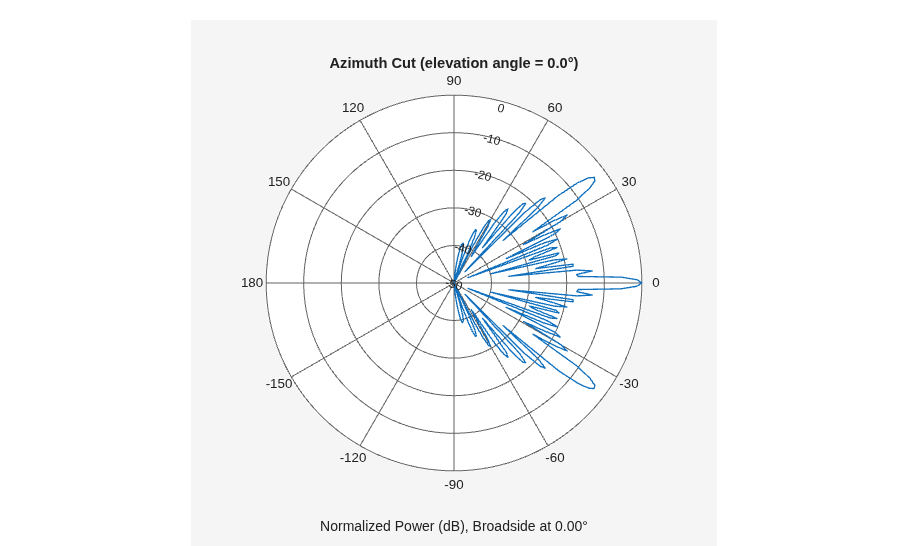
Create a 10-element heterogeneous ULA consisting of cosine antenna elements with different power exponents. Two elements at each end have power values of 1.5 while the inside elements have power exponents of 1.8. Find the power pattern in dB of each element at boresight.
Construct the heterogeneous array and show the element responses at 1 GHz.
sElement1 = phased.CosineAntennaElement(CosinePower=1.5);
sElement2 = phased.CosineAntennaElement(CosinePower=1.8);
sArray = phased.HeterogeneousULA(...
    ElementSet={sElement1,sElement2}, ...
    ElementIndices=[1 1 2 2 2 2 2 2 1 1 ]);
fc = 1e9;
ang = [0;0];
resp = sArray(fc,ang)
resp =

     1
     1
     1
     1
     1
     1
     1
     1
     1
     1
Plot an azimuth cut of the array response at 1 GHz.
c = physconst("LightSpeed");
plotResponse(sArray,fc,c,RespCut="Az",Format="Polar");
pattern(sArray,fc,[-180:180],0, ...
    PropagationSpeed=c, ...
    CoordinateSystem="polar", ...
    Type="powerdb");
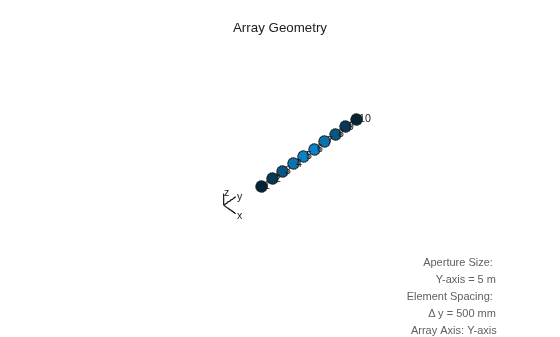
Construct a heterogeneous uniform line array of 10 short-dipole sensor elements. Because short dipoles support polarization, the array should also. Verify that the array supports polarization by looking at the output of isPolarizationCapable. Then, draw the array, showing the tapering.
Construct the array
Construct the array. Then, verify that it supports polarization by looking at the returned value of the isPolarizationCapable method.
sElement1 = phased.ShortDipoleAntennaElement(...
    'FrequencyRange',[100e6 1e9],...
    'AxisDirection','Z');
sElement2 = phased.ShortDipoleAntennaElement(...
    'FrequencyRange',[100e6 1e9],...
    'AxisDirection','Y');
sArray = phased.HeterogeneousULA(...
    'ElementSet',{sElement1,sElement2},...
    'ElementIndices',[1 1 2 2 2 2 2 2 1 1 ],...
    'Taper',taylorwin(10)');
isPolarizationCapable(sArray)
ans = logical
   1
View the array
viewArray(sArray,'ShowTaper',true,'ShowIndex',...
    'All','ShowTaper',true)
Show the response
Show the element horizontal polarization responses at 10 degrees azimuth angle.
fc = 150e6;
ang = [10];
resp = step(sArray,fc,ang)
resp = struct with fields:
    H: [10×1 double]
    V: [10×1 double]
resp.H
ans = 10×1

         0
         0
   -1.2442
   -1.6279
   -1.8498
   -1.8498
   -1.6279
   -1.2442
         0
         0
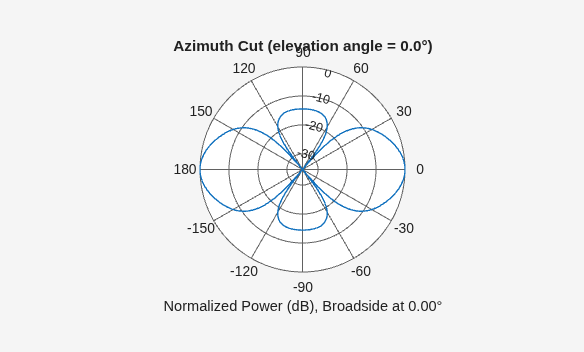
Plot the combined polarization response
c = physconst('LightSpeed');
pattern(sArray,fc,[-180:180],0,...
    'PropagationSpeed',c,...
    'CoordinateSystem','polar',...
    'Type','powerdb',...
    'Polarization','combined');
Create a 5-element heterogeneous ULA of cosine antenna elements with difference responses, and find the response of each element at 30° azimuth.
antenna1 = phased.CosineAntennaElement(CosinePower=1.5);
antenna2 = phased.CosineAntennaElement(CosinePower=1.8);
array = phased.HeterogeneousULA(...
    ElementSet={antenna1,antenna2}, ...
    ElementIndices=[1 2 2 2 1]);
fc = 1e9;
c = physconst("LightSpeed");
ang = [30;0];
resp = array(fc,ang)
resp = 5×1

    0.8059
    0.7719
    0.7719
    0.7719
    0.8059
Find the response of a heterogeneous ULA array of 7 custom microphone elements with different responses.
Create two microphones with different response patterns.
mic1 = phased.CustomMicrophoneElement(...
    FrequencyResponse=[20 20e3]);
mic1.PolarPatternFrequencies = [500 1000];
mic1.PolarPattern = mag2db([...
    0.5+0.5*cosd(mic1.PolarPatternAngles); ...
    0.6+0.4*cosd(mic1.PolarPatternAngles)]);
mic2 = phased.CustomMicrophoneElement(...
    FrequencyResponse=[20 20e3]);
mic2.PolarPatternFrequencies = [500 1000];
mic2.PolarPattern = mag2db([...
    ones(size(mic2.PolarPatternAngles)); ...
    ones(size(mic2.PolarPatternAngles))]);
Create the heterogeneous ULA.
array = phased.HeterogeneousULA(...
    ElementSet={mic1,mic2}, ...
    ElementIndices=[1 1 2 2 2 1 1]);
Find the array response at 40° and 50° azimuth.
fc = [1500, 2000];
ang = [40 50; 0 0];
resp = array(fc,ang)
resp =
resp(:,:,1) =

    9.0642    8.5712
    9.0642    8.5712
   10.0000   10.0000
   10.0000   10.0000
   10.0000   10.0000
    9.0642    8.5712
    9.0642    8.5712


resp(:,:,2) =

    9.0642    8.5712
    9.0642    8.5712
   10.0000   10.0000
   10.0000   10.0000
   10.0000   10.0000
    9.0642    8.5712
    9.0642    8.5712
References
[1] Brookner, E., ed. Radar Technology. Lexington, MA: LexBook, 1996.
[2] Van Trees, H. Optimum Array Processing. New York: Wiley-Interscience, 2002.
Extended Capabilities
Version History
Introduced in R2013a
See Also
phased.ULA | phased.UCA | phased.URA | phased.ReplicatedSubarray | phased.PartitionedArray | phased.HeterogeneousConformalArray | phased.HeterogeneousURA | phased.CosineAntennaElement | phased.CrossedDipoleAntennaElement | phased.CustomAntennaElement | phased.IsotropicAntennaElement | phased.ShortDipoleAntennaElement | sidelobelevel

