dsp.ParallelFilter
R2026bDescription
The dsp.ParallelFilter object is a parallel sum filter structure where
each branch is a filter System object™ or a scalar value. The object passes the input signal through each of its
branches and sums the filtered output from each branch.

To see a list of filter objects that you can add as branches to the parallel filter stack, run this command in the MATLAB® command prompt.
dsp.ParallelFilter.helpSupportedSystemObjects
To create a parallel sum filter structure:
Create the
dsp.ParallelFilterobject and set its properties.Call the object with arguments, as if it were a function.
To learn more about how System objects work, see What Are System Objects?
Alternatively, you can use the parallel function to
create a dsp.ParallelFilter object. However, when you use the
parallel function, you must specify at least one branch to be a filter
object.
Using the generateFilteringCode function, you can generate a MATLAB function script from the parallel filter object, and call that function to
filter a signal. The generated function supports C/C++ code generation if the filters in each
branch support code generation.
Creation
Syntax
Description
pf = dsp.ParallelFilterdsp.FIRFilter
System object with default properties.
pf = dsp.ParallelFilter(filt1,filt2,...,filtn)filt1, the second branch is set to filt2, and so
on. Each branch can be a filter System object or a scalar gain value.
For example, create a parallel filter that includes a lowpass filter, a highpass filter, and a gain branch.
lpFilt = dsp.LowpassFilter(StopbandFrequency=15000, ...
                           PassbandFrequency=12000);
hpFilt = dsp.HighpassFilter(StopbandFrequency=5000, ...
                            PassbandFrequency=8000);
gain = 2;
pf = dsp.ParallelFilter(lpFilt,hpFilt,gain)
pf =
  dsp.ParallelFilter with properties:

          Branch1: [1×1 dsp.LowpassFilter]
          Branch2: [1×1 dsp.HighpassFilter]
          Branch3: 2
CloneBranches: truepf = dsp.ParallelFilter(___, CloneBranches=flag)CloneBranches property to true or
false. Use this syntax in combination with any of the input arguments
in previous syntaxes.
pf = dsp.ParallelFilter(___,InputSampleRate=Value)
Positive real scalar — The input sample rate of the parallel filter is a positive real scalar.
"normalized"— The input sample rate of the parallel filter is in normalized frequency units regardless of the input sample rate of the individual filter branches."auto"— The input sample rate of the parallel filter is determined from the input sample rate of the individual filter branches as per these conditions:If all the branches have a normalized frequency, then the parallel filter has a normalized frequency.
If more than one branch has an absolute sample rate, then the sample rate of these branches must be consistent with the rate conversion ratio of the segment connecting them. The sample rate of the overall parallel filter is in absolute units.
If at least one branch has an absolute sample rate, then the sample rate of the overall parallel filter is in absolute units.
(since R2026a)
Properties
Usage
Syntax
Description
y = pf(x)x through each branch of the parallel filter
pf, sums the outputs from each branch, and returns the resultant output
y. All branches of the parallel filter must support the size, data
type, and complexity of the input signal.
This object supports variable-size signals if all the filter branches within the object support variable-size signals.
Input Arguments
Output Arguments
Object Functions
To use an object function, specify the
System object as the first input argument. For
example, to release system resources of a System object named obj, use
this syntax:
release(obj)
Examples
You can construct a parallel filter using the dsp.ParallelFilter object or the parallel function.
First, create the branches.
B1 = dsp.FIRFilter;
B2 = dsp.Delay(3);
B3 = 2;
Specify these branches while constructing the dsp.ParallelFilter object.
pf1 = dsp.ParallelFilter(B1,B2,B3)
pf1 =
  dsp.ParallelFilter with properties:

          Branch1: [1×1 dsp.FIRFilter]
          Branch2: [1×1 dsp.Delay]
          Branch3: 2
    CloneBranches: true
You can also use the addBranch function to add branches to the default parallel filter.
pf2 = dsp.ParallelFilter(B1);
addBranch(pf2,B2,B3);
pf2
pf2 =
  dsp.ParallelFilter with properties:

          Branch1: [1×1 dsp.FIRFilter]
          Branch2: [1×1 dsp.Delay]
    CloneBranches: true
Now, use the parallel filter function to construct a dsp.ParallelFilter object.
pf3 = parallel(B1,B2,B3)
pf3 =
  dsp.ParallelFilter with properties:

          Branch1: [1×1 dsp.FIRFilter]
          Branch2: [1×1 dsp.Delay]
          Branch3: 2
    CloneBranches: true
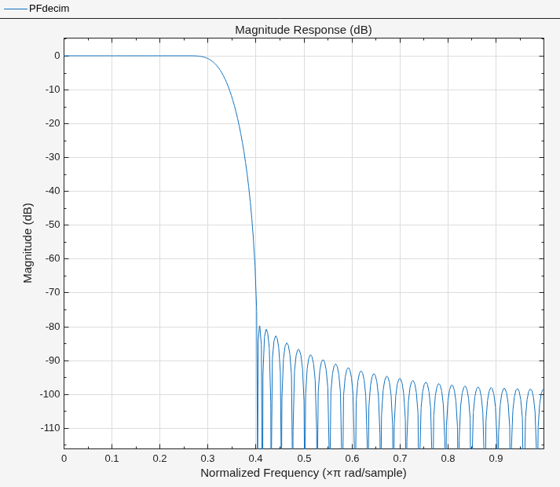
Implement a polyphase FIR decimator using the dsp.ParallelFilter object and visualize its frequency response.
Design Decimator
Design an FIR antialiasing lowpass filter with a decimation factor of 3 using the designMultirateFIR function.
M = 3;
coeffs = designMultirateFIR(1,M);
Implement the FIR decimator as a polyphase structure. For more information about polyphase structures, see the Algorithms section in dsp.FIRDecimator. Here, create the structure using a parallel filter with three branches (as indicated by the decimation factor). Each branch is a cascade of dsp.FIRDecimator, dsp.Delay, and dsp.FIRFilter objects.
branches = cell(1,M);
for phase=1:M
    downsample = dsp.FIRDecimator(M,1); % Trivial downsample
    phaseDelay = dsp.Delay(phase-1);
    phaseFIR = dsp.FIRFilter(coeffs(phase:3:end));
    branches{phase} = cascade(phaseDelay, downsample, phaseFIR);
end

PFdecim = dsp.ParallelFilter(branches{:})
PFdecim =
  dsp.ParallelFilter with properties:

          Branch1: [1×1 dsp.FilterCascade]
          Branch2: [1×1 dsp.FilterCascade]
          Branch3: [1×1 dsp.FilterCascade]
    CloneBranches: true
Visualize the frequency response of the decimator.
filterAnalyzer(PFdecim)
Decimate by 3
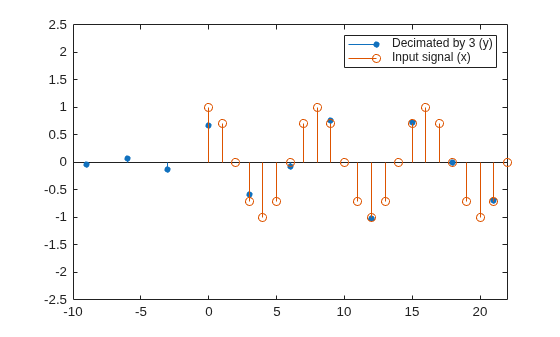
The input is a cosine wave that has an angular frequency of radians per sample.
x = cos(pi/4*(0:95)');
Decimate the cosine signal by a factor of 3.
y = PFdecim(x);
Plot Data
Plot the original and the decimated signals. In order to plot the two signals on the same plot, you must account for the output delay of the FIR decimator and the scaling introduced by the filter. Use the outputDelay function to compute the delay value introduced by the decimator. Shift the output by this delay value.
Visualize the input and the resampled signals. After a short transition, the output converges to a cosine of frequency as expected, which is three times the frequency of the input signal . Due to the decimation factor of 3, the output samples coincide with every third input sample.
[delay,FsOut] = outputDelay(PFdecim,Fc=0)
delay =
36
FsOut =
0.3333
nx = (0:length(x)-1);
ty = (0:length(y)-1)/FsOut-delay;
stem(ty,y,"filled",MarkerSize=4); hold on;
stem(nx,x); hold off;
xlim([-10,22])
ylim([-2.5 2.5])
legend("Decimated by 3 (y)","Input signal (x)");
When you set the CloneBranches property to false, the branches stored in the dsp.ParallelFilter object are references to the branches you provide and reside in the same memory location. Any changes you make to the branches you provide update the branches stored in the dsp.ParallelFilter object. For example, if you update a property in one of the branches you provide, the parallel filter with CloneBranches set to false updates the same property in its stored branches.
When you set the CloneBranches property to true, the branches stored in the dsp.ParallelFilter object are clones of the branches you provide and do not occupy the same memory. Any changes you make to the branches you provide have no impact on the branches stored in the dsp.ParallelFilter object.
Construct two parallel filters, one with CloneBranches set to true and the other with CloneBranches set to false. The two branches you provide B1 and B2 contain the dsp.FIRInterpolator and dsp.FIRDecimator, respectively.
B1 = dsp.FIRInterpolator(13);
B2 = dsp.FIRDecimator(17);
pf_clone = dsp.ParallelFilter(B1,B2)
pf_clone =
  dsp.ParallelFilter with properties:

          Branch1: [1×1 dsp.FIRInterpolator]
          Branch2: [1×1 dsp.FIRDecimator]
    CloneBranches: true
pf_ref = dsp.ParallelFilter(B1,B2, CloneBranches = false)
pf_ref =
  dsp.ParallelFilter with properties:

          Branch1: [1×1 dsp.FIRInterpolator]
          Branch2: [1×1 dsp.FIRDecimator]
    CloneBranches: false
Change the InterpolationFactor to 19 in B1.
B1.InterpolationFactor = 19
B1 =
  dsp.FIRInterpolator with properties:

    InterpolationFactor: 19
        NumeratorSource: 'Property'
              Numerator: [0 -2.0633e-05 -4.7889e-05 -8.0608e-05 -1.1674e-04 -1.5337e-04 -1.8683e-04 -2.1293e-04 -2.2722e-04 -2.2540e-04 -2.0373e-04 -1.5948e-04 -9.1387e-05 0 1.1201e-04 2.3970e-04 3.7591e-04 5.1143e-04 6.3545e-04 … ] (1×312 double)

  Show all properties
Display the value of InterpolationFactor stored in Branch1 of both parallel filters. The change in interpolation factor of B1 does not affect the interpolation factor of Branch1 in the clone parallel filter, pf_clone. However, the same change updates the interpolation factor of Branch1 in the reference parallel filter, pf_ref.
pf_clone.Branch1.InterpolationFactor % no sync (clone)ans = 13
pf_ref.Branch1.InterpolationFactor % sync (reference)ans = 19
Since R2026a
Specify the input sample rate explicitly while constructing the dsp.ParallelFilter object using the InputSampleRate argument.
Parallel Filter with Absolute Sample Rate
Create a dsp.ParallelFilter object with three branches. Each branch is a dsp.FIRFilter object operating in normalized frequency units. Specify the sample rate of the parallel filter as 22050 Hz using the InputSampleRate argument.
filtNorm1 = dsp.FIRFilter;
firtNorm2 = dsp.FIRFilter(designLowpassFIR(FilterOrder=30,CutoffFrequency=0.5,Window="hann"));
filtNorm3 = dsp.FIRFilter(designLowpassFIR(FilterOrder=10,CutoffFrequency=0.5));
parallelSpecifySampleRate = parallel(filtNorm1,firtNorm2,filtNorm3,InputSampleRate=22050)
parallelSpecifySampleRate =
dsp.ParallelFilter with properties:
Branch1: [1×1 dsp.FIRFilter]
Branch2: [1×1 dsp.FIRFilter]
Branch3: [1×1 dsp.FIRFilter]
CloneBranches: true
The parallel filter operates at the absolute frequency that you specify regardless of the sample rate of the filter branches.
info(parallelSpecifySampleRate)
ans =
    'Discrete-Time Filter Parallel Filter
     ----------------------------
     Number of branches: 3
     Branch cloning: enabled
     Input sample rate: 22050
     ----------------------------

     Branch1: dsp.FIRFilter
     -------
     Discrete-Time FIR Filter (real)
     -------------------------------
     Filter Structure  : Direct-Form FIR
     Filter Length     : 2
     Stable            : Yes
     Linear Phase      : Yes (Type 2)
     Input sample rate : Normalized


     Branch2: dsp.FIRFilter
     -------
     Discrete-Time FIR Filter (real)
     -------------------------------
     Filter Structure  : Direct-Form FIR
     Filter Length     : 31
     Stable            : Yes
     Linear Phase      : Yes (Type 1)
     Input sample rate : Normalized


     Branch3: dsp.FIRFilter
     -------
     Discrete-Time FIR Filter (real)
     -------------------------------
     Filter Structure  : Direct-Form FIR
     Filter Length     : 11
     Stable            : Yes
     Linear Phase      : Yes (Type 1)
     Input sample rate : Normalized

     '
Parallel Filter with Normalized Sample Rate
Specify normalized sample rate on the cascade. The first branch of the filter cascade has a sample rate of 17 Hz. The remaining filter branches operate in normalized frequency units.
filtAbs1 = dsp.FIRFilter(SampleRate=17);
firtNorm2 = dsp.FIRFilter(designLowpassFIR(FilterOrder=30,CutoffFrequency=0.5,Window="hann"));
filtNorm3 = dsp.FIRFilter(designLowpassFIR(FilterOrder=10,CutoffFrequency=0.5));
parallelNormSampleRate = parallel(filtAbs1,firtNorm2,filtNorm3,InputSampleRate="normalized")
parallelNormSampleRate =
  dsp.ParallelFilter with properties:

          Branch1: [1×1 dsp.FIRFilter]
          Branch2: [1×1 dsp.FIRFilter]
          Branch3: [1×1 dsp.FIRFilter]
    CloneBranches: true
The parallel filter operates in normalized frequency units regardless of the sample rate of the individual filter branches.
info(parallelNormSampleRate)
ans =
    'Discrete-Time Filter Parallel Filter
     ----------------------------
     Number of branches: 3
     Branch cloning: enabled
     Input sample rate: Normalized
     ----------------------------

     Branch1: dsp.FIRFilter
     -------
     Discrete-Time FIR Filter (real)
     -------------------------------
     Filter Structure  : Direct-Form FIR
     Filter Length     : 2
     Stable            : Yes
     Linear Phase      : Yes (Type 2)
     Input sample rate : 17


     Branch2: dsp.FIRFilter
     -------
     Discrete-Time FIR Filter (real)
     -------------------------------
     Filter Structure  : Direct-Form FIR
     Filter Length     : 31
     Stable            : Yes
     Linear Phase      : Yes (Type 1)
     Input sample rate : Normalized


     Branch3: dsp.FIRFilter
     -------
     Discrete-Time FIR Filter (real)
     -------------------------------
     Filter Structure  : Direct-Form FIR
     Filter Length     : 11
     Stable            : Yes
     Linear Phase      : Yes (Type 1)
     Input sample rate : Normalized

     '
Parallel Filter with Auto Sample Rate
Set the input sample rate of the parallel filter to "auto". The individual filters have a combination of normalized and absolute sample rates. The parallel filter uses the absolute sample rate.
filtAbs1 = dsp.FIRFilter(SampleRate=17);
firtNorm2 = dsp.FIRFilter(designLowpassFIR(FilterOrder=30,CutoffFrequency=0.5,Window="hann"));
filtAbs2 = dsp.FIRFilter(designLowpassFIR(FilterOrder=10,CutoffFrequency=0.5),SampleRate=17);
parallelAutoSampleRate = parallel(filtAbs1,firtNorm2,filtAbs2,InputSampleRate="auto");
info(parallelAutoSampleRate)
ans =
    'Discrete-Time Filter Parallel Filter
     ----------------------------
     Number of branches: 3
     Branch cloning: enabled
     Input sample rate: 17
     ----------------------------

     Branch1: dsp.FIRFilter
     -------
     Discrete-Time FIR Filter (real)
     -------------------------------
     Filter Structure  : Direct-Form FIR
     Filter Length     : 2
     Stable            : Yes
     Linear Phase      : Yes (Type 2)
     Input sample rate : 17


     Branch2: dsp.FIRFilter
     -------
     Discrete-Time FIR Filter (real)
     -------------------------------
     Filter Structure  : Direct-Form FIR
     Filter Length     : 31
     Stable            : Yes
     Linear Phase      : Yes (Type 1)
     Input sample rate : Normalized


     Branch3: dsp.FIRFilter
     -------
     Discrete-Time FIR Filter (real)
     -------------------------------
     Filter Structure  : Direct-Form FIR
     Filter Length     : 11
     Stable            : Yes
     Linear Phase      : Yes (Type 1)
     Input sample rate : 17

     '
The input sample rate of the parallel filter is set to "auto". The sample rate of the FIR filter and FIR interpolator is in absolute units. Since there is a rate conversion ratio of 3 between the two branches, the sample rate of these branches must be consistent with this rate conversion ratio. The input sample rate of the overall parallel filter is 22050 Hz.
filtNorm1 = dsp.FIRFilter(SampleRate=22050);
filtNorm4 = dsp.FIRDecimator(3);  % Normalized frequency
filtAbs3 = dsp.FIRInterpolator(InputSampleRate=22050/3);
parallelAutoSampleRate2 = cascade(filtNorm1,filtNorm4,filtAbs3,InputSampleRate="auto");
info(parallelAutoSampleRate2)
ans =
    'Discrete-Time Filter Cascade
     ----------------------------
     Number of stages: 3
     Stage cloning: enabled
     Input sample rate: 22050
     ----------------------------

     Stage1: dsp.FIRFilter
     -------
     Discrete-Time FIR Filter (real)
     -------------------------------
     Filter Structure  : Direct-Form FIR
     Filter Length     : 2
     Stable            : Yes
     Linear Phase      : Yes (Type 2)
     Input sample rate : 22050


     Stage2: dsp.FIRDecimator
     -------
     Discrete-Time FIR Multirate Filter (real)
     -----------------------------------------
     Filter Structure   : Direct-Form FIR Polyphase Decimator
     Decimation Factor  : 3
     Polyphase Length   : 24
     Filter Length      : 72
     Stable             : Yes
     Linear Phase       : Yes (Type 1)

     Arithmetic         : double
     Input sample rate : Normalized


     Stage3: dsp.FIRInterpolator
     -------
     Discrete-Time FIR Multirate Filter (real)
     -----------------------------------------
     Filter Structure      : Direct-Form FIR Polyphase Interpolator
     Interpolation Factor  : 3
     Polyphase Length      : 24
     Filter Length         : 72
     Stable                : Yes
     Linear Phase          : Yes (Type 1)

     Arithmetic            : double
     Input sample rate : 7350

     '
Consider a parallel filter with nested branches. The input sample rate of the first parallel filter is 22050 Hz. The input sample rate of the second parallel filter is "normalized".
Create a parallel filter with these two filter structures as branches and set the input sample rate of the overall parallel filter to "auto".
filtParallelSpecifySampleRate = dsp.ParallelFilter(InputSampleRate=22050)
filtParallelSpecifySampleRate =
  dsp.ParallelFilter with properties:

          Branch1: [1×1 dsp.FIRFilter]
    CloneBranches: true
filtParallelNormSampleRate = dsp.ParallelFilter(InputSampleRate="normalized")filtParallelNormSampleRate =
dsp.ParallelFilter with properties:
Branch1: [1×1 dsp.FIRFilter]
CloneBranches: true
filtNestedParallel = parallel(filtParallelSpecifySampleRate,filtParallelNormSampleRate,InputSampleRate="auto")filtNestedParallel =
dsp.ParallelFilter with properties:
Branch1: [1×1 dsp.ParallelFilter]
Branch2: [1×1 dsp.ParallelFilter]
CloneBranches: true
The first parallel filter has an absolute sample rate and the second parallel filter operates in normalized frequency units. The nested parallel filter in the "auto" configuration uses the absolute sample rate.
info(filtNestedParallel)
ans =
    'Discrete-Time Filter Parallel Filter
     ----------------------------
     Number of branches: 2
     Branch cloning: enabled
     Input sample rate: Normalized
     ----------------------------

     Branch1: dsp.ParallelFilter
     -------
     Discrete-Time Filter Parallel Filter
     ----------------------------
     Number of branches: 1
     Branch cloning: enabled
     Input sample rate: 22050
     ----------------------------

     Branch1: dsp.FIRFilter
     -------
     Discrete-Time FIR Filter (real)
     -------------------------------
     Filter Structure  : Direct-Form FIR
     Filter Length     : 2
     Stable            : Yes
     Linear Phase      : Yes (Type 2)
     Input sample rate : Normalized


     Branch2: dsp.ParallelFilter
     -------
     Discrete-Time Filter Parallel Filter
     ----------------------------
     Number of branches: 1
     Branch cloning: enabled
     Input sample rate: Normalized
     ----------------------------

     Branch1: dsp.FIRFilter
     -------
     Discrete-Time FIR Filter (real)
     -------------------------------
     Filter Structure  : Direct-Form FIR
     Filter Length     : 2
     Stable            : Yes
     Linear Phase      : Yes (Type 2)
     Input sample rate : Normalized


     '

