주요 콘텐츠

patch

R2026b

Convert mesh or scene object to patch for visualization in axes

Since R2026b

Description

Add-On Required: This feature requires the 3D Asset Processing Library for MATLAB add-on.

patchObj = patch(meshORsceneObj) creates a patch object patchObj from the mesh meshORsceneObj for rendering in axes. The function automatically extracts face colors and transparency from the mesh visual properties.

patchObj = patch(meshORsceneObj,Name=Value) creates a patch object patchObj using one or more name-value arguments. For example, EdgeColor="k" displays a patch with visible black wireframe edges.

Note

Although a subset of essential name-value arguments are listed, the function supports all name-value arguments of the patch object. For the full list of name-value arguments, see the patch object.

example

Examples

collapse all

Define a simple pyramid with 5 vertices and 6 triangular faces.

vertices = [0 0 0; 1 0 0; 1 1 0; 0 1 0; 0.5 0.5 1];
faces = [1 2 5; 2 3 5; 3 4 5; 4 1 5; 1 3 4; 1 2 3];

Create a mesh with per-face color.

faceColors = uint8([230 50  50;    % red - front
                    50  180 50;    % green - right
                    50  100 230;   % blue - back
                    230 180 25;    % yellow - left
                    150 75  200;   % purple - bottom 1
                    25  200 200]); % cyan - bottom 2
pyramidMesh = asset3d.Mesh(vertices,faces,FaceColors=faceColors);

Create a copy of the raw mesh.

translatedMesh = copy(pyramidMesh);

Shift the mesh 2 units along the X-axis.

translate(translatedMesh,[2 0 0])

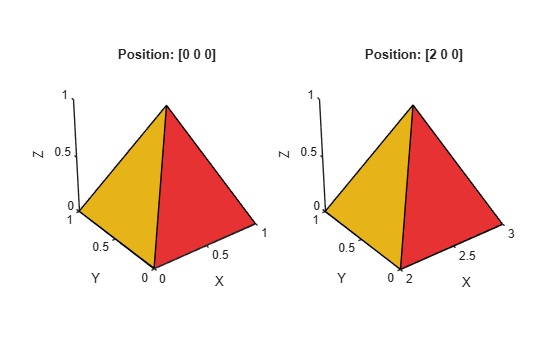
Visualize the mesh shifted 2 units along the X-axis compared to the original position.

figure
subplot(1,2,1)
patch(pyramidMesh,EdgeColor="k")
axis equal
title("Position: [0 0 0]")
subplot(1,2,2)
patch(translatedMesh,EdgeColor="k")
axis equal
title("Position: [2 0 0]")
Input Arguments

collapse all

Source mesh or scene, specified as a Mesh object or Scene object.

Name-Value Arguments

collapse all

Specify optional pairs of arguments as Name1=Value1,...,NameN=ValueN, where Name is the argument name and Value is the corresponding value. Name-value arguments must appear after other arguments, but the order of the pairs does not matter.

Example: patch(mesh,EdgeColor="k") creates a patch with visible black wireframe edges.

Parent figure, specified as an Axes object. If you do not specify Parent, the function displays the patch in a new figure.

Edge color of triangle, specified as "none", "interp", "flat", an RGB triplet, a hexadecimal color code, a color name, or a short name. For more information, see EdgeColor name-value argument of the patch object.

Face color, specified as "interp", "flat", an RGB triplet, a hexadecimal color code, a color name, or a short name. For more information, see FaceColor name-value argument of the patch object.

Face transparency, specified as one of these values:

  • Scalar in range [0,1] — Use uniform transparency across all of the faces. A value of 1 is fully opaque and 0 is completely transparent.

  • "flat" — Use a different transparency for each face.

  • "interp" — Use interpolated transparency for each face.

For more information, see FaceAlpha name-value argument of the patch object.

Explode scene for inspection, specified as a logical 1 (true) or 0 (false). When set to true, the function visually displaces each geometry in the scene outward from the explosion origin, allowing you to inspect individual parts. This does not modify the scene data.

Note

This name-value argument is applicable only when you specify the first input argument as a Scene object.

Data Types: logical

Explosion direction, specified as a positive scalar or a three-element row vector of the form [x y z].

  • If you specify a scalar, the function displaces each geometry in the direction from ExplodeOrigin to the geometry centroid, scaled by the scalar value.

  • If you specify a three-element vector, the function displaces each geometry along the specified direction, proportional to the projection of the vector from ExplodeOrigin to the geometry centroid onto this direction.

If not specified when Explode is true, the function automatically computes the default magnitude from the scene extents.

Note

This name-value argument is applicable only when you specify the first input as a Scene object and Explode is set to true.

Data Types: double

Explosion origin point, specified as a three-element row vector of the form [x y z]. The function displaces geometries outward from this point.

Note

This name-value argument is applicable only when you specify the first input argument as a Scene object and Explode is set to true.

Data Types: double

Show node name labels, specified as a logical 1 (true) or 0 (false). When set to true, each geometry in the scene is annotated with its scene-graph node name.

Note

This name-value argument is applicable only when you specify the first input argument as a Scene object.

Data Types: logical

Line style, specified as "-", "--", ":", "-.", or "none".

For more information, see LineStyle name-value argument of the patch object.

Output Arguments

collapse all

Patch handle, returned as a patch object. For more information on the object properties, see Patch Properties.

Version History

Introduced in R2026b