networkLayer
R2026bDescription
A network layer contains a nested network. Use network layers to simplify building large networks that contain repeating components.
During training and inference a network layer behaves identically to the nested network.
Tip
To visualize a network layer, use Deep Network Designer.
To see inside the layer, double click the layer. To edit the layers in Deep Network
Designer, you must first expand the network using the expandLayers
function before opening the network in the app. After editing the network and exporting it
to the workspace, you can regroup the layers into network layers using the groupLayers
function. Adding a network layer to a network in Deep Network Designer is not
supported.
Creation
Description
layer = networkLayer(___,Name=Value)Name="myNetworkLayer" sets the name of the network layer.
Input Arguments
Name-Value Arguments
Properties
Examples
Create an array of layers containing an lstmLayer with 100 hidden units and a dropoutLayer with a dropout probability of 0.2.
layers = [lstmLayer(100,OutputMode="sequence")
    dropoutLayer(0.2)];
Create a network layer containing these layers.
lstmDropoutLayer = networkLayer(layers)
lstmDropoutLayer =
  NetworkLayer with properties:

           Name: ''
     InputNames: {'lstm'}
    OutputNames: {'dropout'}

   Learnable Parameters
        Network: [1×1 dlnetwork]

   State Parameters
        Network: [1×1 dlnetwork]

  Show all properties
Inspect the layers of the network layer. This is equivalent to calling lstmDropoutLayer.Network.Layers.
lstmDropoutLayer.Layers
ans =
  2×1 Layer array with layers:

     1   'lstm'      LSTM      LSTM with 100 hidden units
     2   'dropout'   Dropout   20% dropout
Use the network layer to build a network which you can train using the trainnet function.
layers = [sequenceInputLayer(3)
    lstmDropoutLayer
    lstmDropoutLayer
    fullyConnectedLayer(10)
softmaxLayer];Download a pretrained image classification network.
resnet = imagePretrainedNetwork("resnet50");Load a test image.
img = imread("peppers.png");
figure
imshow(img)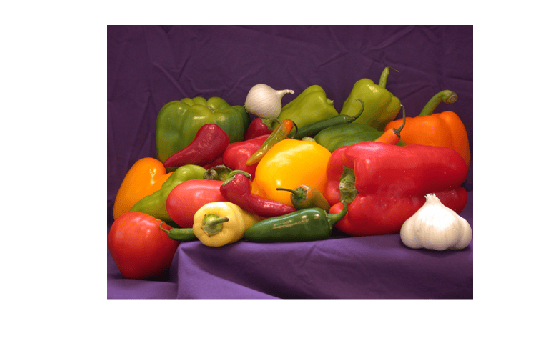
Use the pretrained network to create a network layer by specifying intermediate layers as the outputs of the network layer. This network layer can be used as a feature extractor, for example as the backbone of an object detection network such as a Mask R-CNN object detector.
extractorLayer = networkLayer(resnet,OutputNames=["activation_10_relu" "activation_22_relu" "activation_40_relu" "activation_49_relu"]);
Create a dlnetwork object containing the feature extractor and initialize the network using the test image.
img = dlarray(single(img),"SSC");
net = dlnetwork(extractorLayer,img);
Use the predict function to compute the outputs of network.
[output1,output2,output3,output4] = predict(net,img);
extractedFeatures = {output1 output2 output3 output4};
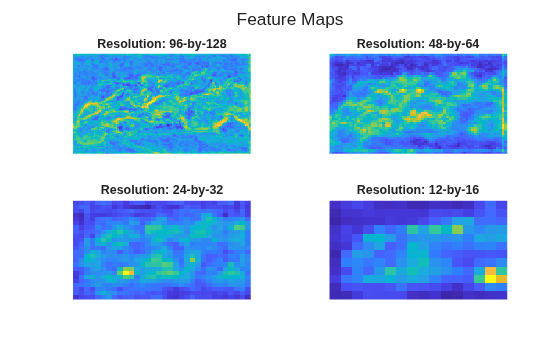
Average the extracted features over the channel dimension and plot the extracted features.
figure
t = tiledlayout("flow");
title(t,"Feature Maps")
for idx=1:numel(extractedFeatures)
    features = mean(extractdata(extractedFeatures{idx}),3);
    resolution = size(features);
    nexttile
    imagesc(features)
    title("Resolution: " + resolution(1) + "-by-" + resolution(2))
    axis off
end
Create an array of layers.
convLayers = [ ...
    convolution1dLayer(5,16,Padding="causal")
    reluLayer
    layerNormalizationLayer];
Use networkLayer to create a convolutional block of layers.
convBlock = networkLayer(convLayers);
Define a network containing two convolutional blocks.
layers = [ ...
    sequenceInputLayer(10)
    convBlock
    convBlock
    globalAveragePooling1dLayer
    fullyConnectedLayer(3)
    softmaxLayer];
Visualize the network using the Deep Network Designer app.
deepNetworkDesigner(layers)
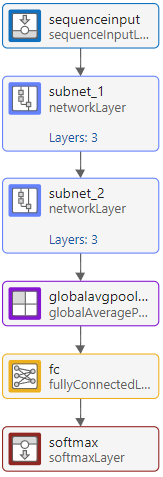
To see inside the network layer, double click the layer.
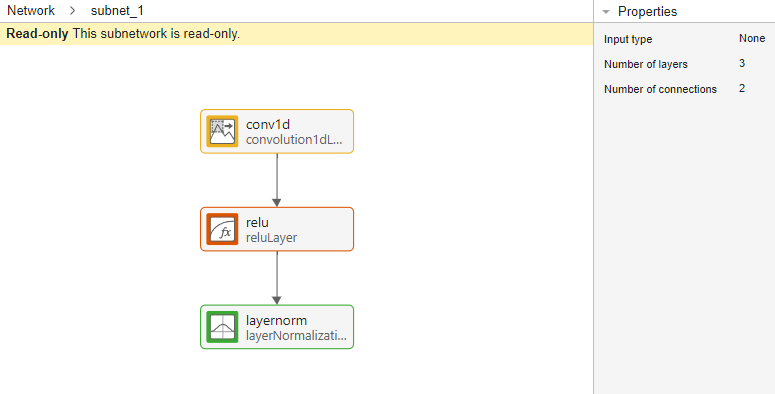
To navigate up in the hierarchy, in the bar that appears above the canvas, click the name of the network whose level you want to see.

To edit the layers in Deep Network Designer, you must first expand the network using the expandLayers function before opening the network in the app. After editing the network and exporting it to the workspace, you can regroup the layers into network layers using the groupLayers function. Adding a network layer to a network in Deep Network Designer is not supported.
Limitations
Creating network layers that contain input layers is not recommended as they have limited functionality. For example, they do not support:
Export to Simulink®
Code generation
Verification using
verifyNetworkRobustnessorestimateNetworkOutputBoundsCompression using
compressNetworkUsingTaylorPruningorcompressNetworkUsingProjection
More About
Tips
To get output from a layer inside a
networkLayerusing thepredict,minibatchpredict, andforwardfunctions, do one of the following:When you create the
networkLayer, specify its outputs using theOutputNamesoption. For an example, see Create Image Feature Extractor Layer.If your network already contains a
networkLayer, then expand the network layer, set theOutputNamesproperty of the network, then regroup the layers.For example, create a network that contains a
networkLayer.net = resnetNetwork([64 64],10); net = groupLayers(net);
To get the network output from the 2-D convolutional layer
"conv2"that is nested inside the"block1"network layer, which itself is nested inside the"stack3"network layer, expand the two network layers, set theOutputNamesproperty of the network to the desired output, then regroup the network layers. When you make predictions using the networknet, MATLAB® returns output from the specified convolutional layer.net = expandLayers(net); net.OutputNames = "stack3:block1:conv2"; net = groupLayers(net);To avoid expanding other layers with the
expandLayersfunctions, specify the layers to expand and turn off recursive expansion.net = expandLayers(net,"stack1",Recursive=false);To avoid grouping other layers with the
groupLayersfunction, specify the layers to group.net = groupLayers(net,["stack3:block1" "stack3:block2"]);
Version History
Introduced in R2024a

