rotatefactors
Rotate factor loadings
Description
specifies additional options using one or more name-value arguments. For example, you can
specify the method for computing the rotated factor loadings.B = rotatefactors(X,Name=Value)
Examples
Load the hald data set, which measures the effect of cement composition on its hardening heat.
load haldThe matrix ingredients contains the percent composition of four chemicals present in the cement. Use the pca function to find the two principal components with the highest variance for the ingredients data.
X = pca(ingredients,NumComponents=2)
X = 4×2
-0.0678 -0.6460
-0.6785 -0.0200
0.0290 0.7553
0.7309 -0.1085
X contains the factor loadings for the four chemicals.
Find a rotated version of X by using the rotatefactors function.
B = rotatefactors(X)
B = 4×2
-0.0253 -0.6491
-0.6757 -0.0645
-0.0206 0.7556
0.7364 -0.0603
By default, the rotatefactors function maximizes the varimax criterion to find the rotated factor loadings B.
Load the hald data set, which measures the effect of cement composition on its hardening heat.
load carbigDefine the variable matrix and remove observations with missing values.
cardata = [Acceleration Displacement Horsepower MPG Weight]; cardata = cardata(all(~isnan(cardata),2),:);
Estimate the factor loadings using a minimum mean squared error prediction for a factor analysis with two common factors. Do not rotate the factor loadings.
[Lambda,Psi,T,~,F] = factoran(cardata,2,Rotate="none");Rotate the factors using the orthomax method.
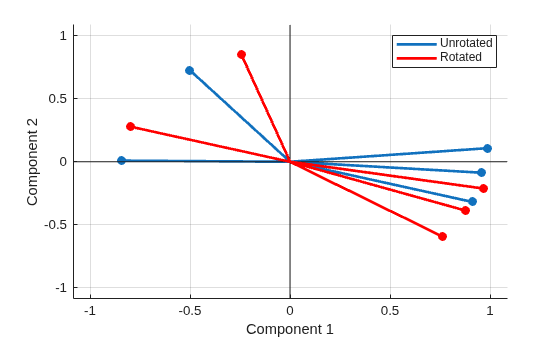
rotatedLambda = rotatefactors(Lambda,Method="orthomax");Plot the unrotated and rotated factor loadings.
grid on biplot(Lambda,LineWidth=2,MarkerSize=20) hold on biplot(rotatedLambda,LineWidth=2,MarkerSize=20,Color="red") legend(["Unrotated" "" "" "Rotated"]) hold off
Input Arguments
Name-Value Arguments
Specify optional pairs of arguments as
Name1=Value1,...,NameN=ValueN, where Name is
the argument name and Value is the corresponding value.
Name-value arguments must appear after other arguments, but the order of the
pairs does not matter.
Example: B = rotatefactors(X,Method="orthomax",Coeff=2) returns a
rotated version of the factor loadings X that maximizes the orthomax
criterion with a coefficient value of 2.
Rotation method, specified as a value in the following table. You can set the additional name-value arguments shown for the specified method.
| Value | Description | Additional Name-Value Arguments |
|---|---|---|
| Orthogonal rotation of | Coeff, Normalize,
RelTol, MaxIt |
| Orthomax rotation of | Normalize, RelTol,
MaxIt |
| Orthomax rotation of | Normalize, RelTol,
MaxIt |
| Orthomax rotation of | Normalize, RelTol,
MaxIt |
| Orthomax rotation of | Normalize, RelTol,
MaxIt |
| Oblique rotation (the default) or an orthogonal rotation of
| Target (required), Type |
| Oblique rotation (the default) or an orthogonal rotation of
| Target(required), Type |
| Oblique Procrustes rotation of | Coeff, Normalize,
RelTol, MaxIt, Power |
Example: Method="orthomax"
Data Types: char | string
Flag to row-normalize the factor loadings, specified as "on" or
"off", or as a logical 0
(false) or 1 (true). The
function ignores the value of Normalize when
Method is "procrustes" or
"pattern". For all other methods, when
Normalize is "on" (the default),
rotatefactors normalizes each row of X to
have a unit Euclidean norm prior to rotation, and unnormalizes the rows after
rotation.
Example: Normalize="off"
Data Types: char | string | logical
Rotation coefficient, specified as a numeric scalar. When
Method is "orthomax", the function finds a
rotation that minimizes
sum(d*sum(B.^k,1) –
Coeff*sum(B.^2,1).^2), where k=4. When
Method is "promax", k
equals the value of Power. For all other methods,
rotatefactors ignores the value of
Coeff.
Example:
Coeff=2.5
Data Types: single | double
Exponent for creating the target matrix when Method is
"promax", specified as a numeric scalar greater than 1. For all
other methods, rotatefactors ignores the value of
Power.
Example: Power=3
Data Types: single | double
Target matrix, specified as a numeric matrix with the same dimensions as
X. When Method is
"procrustes", the function performs an oblique Procrustes
rotation of X to the target loadings matrix
Target. When Method is
"pattern", the function performs an oblique or orthogonal
rotation of X to the pattern matrix Target.
Specify Type to choose the type of rotation. If
Type="oblique" (the default), each column of
Target must contain at least m – 1 zeros,
where m is the number of columns (factors) in
X. If Type="orthogonal", the
jth column of Target must contain at least
m – j zeros.
The pattern matrix Target defines the restricted elements of
the rotated factor loadings B. That is, the elements of
B that correspond to zero elements of the pattern matrix are
constrained to have small magnitude, whereas the elements of B
that correspond to nonzero elements of Target can have any
magnitude.
For all other methods, rotatefactors ignores the value of
Target.
Example: Target=[2 4; 2 1; 5 6]
Data Types: single | double
Type of rotation, specified as "oblique" or
"orthogonal". This argument is valid only when
Method is "procrustes" or
"pattern".
If Type is "orthogonal", the rotation is
orthogonal, and the factors remain uncorrelated.
If Type is "oblique" (the default), the
rotation is oblique, and the rotated factors might be correlated.
For all other methods, rotatefactors ignores the value of
Type and performs an orthogonal rotation.
Example: Type="orthogonal"
Data Types: char | string
Output Arguments
Rotated factor loadings, returned as a numeric matrix.
Rotation matrix, returned as a numeric matrix T where
B = X*T. You can compute the correlation matrix of the rotated
factor loadings using C = inv(T'*T). For orthogonal rotation,
C is the identity matrix. For oblique rotation,
C has unit diagonal elements but nonzero off-diagonal
elements.
References
[1] Harman, Harry Horace. Modern Factor Analysis. 3rd Ed. Chicago: University of Chicago Press, 1976.
[2] Lawley, D. N., and A. E. Maxwell. Factor Analysis as a Statistical Method. 2nd Ed. New York: American Elsevier Publishing Co., 1971.
Version History
Introduced before R2006a
See Also
biplot | factoran | pca | pcacov | procrustes
MATLAB Command
You clicked a link that corresponds to this MATLAB command:
Run the command by entering it in the MATLAB Command Window. Web browsers do not support MATLAB commands.
웹사이트 선택
번역된 콘텐츠를 보고 지역별 이벤트와 혜택을 살펴보려면 웹사이트를 선택하십시오. 현재 계신 지역에 따라 다음 웹사이트를 권장합니다:
또한 다음 목록에서 웹사이트를 선택하실 수도 있습니다.
사이트 성능 최적화 방법
최고의 사이트 성능을 위해 중국 사이트(중국어 또는 영어)를 선택하십시오. 현재 계신 지역에서는 다른 국가의 MathWorks 사이트 방문이 최적화되지 않았습니다.
미주
- América Latina (Español)
- Canada (English)
- United States (English)
유럽
- Belgium (English)
- Denmark (English)
- Deutschland (Deutsch)
- España (Español)
- Finland (English)
- France (Français)
- Ireland (English)
- Italia (Italiano)
- Luxembourg (English)
- Netherlands (English)
- Norway (English)
- Österreich (Deutsch)
- Portugal (English)
- Sweden (English)
- Switzerland
- United Kingdom (English)