실시간 모델 준비
R2026b실시간으로 사용할 Simscape 모델을 준비하려면 타깃 머신에 대해 충분히 작은 비용과 시간 스텝으로 정확한 결과를 생성할 수 있도록 성능과 충실도 간의 균형을 반복적으로 조정해야 합니다. 먼저 모델에서 기준 결과를 얻으십시오. 모델이 고정 스텝 솔버를 사용하여 기준 결과와 비교했을 때 정확한 결과를 생성하면 모델을 실시간 타깃에 배포해 볼 수 있습니다. 성능과 충실도 간에 균형을 맞출 수 있도록 필요에 따라 다음 단계를 수행하십시오.
더 복잡한 블록과 파라미터화 대신 이상적인 블록 또는 시스템 수준의 블록과 이상적인 파라미터화를 사용합니다.
빠른 동특성의 원인을 제거합니다.
수치적 경직성의 원인을 제거합니다.
영점교차의 원인을 제거합니다.
분할 솔버를 사용합니다.
모델을 분할합니다.
솔버 반복을 최소화합니다.
FPGA 배포의 경우, 각종 모드(mode)의 원인을 제거합니다.
빠른 동특성과 수치적 경직성에 대한 솔버 성능을 분석하려면 솔버 프로파일러 툴을 사용하십시오. 고정 스텝과 고정 비용으로 변환할 준비가 된 경우 simscape.getLocalSolverFixedCostInfo 함수를 사용하여 수행할 비선형 반복 횟수를 결정하십시오.
툴
| 솔버 프로파일러 | Identify solver performance bottlenecks |
함수
simscape.getLocalSolverFixedCostInfo | Determine the iteration requirement for fixed-cost solvers |
도움말 항목
고정 스텝 및 고정 비용 설정
- Examine Model Dynamics Using Solver Profiler
Identify factors affecting model simulation using the Solver Profiler. - Solvers for Real-Time Simulation
The fixed-step solver, step size, and number of iterations that you specify affect how your Simscape™ model simulates in real time. - Identify and Resolve System Stiffness in Simscape Models
Analyze the effect of particular block variables on overall system stiffness of a Simscape network. - Define Step Size and Number of Nonlinear Iterations for Simscape Real-Time Simulation
Determine the step size and number of nonlinear iterations for fixed-step, fixed-cost simulation. - Estimate Computation Costs
Determine if your Simscape model is likely to cause an overrun when you simulate it on your real-time target machine by estimating computational costs.
성능 최적화
- Reduce Zero Crossings
Eliminate components that cause zero crossings to increase the minimal step-size for fixed-step simulation and to make your Simscape model real-time capable. - Increase Simulation Speed Using the Partitioning Solver
Improve performance by using the Simscape Partitioning solver to convert a large system of equations into several smaller systems of equations that are easier to solve.
FPGA 배포
- Get Started with Simscape Hardware-in-the-Loop Workflow (HDL Coder)
Simscape Hardware-in-the-Loop workflow modeling guidelines and restrictions. - Simscape Language Support for FPGA HIL Deployment (HDL Coder)
Simscape language support in Simscape Hardware-in-the-Loop Workflow. - Modeling Guidelines for Simscape Subsystem Replacement (HDL Coder)
Simscape modeling best practices for replacing Simscape subsystem with state-space algorithm. - Replace Piecewise-Constant Resistor with Switched Linear Components (HDL Coder)
Convert a Simscape model with nonlinear component into a switched linear model. - Estimate Achievable Target Frequency Without Running Synthesis (HDL Coder)
Estimate the optimal frequency that you want your Simscape models to achieve on FPGA without running synthesis. - Modeling Techniques for Simscape Components for FPGA HIL Deployment (HDL Coder)
Model your power electronic converter by using hardware-in-the-loop (HIL) simulation in a real-time target machine.
일반 플랫폼
- Requirements for Using Alternative Platforms
Follow the recommendations for minimum hardware, software, and compiler specifications to deploy your Simscape model for hardware-in-the-loop (HIL) simulation using a custom standalone application. - Embedded and Generic Real-Time Resources
Simulink® Coder™ and Embedded Coder® use system target files (STFs) to generate code for interfacing with specific real-time operating systems.
추천 예제
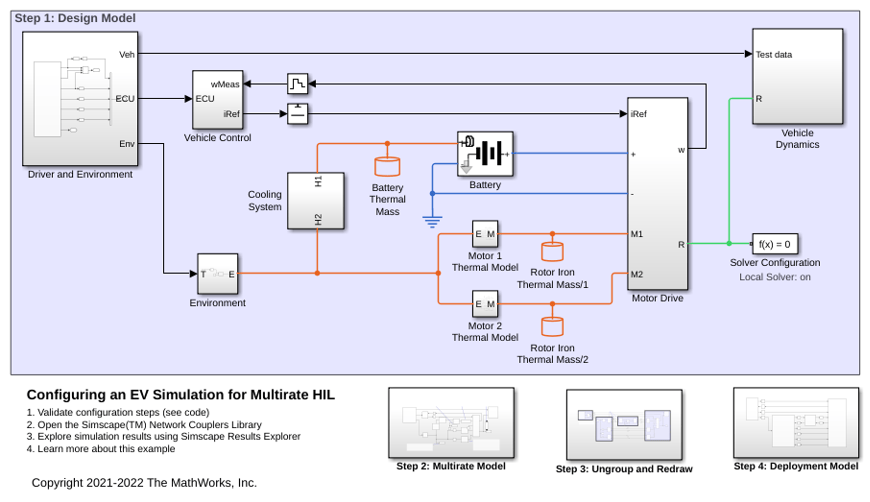
Configuring an EV Simulation for Multirate HIL
An electric vehicle model suitable for multirate Hardware-In-the-Loop (HIL) deployment. The example uses the Simscape™ Network Couplers Library to split the model into separate Simulink® subsystems that can be deployed at different sample rates. This allows you to run parts of the system (for example thermal components) with a slower sample time thereby reducing overall computational cost.
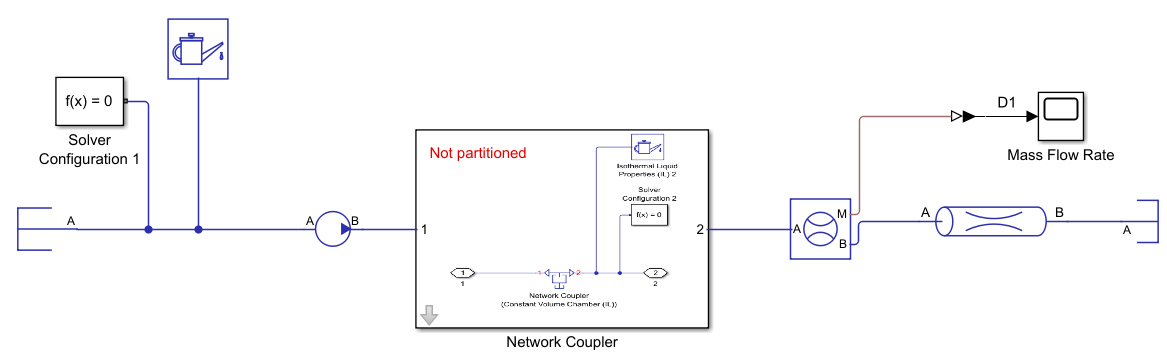
Partition a Model By Using a Network Coupler Block
Partition a Simscape model for parallel processing on real-time processors.

