rlPPOAgent
R2026bProximal policy optimization (PPO) reinforcement learning agent
Description
Proximal policy optimization (PPO) is an on-policy, policy gradient reinforcement learning method for environments with a discrete or continuous action space. It directly estimates a stochastic policy and uses a value function critic to estimate the value of the policy. This algorithm alternates between sampling data through environmental interaction and optimizing a clipped surrogate objective function using stochastic gradient descent. For continuous action spaces, this agent does not enforce constraints set in the action specification; therefore, if you need to enforce action constraints, you must do so within the environment.
For more information on PPO agents, see Proximal Policy Optimization (PPO) Agent. For more information on the different types of reinforcement learning agents, see Reinforcement Learning Agents.
Creation
Syntax
Description
Create Default Agent from Observation and Action Specifications
agent = rlPPOAgent(observationInfo,actionInfo)
agent = rlPPOAgent(observationInfo,actionInfo,initOpts)initOpts object. For more information on the initialization
options, see rlAgentInitializationOptions.
Create Agent from Actor and Critic
Specify Agent Options
agent = rlPPOAgent(___,agentOptions)agentOptions input argument. Use this syntax after
any of the input arguments in the previous syntaxes.
Input Arguments
Properties
Object Functions
train | Train reinforcement learning agents within a specified environment |
sim | Simulate trained reinforcement learning agents within specified environment |
getAction | Obtain action from agent, actor, or policy object given environment observations |
getActor | Extract actor from reinforcement learning agent |
setActor | Set actor of reinforcement learning agent |
getCritic | Extract critic from reinforcement learning agent |
setCritic | Set critic of reinforcement learning agent |
generatePolicyFunction | Generate MATLAB function that evaluates policy of an agent or policy object |
Examples
Create an environment and obtain its observation and action specifications. For this example, load the environment used in the example Create DQN Agent Using Deep Network Designer and Train Using Image Observations. This environment has two observations: a 50-by-50 grayscale image and a scalar (the angular velocity of the pendulum). The action is a scalar with five possible elements (a torque of -2, -1, 0, 1, or 2 Nm applied to a swinging pole).
env = rlPredefinedEnv("SimplePendulumWithImage-Discrete");Obtain observation and action specifications from the environment.
obsInfo = getObservationInfo(env);
actInfo = getActionInfo(env);
The agent creation function initializes the actor and critic networks randomly. To reproduce the results of this section, specify the seed and algorithm used for random number generation.
rng(0,"twister")Create a PPO agent from the environment observation and action specifications. Because actInfo is an rlFiniteSetSpec object, rlPPOAgent creates an agent with a discrete action space. When actInfo is an rlNumericSpec object, rlPPOAgent creates an agent with a continuous action space.
agent = rlPPOAgent(obsInfo,actInfo);
To check your agent, use the getAction function to return the action from a batch of 10 random observations.
robs1 = rand([obsInfo(1).Dimension 10]);
robs2 = rand([obsInfo(2).Dimension 10]);
act = getAction(agent,{robs1,robs2});
Display the seventh element in the batch.
act{1}(7)ans = -2
You can now test and train the agent within the environment. You can also use getActor and getCritic to extract the actor and critic, respectively, and getModel to extract the approximator model (by default a deep neural network) from the actor or critic.
Create an environment and obtain its observation and action specifications. For this example, load the environment used in the example Train DDPG Agent with Custom Networks Using Image Observation. This environment has two observations: a 50-by-50 grayscale image and a scalar (the angular velocity of the pendulum). The action is a scalar representing a torque ranging continuously from -2 to 2 Nm.
env = rlPredefinedEnv("SimplePendulumWithImage-Continuous");

obsInfo = getObservationInfo(env);
actInfo = getActionInfo(env);
Create an agent initialization option object, specifying that each hidden fully connected layer in the network must have 128 neurons (instead of the default number, 256).
initOpts = rlAgentInitializationOptions(NumHiddenUnit=128);
The agent creation function initializes the actor and critic networks randomly. To reproduce the results of this section, specify the seed and algorithm used for random number generation.
rng(0,"twister")Create a PPO actor-critic agent from the environment observation and action specifications. Because actInfo is an rlNumericSpec object, rlPPOAgent creates an agent with a continuous action space. When actInfo is an rlFiniteSetSpec object, rlPPOAgent creates an agent with a discrete action space.
agent = rlPPOAgent(obsInfo,actInfo,initOpts);
Extract the deep neural networks from both the agent actor and critic.
actorNet = getModel(getActor(agent));
criticNet = getModel(getCritic(agent));
To verify that each hidden fully connected layer has 128 neurons, you can display the layers on the MATLAB® command window,
criticNet.Layers
or visualize the structure interactively using analyzeNetwork.
analyzeNetwork(criticNet)
Plot actor and critic networks.
plot(actorNet)
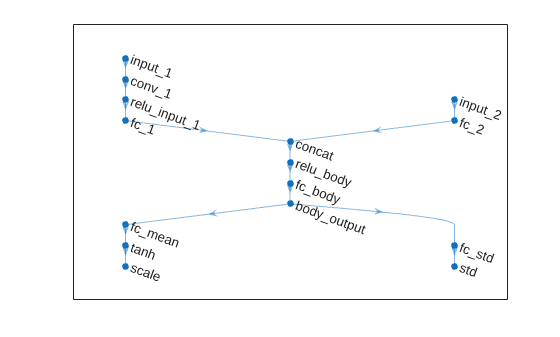
plot(criticNet)
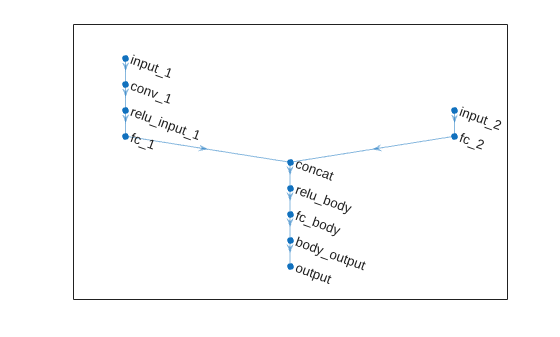
To check your agent, use the getAction function to return the action from a batch of 10 random observations.
robs1 = rand([obsInfo(1).Dimension 10]);
robs2 = rand([obsInfo(2).Dimension 10]);
act = getAction(agent,{robs1,robs2});
Display the value of the seventh element in the batch.
act{1}(7)ans = -0.0295
You can now test and train the agent within the environment.
Create an environment object, and obtain its observation and action specifications.
env = rlPredefinedEnv("CartPole-Discrete");
obsInfo = getObservationInfo(env);
actInfo = getActionInfo(env);
PPO agents use a parameterized value function as a critic. A value-function critic takes the current observation as input and returns a single scalar as output (the estimated discounted cumulative long-term reward for following the policy from the state corresponding to the current observation).
To model the parameterized value function within the critic, use a neural network with one input layer (which receives the content of the observation channel, as specified by obsInfo) and one output layer (which returns the scalar value). Note that prod(obsInfo.Dimension) returns the total number of dimensions of the observation space regardless of whether the observation space is a column vector, row vector, or matrix.
Define the network as an array of layer objects.
criticNet = [
    featureInputLayer(prod(obsInfo.Dimension))
    fullyConnectedLayer(100)
    reluLayer
    fullyConnectedLayer(1)
    ];
Convert to a dlnetwork object and display the number of parameters.
criticNet = dlnetwork(criticNet);
summary(criticNet)
   Initialized: true

   Number of learnables: 601

   Inputs:
      1   'input'   4 features
Create the critic using criticNet and the observation specification object. For more information, see rlValueFunction.
critic = rlValueFunction(criticNet,obsInfo);
Check the critic with a random observation input.
getValue(critic,{rand(obsInfo.Dimension)})ans = single
-0.2479
Policy gradient agents use a parameterized stochastic policy, which for discrete action spaces is implemented by a discrete categorical actor. This actor takes an observation as input and returns as output a random action sampled (among the finite number of possible actions) from a categorical probability distribution.
To model the parameterized policy within the actor, use a neural network with one input layer (which receives the content of the environment observation channel, as specified by obsInfo) and one output layer. The output layer must return a vector of probabilities for each possible action, as specified by actInfo. Note that numel(actInfo.Dimension) returns the number of elements of the discrete action space.
Define the network as an array of layer objects.
actorNet = [
    featureInputLayer(prod(obsInfo.Dimension))
    fullyConnectedLayer(200)
    reluLayer
    fullyConnectedLayer(numel(actInfo.Dimension))
    ];
Convert to a dlnetwork object and display the number of parameters.
actorNet = dlnetwork(actorNet);
summary(actorNet)
   Initialized: true

   Number of learnables: 1.4k

   Inputs:
      1   'input'   4 features
Create the actor using actorNet and the environment specification objects. For more information, see rlDiscreteCategoricalActor.
actor = rlDiscreteCategoricalActor(actorNet,obsInfo,actInfo);
Check the actor with a random observation input.
getAction(actor,{rand(obsInfo.Dimension)})ans = 1×1 cell array
{[-10]}
Create a PPO agent using the actor and the critic.
agent = rlPPOAgent(actor,critic)
agent =
rlPPOAgent with properties:
AgentOptions: [1×1 rl.option.rlPPOAgentOptions]
UseExplorationPolicy: 0
ObservationInfo: [1×1 rl.util.rlNumericSpec]
ActionInfo: [1×1 rl.util.rlFiniteSetSpec]
SampleTime: 1
UseGPUForLearning: "off"
IntrinsicReward: []
Specify agent options, including training options for the actor and the critic.
agent.AgentOptions.ExperienceHorizon = 1024; agent.AgentOptions.DiscountFactor = 0.95; agent.AgentOptions.CriticOptimizerOptions.LearnRate = 8e-3; agent.AgentOptions.CriticOptimizerOptions.GradientThreshold = 1; agent.AgentOptions.ActorOptimizerOptions.LearnRate = 8e-3; agent.AgentOptions.ActorOptimizerOptions.GradientThreshold = 1;
To check your agent, use the getAction function to return the action batch from a batch of 16 random observations.
obs = rand([obsInfo.Dimension 16]);
act = getAction(agent,{obs});Display the seventh element of the batch.
act{1}(:,:,7)ans = 10
You can now test and train the agent against the environment.
Create an environment with a continuous action space, and obtain its observation and action specifications. For this example, load the double-integrator continuous action space environment used in the example Compare DDPG Agent to LQR Controller. The observation from the environment is a vector containing the position and velocity of a mass. The action is a scalar representing a force, applied to the mass, ranging continuously from -2 to 2 Newton.
env = rlPredefinedEnv("DoubleIntegrator-Continuous");Set the MaxForce property of the environment to 2 Newton.
env.MaxForce = 2;
Get the observation and action specifications.
obsInfo = getObservationInfo(env)
obsInfo =
rlNumericSpec with properties:
LowerLimit: -Inf
UpperLimit: Inf
Name: "states"
Description: "x, dx"
Dimension: [2 1]
DataType: "double"
actInfo = getActionInfo(env)
actInfo =
rlNumericSpec with properties:
LowerLimit: -2
UpperLimit: 2
Name: "force"
Description: [0×0 string]
Dimension: [1 1]
DataType: "double"
Note that the action upper and lower limits are set to -2 and 2 Newton, respectively. You set these limit later in the scaling layer of the actor network.
The actor and critic networks are initialized randomly. To reproduce the results of this section, specify the seed and algorithm used for random number generation.
rng(0,"twister")PPO agents use a parameterized value function as a critic. A value-function critic takes the current observation as input and returns a single scalar as output (the estimated discounted cumulative long-term reward for following the policy from the state corresponding to the current observation).
To model the parameterized value function within the critic, use a neural network with two input layers (one for each observation channel, as specified by obsInfo) and one output layer (returning the scalar value). Note that prod(obsInfo.Dimension) returns the total number of dimensions of the observation space regardless of whether the observation space is a column vector, row vector, or matrix.
Define the network as an array of layer objects.
criticNet = [
featureInputLayer(prod(obsInfo.Dimension))
fullyConnectedLayer(100)
reluLayer
fullyConnectedLayer(1)
];Convert to a dlnetwork object, initialize the network, and display the number of parameters.
criticNet = dlnetwork(criticNet); criticNet = initialize(criticNet); summary(criticNet)
Initialized: true
Number of learnables: 401
Inputs:
1 'input' 2 features
Create the critic approximator object using criticNet and the observation specification. For more information, see rlValueFunction.
critic = rlValueFunction(criticNet,obsInfo);
Check the critic with a batch of 10 random observations.
v = getValue(critic,{rand([obsInfo.Dimension 10])});Display the seventh element in the batch.
v(7)
ans = single
-0.0662
PPO agents use a parameterized stochastic policy, which for continuous action spaces is implemented by a continuous Gaussian actor. This actor takes an observation as input and returns as output a random action sampled from a Gaussian probability distribution.
To approximate the mean values and standard deviations of the Gaussian distribution, you must use a neural network with two output layers, each having as many elements as the dimension of the action space. One output layer must return a vector containing the mean values for each action dimension. The other must return a vector containing the standard deviation for each action dimension.
Note that standard deviations must be nonnegative and mean values must fall within the range of the action. Therefore the output layer that returns the standard deviations must be a softplus or ReLU layer, to enforce nonnegativity, while the output layer that returns the mean values must be a scaling layer, to scale the mean values to the output range.
For this example the environment has only one observation channel and therefore the network has only one input layer.
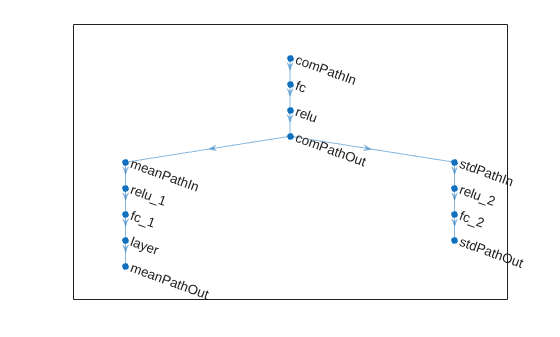
Define each network path as an array of layer objects, and assign names to the input and output layers of each path. These names allow you to connect the paths and then later explicitly associate the network input and output layers with the appropriate environment channel.
% Define common input path layer commonPath = [ featureInputLayer(prod(obsInfo.Dimension),Name="comPathIn") fullyConnectedLayer(100) reluLayer fullyConnectedLayer(1,Name="comPathOut") ]; % Define mean value path meanPath = [ fullyConnectedLayer(15,Name="meanPathIn") reluLayer fullyConnectedLayer(prod(actInfo.Dimension)); tanhLayer; scalingLayer(Name="meanPathOut",Scale=actInfo.UpperLimit) ]; % Define standard deviation path sdevPath = [ fullyConnectedLayer(15,"Name","stdPathIn") reluLayer fullyConnectedLayer(prod(actInfo.Dimension)); softplusLayer(Name="stdPathOut") ];
Create dlnetwork object and add layers.
actorNet = dlnetwork; actorNet = addLayers(actorNet,commonPath); actorNet = addLayers(actorNet,meanPath); actorNet = addLayers(actorNet,sdevPath);
Connect layers.
actorNet = connectLayers(actorNet,"comPathOut","meanPathIn/in"); actorNet = connectLayers(actorNet,"comPathOut","stdPathIn/in");
Plot network.
plot(actorNet)
Initialize network and display the number of weights.
actorNet = initialize(actorNet); summary(actorNet)
Initialized: true
Number of learnables: 493
Inputs:
1 'comPathIn' 2 features
Create the actor approximator object using actorNet, the environment specifications, the name of the network input layer to be connected with the environment observation channel, and the names of the network output layers that calculate the mean the standard deviation values of the action.
For more information, see rlContinuousGaussianActor.
actor = rlContinuousGaussianActor(actorNet, obsInfo, actInfo, ... "ActionMeanOutputNames","meanPathOut", ... "ActionStandardDeviationOutputNames","stdPathOut", ... ObservationInputNames="comPathIn");
Check the actor with a batch of 10 random observations.
act = getAction(actor,{rand([obsInfo.Dimension 10])});Display the seventh element in the batch.
act{1}(7)ans = single
0.1212
Create a PPO agent using the actor and the critic.
agent = rlPPOAgent(actor,critic)
agent =
rlPPOAgent with properties:
AgentOptions: [1×1 rl.option.rlPPOAgentOptions]
UseExplorationPolicy: 0
ObservationInfo: [1×1 rl.util.rlNumericSpec]
ActionInfo: [1×1 rl.util.rlNumericSpec]
SampleTime: 1
UseGPUForLearning: "off"
IntrinsicReward: []
Specify agent options, including training options for the actor and the critic.
agent.AgentOptions.ExperienceHorizon = 1024; agent.AgentOptions.DiscountFactor = 0.95; agent.AgentOptions.CriticOptimizerOptions.LearnRate = 8e-3; agent.AgentOptions.CriticOptimizerOptions.GradientThreshold = 1; agent.AgentOptions.ActorOptimizerOptions.LearnRate = 8e-3; agent.AgentOptions.ActorOptimizerOptions.GradientThreshold = 1;
Specify training options for the critic.
criticOpts = rlOptimizerOptions( ...
LearnRate=8e-3,GradientThreshold=1);To check your agent, use the getAction function to return the action from a random observation.
getAction(agent,{rand(obsInfo.Dimension)})ans = 1×1 cell array
{[-0.1100]}
You can now test and train the agent within the environment.
For this example load the predefined environment used for the Train Default DQN Agent to Balance Discrete Cart-Pole example.
env = rlPredefinedEnv("CartPole-Discrete");Get observation and action information. This environment has a continuous four-dimensional observation space (the positions and velocities of both cart and pole) and a discrete one-dimensional action space consisting on the application of two possible forces, -10N or 10N.
obsInfo = getObservationInfo(env); actInfo = getActionInfo(env);
The actor and critic networks are initialized randomly. To reproduce the results of this section, specify the seed and algorithm used for random number generation.
rng(0,"twister")PPO agents use a parameterized value function as a critic. To model the parameterized value function within the critic, use a recurrent neural network.
Define the network as an array of layer objects. To create a recurrent neural network, use a sequenceInputLayer as the input layer and include at least one lstmLayer.
criticNet = [
sequenceInputLayer(prod(obsInfo.Dimension))
fullyConnectedLayer(8)
reluLayer
lstmLayer(8)
fullyConnectedLayer(1)
];Convert to a dlnetwork object and display the number of learnable parameters.
criticNet = dlnetwork(criticNet); summary(criticNet)
Initialized: true
Number of learnables: 593
Inputs:
1 'sequenceinput' Sequence input with 4 channels
Create the critic using criticNet and the observation specification object. For more information, see rlValueFunction.
critic = rlValueFunction(criticNet,obsInfo);
Check the critic with a random observation input.
getValue(critic,{rand(obsInfo.Dimension)})ans = single
0.0017
Because the critic has a recurrent network, the actor must have a recurrent network too. Define the network as an array of layer objects.
actorNet = [
sequenceInputLayer(prod(obsInfo.Dimension))
fullyConnectedLayer(100)
reluLayer
lstmLayer(8)
fullyConnectedLayer(numel(actInfo.Elements))
softmaxLayer
];
Convert the network to a dlnetwork object and display the number of learnable parameters.
actorNet = dlnetwork(actorNet); summary(actorNet)
Initialized: true
Number of learnables: 4k
Inputs:
1 'sequenceinput' Sequence input with 4 channels
Create the actor using actorNet and the environment specification objects. For more information, see rlDiscreteCategoricalActor.
actor = rlDiscreteCategoricalActor(actorNet,obsInfo,actInfo);
Check the actor with a random observation input.
getAction(actor,{rand(obsInfo.Dimension)})ans = 1×1 cell array
{[-10]}
Set some training option for the critic.
criticOptions = rlOptimizerOptions( ... LearnRate=1e-2, ... GradientThreshold=1);
Set some training options for the actor.
actorOptions = rlOptimizerOptions( ... LearnRate=1e-3, ... GradientThreshold=1);
Create the agent options object.
agentOptions = rlPPOAgentOptions( ... AdvantageEstimateMethod="finite-horizon", ... ClipFactor=0.1, ... CriticOptimizerOptions=criticOptions, ... ActorOptimizerOptions=actorOptions);
When recurrent neural networks are used, the MiniBatchSize property is the length of the learning trajectory.
agentOptions.MiniBatchSize
ans = 128
Create the agent using the actor and critic, as well as the agent options object.
agent = rlPPOAgent(actor,critic,agentOptions)
agent =
rlPPOAgent with properties:
AgentOptions: [1×1 rl.option.rlPPOAgentOptions]
UseExplorationPolicy: 0
ObservationInfo: [1×1 rl.util.rlNumericSpec]
ActionInfo: [1×1 rl.util.rlFiniteSetSpec]
SampleTime: 1
UseGPUForLearning: "off"
IntrinsicReward: []
Check your agent with a random observation input.
getAction(agent,rand(obsInfo.Dimension))
ans = 1×1 cell array
    {[-10]}
To evaluate the agent using sequential observations, use the sequence length (time) dimension. For example, obtain actions for a sequence of 9 observations.
[action,state] = getAction(agent, ...
    {rand([obsInfo.Dimension 1 9])});
Display the action corresponding to the seventh element of the observation.
action = action{1};
action(1,1,1,7)
ans = -10
You can now test and train the agent within the environment.
Tips
The default agent for continuous action spaces already enforces constraints set by the action specification for greedy actions. In other words, the default actor network is such that the mean value of exploratory (that is, non-greedy) actions is always within the limits set by the action specifications. On the other hand, constraints on exploratory actions are not enforced.
For continuous action spaces and with custom networks, this agent does not automatically enforce the constraints set by the action specification. In this case, you must enforce action space constraints within the environment.
While tuning the learning rate of the actor network is necessary for PPO agents, it is not necessary for TRPO agents.
Extended Capabilities
Version History
Introduced in R2019bSee Also
Apps
Functions
getAction|getActor|getCritic|getModel|generatePolicyFunction|generatePolicyBlock|getActionInfo|getObservationInfo
Objects
rlPPOAgentOptions|rlAgentInitializationOptions|rlValueFunction|rlDiscreteCategoricalActor|rlContinuousGaussianActor|rlPGAgent|rlACAgent|rlTRPOAgent

