dsp.MovingVariance
R2026bMoving variance
Description
The dsp.MovingVariance
System object™ computes the moving variance of the input signal along each channel,
independently over time. The object uses either the sliding window method or the exponential
weighting method to compute the moving variance. In the sliding window method, a window of
specified length is moved over the data, sample by sample, and the variance is computed over
the data in the window. In the exponential weighting method, the object subtracts each sample
of the data from the average, squares the difference, and multiplies the squared result with a
weighting factor. The object then computes the variance by adding all the weighted
data.
You can make the window length tunable by setting
the EnableTunableWindowLength property to true. In
this mode, use the TunableWindowLength property to change the window
length even after you pass some data to the object and the object is locked. The
MaxWindowLength property specifies the maximum allowed window
length. (since R2026b)
For more details, see Algorithms.
The dsp.MovingVariance object and the movvar function both compute the moving variance of the input signal. However,
the object can process large streams of real-time data and handle system states automatically.
The function performs one-time computations on data that is readily available and cannot
handle system states. For a comparison between the two, see System Objects vs MATLAB Functions.
To compute the moving variance of the input:
Create the
dsp.MovingVarianceobject and set its properties.Call the object with arguments, as if it were a function.
To learn more about how System objects work, see What Are System Objects?
Creation
Syntax
Description
MovVar = dsp.MovingVarianceMovVar, using the default
properties.
MovVar = dsp.MovingVariance(Len)WindowLength property to Len.
MovVar = dsp.MovingVariance(Len,Overlap)WindowLength property to Len and the
OverlapLength property to Overlap.
MovVar = dsp.MovingVariance(PropertyName=Value)Name=Value
arguments. For example, to specify an exponential weighting factor of
0.2, set ForgettingFactor to
0.9
Properties
Usage
Syntax
Description
Input Arguments
Output Arguments
Object Functions
To use an object function, specify the
System object as the first input argument. For
example, to release system resources of a System object named obj, use
this syntax:
release(obj)
Examples
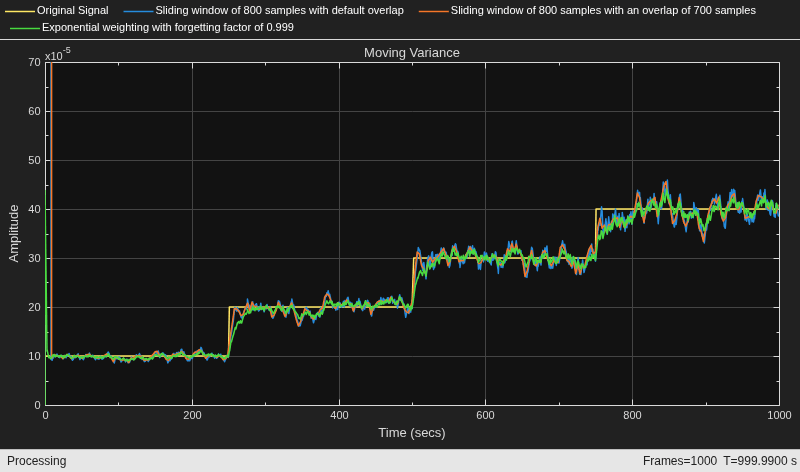
Compute the moving variance of a noisy square wave signal with varying amplitude using the dsp.MovingVariance object.
Initialization
Set up movvarWindow, movvarWindow_overlap, and movvarExp objects. movvarWindow uses the sliding window method with a window length of 800 samples and a default overlap length of 799 samples, which is 1 sample less than the specified window length. movvarWindow_overlap uses a window length of 800 samples and an overlap length of 700 samples. movvarExp uses the exponentially weighting method with a forgetting factor of 0.999.
Create a time scope for viewing the output.
FrameLength = 100;
Fs = 100;
movvarWindow = dsp.MovingVariance(800);
movvarWindow_overlap = dsp.MovingVariance(800,700);
movvarExp = dsp.MovingVariance(Method="Exponential weighting",...
    ForgettingFactor=0.999);
scope  = timescope(SampleRate=[Fs,Fs,Fs/(800-700),Fs],...
    TimeSpanOverrunAction="Scroll",...
    TimeSpanSource="Property",...
    TimeSpan=1000,...
    ShowGrid=true,...
    BufferLength=1e7,...
    YLimits=[0 7e-4]);
title = "Moving Variance";
scope.Title = title;
scope.ChannelNames = {"Original Signal",...
    "Sliding window of 800 samples with default overlap",...
    "Sliding window of 800 samples with an overlap of 700 samples",...
    "Exponential weighting with forgetting factor of 0.999"};
Compute the Variance
Generate a noisy square wave signal. Vary the amplitude of the square wave after a given number of frames. Apply the sliding window method and the exponentially weighting method on this signal. The actual variance is np. This value is used while adding noise to the data. Compare the actual variance with the computed variances on the time scope.
count = 1;
noisepower = 1e-4 * [1 2 3 4];
for index = 1:length(noisepower)
    np = noisepower(index);
    yexp = np*ones(FrameLength,1);
    for i = 1:250
        x = 1 + sqrt(np) * randn(FrameLength,1);
        y1 = movvarWindow(x);
        y2 = movvarWindow_overlap(x);
        y3 = movvarExp(x);
        scope(yexp,y1,y2,y3);
    end
end
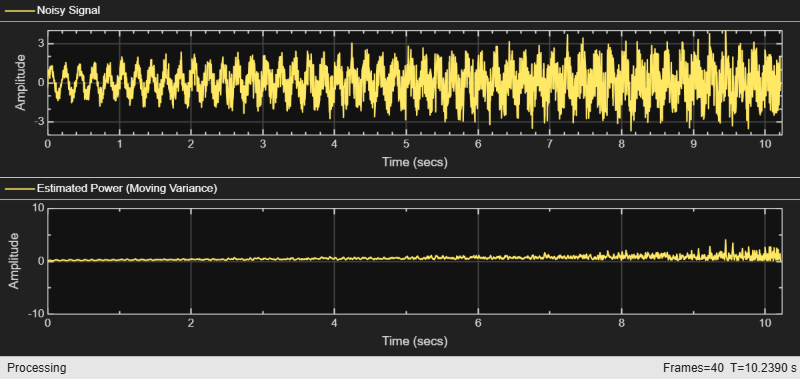
Estimate the power of a noisy signal whose noise level changes over time. Adapt the variance window length inversely to the noise power so that periods of heavy noise use a shorter window to track rapid changes and periods of light noise use a longer window for a more accurate estimate.
Create Input Signal
Create a sine wave signal with a frequency of 5 Hz. Set the sampling rate to 1000 Hz and the frame size to 256 samples.
Fs = 1000;
frameSize = 256;
numFrames = 40;
sine = dsp.SineWave(Frequency=5,SampleRate=Fs,...
    SamplesPerFrame=frameSize)
sine =
dsp.SineWave with properties:
Amplitude: 1
Frequency: 5
PhaseOffset: 0
ComplexOutput: false
Method: 'Trigonometric function'
SamplesPerFrame: 256
SampleRate: 1000
OutputDataType: 'double'
Create Moving Variance Object
Create a dsp.MovingVariance object with tunable window length enabled. Set the maximum window length to 50 and the initial tunable window length to 40 (long window for accurate baseline estimate). Enable auto-adjustment to handle edge cases.
movVar = dsp.MovingVariance(EnableTunableWindowLength=true,...
    TunableWindowLength=40,...
    MaxWindowLength=50,...
    AutoAdjustInvalidWindowLength=true)
movVar =
  dsp.MovingVariance with properties:

                           Method: 'Sliding window'
              SpecifyWindowLength: true
        EnableTunableWindowLength: true
              TunableWindowLength: 40
                  MaxWindowLength: 50
    AutoAdjustInvalidWindowLength: true
Create a timescope object to view the input signal and the estimated power.
scope = timescope(SampleRate=Fs,...
    TimeSpanSource="property",TimeSpan=numFrames*frameSize/Fs,...
    TimeSpanOverrunAction="Scroll",...
    ShowGrid=true,YLimits=[-4 4],ChannelNames={"Noisy Signal","Estimated Power (Moving Variance)"},...
    LayoutDimensions=[2 1],NumInputPorts=2);
Apply Adaptive Power Estimation
The noise power increases linearly over time. At each frame, add Gaussian noise whose power grows from low to high. Adapt the window length inversely to the noise power so that heavier noise is tracked with a shorter window for faster response to changing power levels.
As the noise power increases over time, the adaptive algorithm uses a progressively shorter window to track the rising power more closely.
for index = 1:numFrames
    x = sine();
    noisePower = 0.01 + 0.99*(index/numFrames);
    noisySignal = x + sqrt(noisePower)*randn(frameSize,1);
    wl = round(50 - 45*(index/numFrames));
    movVar.TunableWindowLength = wl;
    y = movVar(noisySignal);
    scope(noisySignal,y)
end
Generate C code for a moving variance computation with a tunable window length parameter. Verify that the window length appears as a tunable parameter in the generated code.
Create Entry-Point Function
Create an entry-point function that instantiates a dsp.MovingVariance object with tunable window length enabled. The function accepts a data input and a tunable window length value.
type movingVarTunableWL.mfunction y = movingVarTunableWL(x,wl) %#codegen
%movingVarTunableWL Moving variance with tunable window length
% y = movingVarTunableWL(x,wl) computes the moving variance of
% the input x using a window length that can be changed at runtime.
persistent movVar
if isempty(movVar)
movVar = dsp.MovingVariance(EnableTunableWindowLength=true,...
MaxWindowLength=31,...
AutoAdjustInvalidWindowLength=true);
end
movVar.TunableWindowLength = wl;
y = movVar(x);
end
Generate C Code
Generate C code for the entry-point function using codegen. Specify the input data as a 256-by-1 column vector of doubles and the window length as a scalar double.
codegen movingVarTunableWL -args {zeros(256,1),0} -config:lib -report
Code generation successful: View report
Verify Tunable Parameter in Generated Code
Inspect the generated code to verify that TunableWindowLength appears as a parameter that can be changed at runtime without regenerating code.
The generated code contains the TunableWindowLength field in the persistent object state, confirming that you can change the window length at runtime in the deployed code.
Algorithms
In the sliding window method, the output at the current sample is the variance of the current sample with respect to the data in the window. To compute the first output sample, the algorithm waits until it receives the hop size number of input samples. Hop size is defined as window length – overlap length. Remaining samples in the window are considered to be zero. As an example, if the window length is 5 and the overlap length is 2, then the algorithm waits until it receives 3 samples of input to compute the first sample of the output. After generating the first output, it generates the subsequent output samples for every hop size number of input samples.
When you do not specify the window length, the algorithm chooses an infinite window length. In this mode, the output is the moving variance of the current sample with respect to all previous samples in the channel.
Consider an example of computing the moving variance of a streaming input data using the sliding window method. The algorithm uses a window length of 4 and an overlap length of 3. With each input sample that comes in, the window of length 4 moves along the data.
![Sliding window method for moving variance with window length 4 and input samples [-1, -2, 3, 2, 5, 2]. At each time step n=0 through n=5, the window fills with zeros until length 4 is reached, then moves along the data. Moving variance computes var for each window position, producing values 0.250, 0.916, 4.667, 5.667, 8.667, 2.000 at n=5](movvar_slidewin.png)
In the exponential weighting method, the moving variance is computed recursively using these formulas:
To compute the moving variance, the algorithm implements these equations recursively.
— Moving variance of the current data sample with respect to the rest of the data in the channel.
— Moving average at the current sample. For details on computing the moving average, see
dsp.MovingAverage.— Difference between each data sample and the average of the data, squared.
— Difference between each data sample and the average of the data, squared and multiplied with the forgetting factor. All the squared terms are added.
— Weighting factor applied to the sum.
λ — Forgetting factor you can specify through the
ForgettingFactorproperty.
As the age of the data increases, the magnitude of the weighting factor decreases exponentially, and never reaches zero. In other words, the recent data has more influence on the current variance, than the older data.
The value of the forgetting factor determines the rate of change of the weighting factors. A forgetting factor of 0.9 gives more weight to the older data than does a forgetting factor of 0.1. A forgetting factor of 1.0 indicates infinite memory. All the past samples are given an equal weight.
Consider an example of computing the moving variance using the exponential weighting method. The forgetting factor is 0.9.
![Exponential weighting method for moving variance with forgetting factor 0.9. Three input frames: [2,3,4,5] at n=0 producing outputs [0.0000, 0.5000, 0.9982, 1.6587], [6,7,8,9] at n=1 producing outputs [2.4780, 3.4514, 4.5734, 5.8375], and [3,4,6,8] at n=2 producing outputs [6.2519, 5.5814, 4.7901, 4.9790]](movvar_expwei.png)
References
[1] Bodenham, Dean. “Adaptive Filtering and Change Detection for Streaming Data.” PH.D. Thesis. Imperial College, London, 2012.
Extended Capabilities
Version History
Introduced in R2016bSee Also
Functions
Objects
dsp.MovingMaximum|dsp.MovingMinimum|dsp.MovingAverage|dsp.MovingRMS|dsp.MovingStandardDeviation|dsp.MedianFilter

