MATLAB 도움말 센터
Set cost value of cells in vehicle costmap
setCosts(costmap,xyPoints,costVals)
setCosts(costmap,xyPoints,costVals) sets the costs, costVals, for the (x, y) points in xyPoints in the vehicle costmap.
costmap
xyPoints
costVals
example
collapse all
Create a 10-by-15 meter vehicle costmap. Cells have a side length of 1 meter.
costmap = vehicleCostmap(10,15);
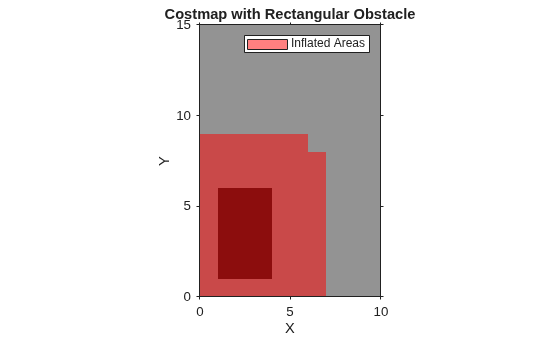
Define a set of (x,y) coordinates that correspond to a 3-by-5 meter rectangle.
[x,y] = meshgrid(2:4,2:6); xyPoints = [x(:),y(:)];
Mark the rectangle as an obstacle by increasing the cost of its cells to 0.9.
costVal = 0.9; setCosts(costmap,xyPoints,costVal); plot(costmap) title('Costmap with Rectangular Obstacle')
vehicleCostmap
Costmap, specified as a vehicleCostmap object.
Points, specified as an M-by-2 real-valued matrix that represents the (x, y) coordinates of M points.
Example: [3.4 2.6] specifies a single point at (3.4, 2.6)
[3.4 2.6]
Example: [3 2;3 3;4 7] specifies three points: (3, 2), (3, 3), and (4, 7)
[3 2;3 3;4 7]
Cost of points in xyPoints, specified as an M-element real-valued vector.
Example: 0.8 specifies the cost of a single point
0.8
Example: [0.2 0.5 0.8] specifies the cost of three points
[0.2 0.5 0.8]
expand all
Introduced in R2018a
getCosts | vehicleCostmap
getCosts
You clicked a link that corresponds to this MATLAB command:
Run the command by entering it in the MATLAB Command Window. Web browsers do not support MATLAB commands.
웹사이트 선택
번역된 콘텐츠를 보고 지역별 이벤트와 혜택을 살펴보려면 웹사이트를 선택하십시오. 현재 계신 지역에 따라 다음 웹사이트를 권장합니다:
또한 다음 목록에서 웹사이트를 선택하실 수도 있습니다.
사이트 성능 최적화 방법
최고의 사이트 성능을 위해 중국 사이트(중국어 또는 영어)를 선택하십시오. 현재 계신 지역에서는 다른 국가의 MathWorks 사이트 방문이 최적화되지 않았습니다.
미주
유럽
아시아 태평양
지역별 지사에 문의