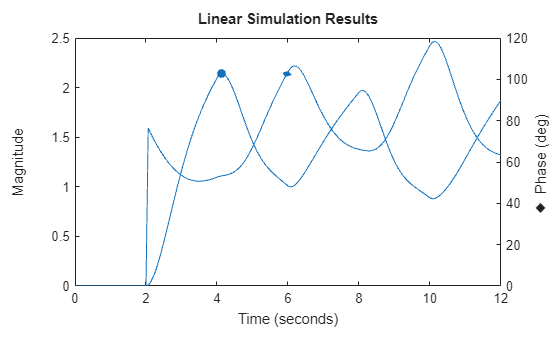
lsimplot
R2026bPlot simulated time response of dynamic system to arbitrary inputs
Syntax
Description
The lsimplot function plots the simulated time response of a
dynamic system
model to arbitrary inputs. To
customize the plot, you can return an LSimPlot object and modify it using dot
notation. For more information, see Customize Linear Analysis Plots at Command Line.
To obtain time response data, use the lsim function.
lsimplot(
plots the simulated time response of the model sys,u,t)sys for input signal
u and corresponding time vector t.
If sys is a multi-input, multi-output (MIMO) model, then the
lsimplot function creates a grid of plots with each plot displaying the
response of one input-output pair.
If sys is a model with
complex coefficients, then the plot shows both the real and imaginary components of the
response on a single axes and indicates the imaginary component with a diamond marker. You
can also view the response using magnitude-phase and complex-plane plots. (since R2025a)
lsimplot(___, plots
the simulated response with the plotting options specified in
plotoptions)plotoptions. Settings you specify in
plotoptions override the plotting preferences for the current
MATLAB® session. This syntax is useful when you want to write a script to generate
multiple plots that look the same regardless of the local preferences.
lsimplot(___, specifies
response properties using one or more name-value arguments. For example,
Name=Value)lsimplot(sys,LineWidth=1) sets the plot line width to 1. (since R2026a)
When plotting responses for multiple systems, the specified name-value arguments apply to all responses.
The following name-value arguments override values specified in other input arguments.
Time— Overrides time values specified usingtInitialCondition— Overrides initial conditions specified usingICInterpolationMethod— Overrides interpolation method specified usingmethodParameter— Overrides parameter values specified usingpColor— Overrides colors specified usingLineSpecMarkerStyle— Overrides marker styles specified usingLineSpecLineStyle— Overrides line styles specified usingLineSpec
lsimplot( plots the
simulated response in the specified parent graphics container, such as a
parent,___)Figure or TiledChartLayout, and sets the
Parent property. Use this syntax when you want to create a plot in
a specified open figure or when creating apps in App Designer.
lsimplot( opens the Linear Simulation
Tool for simulating sys)sys.
lp = lsimplot(___)
Examples
For this example, change time units to minutes and turn the grid on for the simulated response plot. Consider the following transfer function.
sys = tf(3,[1 2 3]);
To compute the response of this system to an arbitrary input signal, provide lsimplot with a vector of the times t at which you want to compute the response and a vector u containing the corresponding signal values. For instance, plot the system response to a ramping step signal that starts at 0 at time t = 0, ramps from 0 at t = 1 to 1 at t = 2, and then holds steady at 1. Define t and compute the values of u.
t = 0:0.04:8;
u = max(0,min(t-1,1));
Use lsimplot plot the system response to the signal with chart object lp.
lp = lsimplot(sys,u,t);
grid on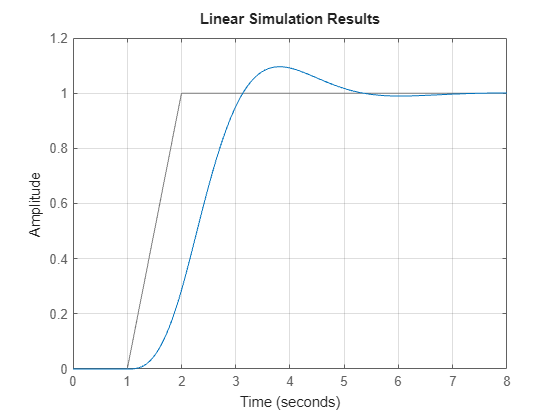
The plot shows the applied input (u,t) in gray and the system response in blue.
Modify the chart object to change the time units to minutes.
lp.TimeUnit = "minutes";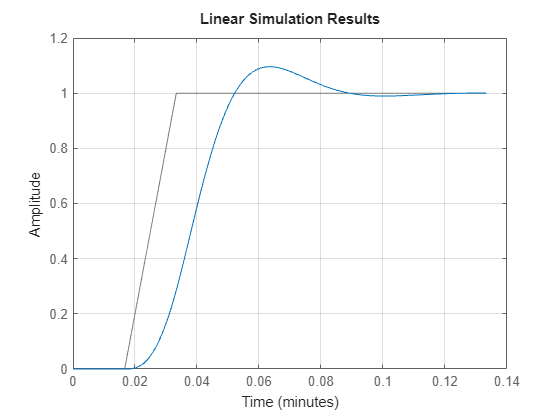
The plot automatically updates when you modify the chart object.
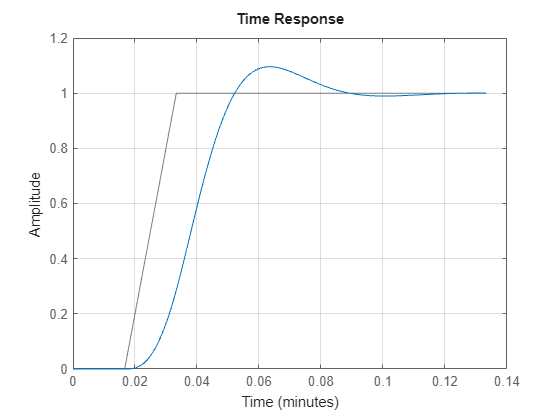
Alternatively, you can also use the timeoptions command to specify the required plot options. First, create an options set based on the toolbox preferences.
plotoptions = timeoptions('cstprefs');Change properties of the options set by setting the time units to minutes and enabling the grid.
plotoptions.TimeUnits = 'minutes';
plotoptions.Grid = 'on';
lsimplot(sys,u,t,plotoptions);
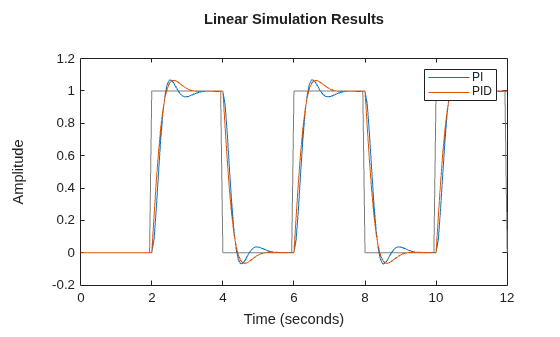
lsimplot allows you to plot the simulated responses of multiple dynamic systems on the same axis. For instance, compare the closed-loop response of a system with a PI controller and a PID controller. Then, customize the plot by enabling normalization and turning the grid on.
First, create a transfer function of the system and tune the controllers.
H = tf(4,[1 10 25]);
C1 = pidtune(H,'PI');
C2 = pidtune(H,'PID');
Form the closed-loop systems.
sys1 = feedback(H*C1,1);
sys2 = feedback(H*C2,1);
Plot the responses of both systems to a square wave with a period of 4 s.
[u,t] = gensig("square",4,12);
lp1 = lsimplot(sys1,sys2,u,t);
legend("PI","PID");
Enable normalization and turn on the grid.
lp1.Normalize = "on";
grid on
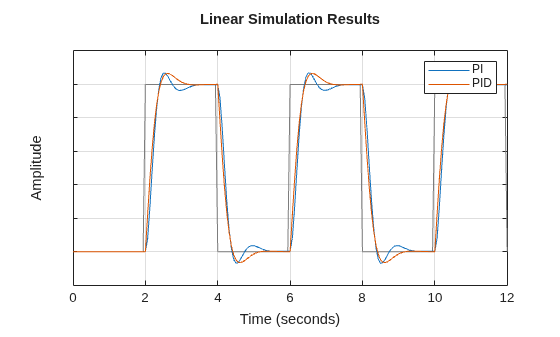
The plot automatically updates when you modify the chart object properties.
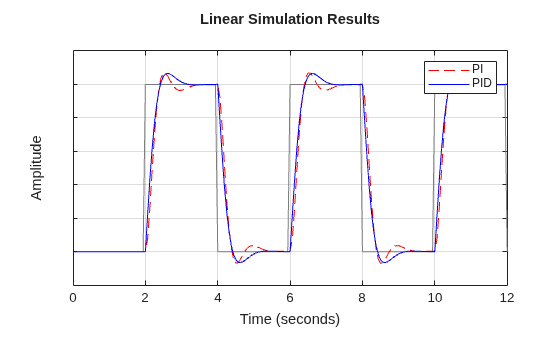
By default, lsimplot chooses distinct colors for each system that you plot. You can specify colors and line styles using the LineSpec input argument. The first LineSpec "r--" specifies a dashed red line for the response with the PI controller. The second LineSpec "b" specifies a solid blue line for the response with the PID controller. The legend reflects the specified colors and line styles.
lp2 = lsimplot(sys1,"r--",sys2,"b",u,t);
legend("PI","PID");
lp2.Normalize = "on";
grid on
By default, lsimplot simulates the model assuming all states are zero at the start of the simulation. When simulating the response of a state-space model, use the optional x0 input argument to specify nonzero initial state values. Consider the following two-state SISO state-space model.
A = [-1.5 -3;
      3   -1];
B = [1.3; 0];
C = [1.15 2.3];
D = 0;
sys = ss(A,B,C,D);
Suppose that you want to allow the system to evolve from a known set of initial states with no input for 2 s, and then apply a unit step change. Specify the vector x0 of initial state values, and create the input vector.
x0 = [-0.2 0.3];
t = 0:0.05:8;
u = zeros(length(t),1);
u(t>=2) = 1;
First, create a default options set using timeoptions.
plotoptions = timeoptions;
Next change the required properties of the options set plotoptions and plot the simulated response with the zero order hold option.
plotoptions.Title.FontSize = 15;
plotoptions.Title.Color = [0 0 1];
plotoptions.Grid = 'on';
h = lsimplot(sys,u,t,x0,plotoptions,'zoh');
hold on
title('Simulated Time Response with Initial Conditions')
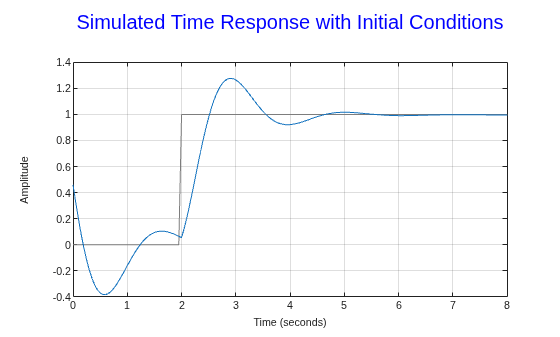
The first half of the plot shows the free evolution of the system from the initial state values [-0.2 0.3]. At t = 2 there is a step change to the input, and the plot shows the system response to this new signal beginning from the state values at that time. Because plotoptions begins with a fixed set of options, the plot result is independent of the toolbox preferences of the MATLAB session.
Since R2025a
Create a state-space model with complex coefficients.
A = [-2-2i -2;1 0];
B = [2;0];
C = [0 0.5+2.5i];
D = 0;
sys = ss(A,B,C,D);
Plot the response of the system to a square wave with a period of 4 s.
[u,t] = gensig("square",4,12);
lp = lsimplot(sys,u,t);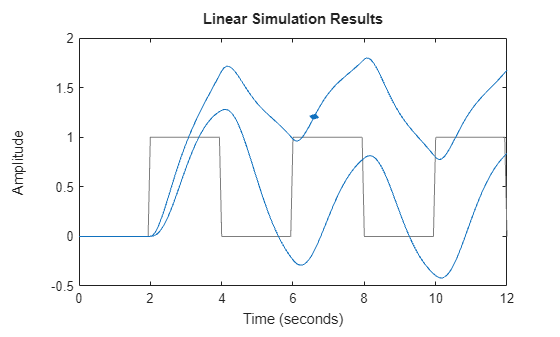
By default, the plot shows the real and imaginary components of the response on a single axes, indicating the imaginary component using a diamond marker.
You can also view the complex response using either a magnitude-phase plot or a complex-plane plot. For example, to view the magnitude and phase of the response, right-click the plot area and select Complex View >Magnitude-Phase.
Alternatively, you can set the ComplexViewType parameter of the corresponding chart object.
lp.ComplexViewType = "magnitudephase";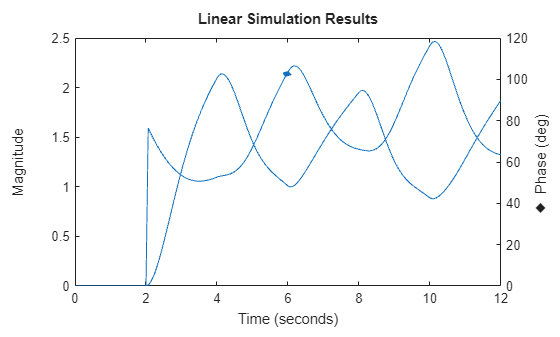
The plot shows the magnitude and phase of the response on a single axes, indicating the phase plot using a diamond marker.
You can view response characteristics in the plot. For example, to view the peak response, right-click the plot and select Characteristics > Peak Response.
Alternatively, you can enable the Visible property of the corresponding characteristic parameter of the chart object.
lp.Characteristics.PeakResponse.Visible = "on";