roitool

Interactive roi definition tool

이 제출물을 팔로우합니다

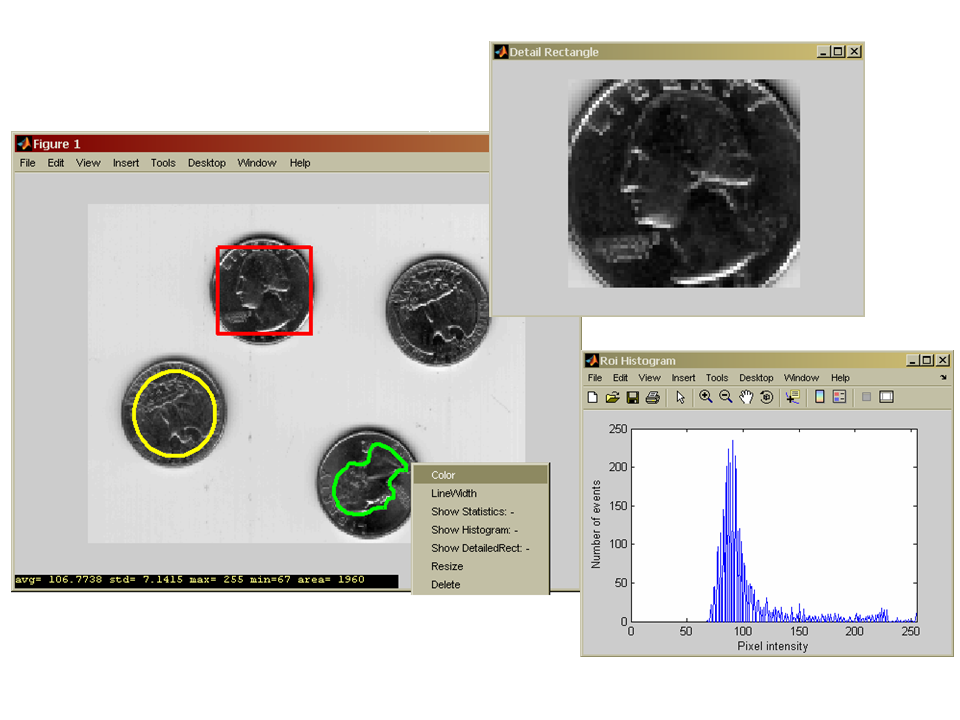
ROITOOL enables to define different type of rois on images (intensity, RGB) by mouse. The supported types are 'polygon', 'circle' and 'rectangle'. ROIPOLY returns the handler of the line object relating
to the roi. The created roi can be dragged and moved to any position of the image with the help of DRAGGABE function (developed by Francois Bouffard, see the help of draggable).

ROITOOL generates a context menu to the roi making possible the selection of the following commands:(MATLAB displays the context menu whenever you right-click over the object)

- change the roi color
- change the size of the line width
- switch on/off the 'statistical bar', which displays the main stat. results of the roi (mean, std, min, max, roi area)
- switch on/off the 'histogram figure', which shows the intensity histogram of the pixels belonging to the roi
- switch on/off the 'detailed rectangle' figure, which plots the zoomed image segment defined by the rectangle roi
- resize the roi (in case of circle or rectangle roi)
- delete the roi

ROITOOL('circledemo'), ROITOOL('rectangledemo') or ROITOOL('polygondemo')

start the roi definition using the MATLAB 'MRI' data set.

Installing, running: unzip the downloaded file and include them to your matlab path

인용 양식

Laszlo Balkay (2026). roitool (https://kr.mathworks.com/matlabcentral/fileexchange/9183-roitool), MATLAB Central File Exchange. 검색 날짜: .

도움

도움 받은 파일: draggable

카테고리

Help CenterMATLAB Answers에서 Display and Exploration에 대해 자세히 알아보기

일반 정보

MATLAB 릴리스 호환 정보

  • 모든 릴리스와 호환

플랫폼 호환성

  • Windows
  • macOS
  • Linux
버전 퍼블리시됨 릴리스 정보 Action
1.0.0.0

ROI definition can be done on RGB image also. Some bugs has been fixed.