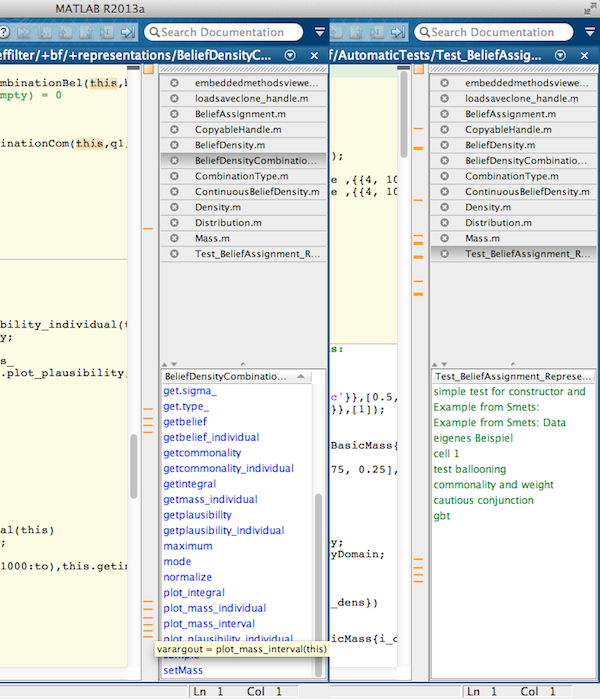
embeddedmethodsview​er - show functions and methods within matlab editor

Plugin for the matlab editor, which lists all functions and methods of the currently edited document

이 제출물을 팔로우합니다

Creates overview of all functions, subfunctions or methods of the currently edited function or class file. For script files the section headlines are drawn. For that, a list below the document bar is generated, which refresh’s automatically while you are typing.

It only works if the position of the document bar is on the right or left side of the editor.

The list of functions is sortable and can be used for navigation. It should help to keep the overview in large projects or class files.
Mouseover gives information about in- and output arguments of the functions and methods.

Furthermore an instance of the currently edited class file is generated in the base workspace, if the constructor can be called with no arguments.
Names of instances are: this, obj (change createInstance_, if necessary)

Please report all bugs found.

If you like the plugin, add 'embeddedmethodsviewer' to your 'startup.m' file

Many thanks to Yair Altman for providing findjobj.

In most cases function needs 'findjobj' from matlabcentral.com:
http://www.mathworks.com/matlabcentral/fileexchange/14317

history:
2013/08/26 - first release
2013/08/30 - resolved problems with r2013b preview, changed way to quit program

인용 양식

Mario Lietz (2026). embeddedmethodsviewer - show functions and methods within matlab editor (https://kr.mathworks.com/matlabcentral/fileexchange/43198-embeddedmethodsviewer-show-functions-and-methods-within-matlab-editor), MATLAB Central File Exchange. 검색 날짜: .

카테고리

Help CenterMATLAB Answers에서 Environment and Settings에 대해 자세히 알아보기

일반 정보

MATLAB 릴리스 호환 정보

  • 모든 릴리스와 호환

플랫폼 호환성

  • Windows
  • macOS
  • Linux
버전 퍼블리시됨 릴리스 정보 Action
1.1.0.0

Resolved problems with r2013b preview
Changed way to quit program.

1.0.0.0