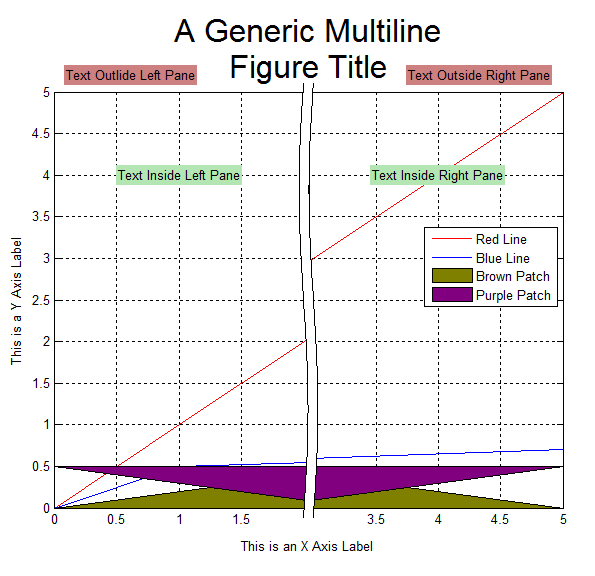
Break X Axis

Splits the x-axis into 2 disjoint regions in order to hide an uninteresting portion of a figure.

이 제출물을 팔로우합니다

Features
1.) Minimal fuss, just works
2.) Professional looking graphs
3.) Works with all 2D graphics objects: Lines, Text, Patches, Images, etc.
5.) Obeys ‘XTickMode’ for automatic or manual positioning of tick marks.
6.) Obeys ‘Layer’ property
7.) Works with semilogy plots and with either axis reversed
8.) Can resize after splitting axis
8.) Possible to unsplit axis

Limitations
1.) No support for semilogx or loglog plots
2.) Creates extra copies of the data which may be problematic when displaying very large data sets.
3.) Text inside an axes must have 'Clipping' turned 'Off' or be added after splitting the axis. Otherwise it may be rendered twice. See TextExample.m for more details.

인용 양식

Peter (2026). Break X Axis (https://kr.mathworks.com/matlabcentral/fileexchange/42905-break-x-axis), MATLAB Central File Exchange. 검색 날짜: .

도움

도움 받은 파일: BreakAxis, BreakXAxis, BreakPlot

도움 준 파일: Aesethetic Axis Breaks, Break Y Axis

카테고리

Help CenterMATLAB Answers에서 Axes Appearance에 대해 자세히 알아보기

일반 정보

MATLAB 릴리스 호환 정보

  • 모든 릴리스와 호환

플랫폼 호환성

  • Windows
  • macOS
  • Linux
버전 퍼블리시됨 릴리스 정보 Action
1.2.0.0

Added a screen shot

1.1.0.0

Fixed a bug that caused plots to be misaligned in some complex figures.

1.0.0.0