Constraining a 3d plot

이전 댓글 표시
I have a 3D array of data which I have successfully represented using 'isosurface'. However my data/figure/3D plot is essentially in a 'cube' format but I wish to cut out the corners of the isosurface plot to represent the true symmetry I am interested in. Essentially I want to limit the 'cube' on the image below to just the weird 'unit-cell' within the cube.
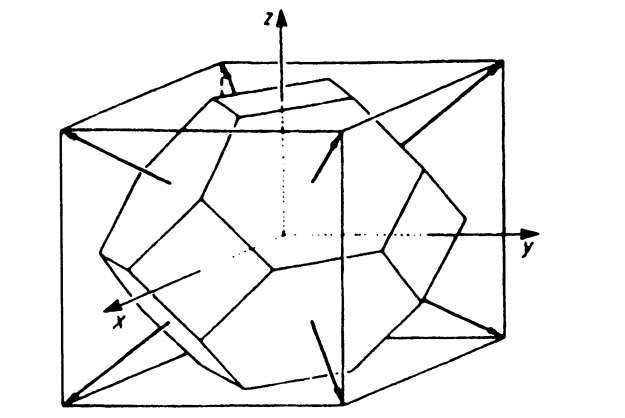
What I have tried:
I took the original data matrix and cut out the 'corners' by changing the areas outside the inner 'unit-cell' to NaN, and then replotted everything using isosurface. It theoretically works fine, however I believe that due to my finite resolution of datapoints, the isosurface interpolation works very poorly at the edges were I 'cut' the data. Below are the 2 images of the isosurface plot before and after "cutting".


So what I would really like to do is to "cut" the figure/image AFTER doing 'isosurface', so it has the extra points to do the interpolation first. If there is an easy way to manipulate x,y,zlim to fit irregular shapes, that would be the exact solution I'm looknig I guess. Is that something that can be done?
Currently unimportant at all to my question (if I'm not mistaken), but leaving it just in case. Below is a brief rundown of how I did the cutting: %also I don't know how to end the 'insert-code' so it's at the bottom..
[xx,yy,zz]=meshgrid(kx,ky,kz); %making a meshgrid of my cube data (kx ky and kz)
for x=1:81 %just the lengths of my kx ky kz
for y=1:81
for z=1:47
b=[xx(x,y,z),yy(x,y,z),zz(x,y,z)]/G; %Matrix division by matrix G, which are the 3 basis vectors pointing orthogonally out of the hexagons in the image above
c=[xx(x,y,z),yy(x,y,z),zz(x,y,z)]/G1; %Doing again and adding one different vector to cover all the hexagons
b1(x,y,z)=b(1); %now I convert each xx yy zz point to b1 b2 b3, which is in term of the basis vectors G (so the "cutting" conditions can be easily defined now)
b2(x,y,z)=b(2);
b3(x,y,z)=b(3);
b1(x,y,z)=b(1);
b2(x,y,z)=b(2);
b3(x,y,z)=b(3);
end
end
end
BZ = abs(b1)<=0.5 & abs(b2)<=0.5 & abs(b3)<=0.5 & abs(c1)<=0.5 & abs(c2)<=0.5 & abs(c3)<=0.5; %BZ now contains the "cut" matrix (everything outside the hexagons have either |a| or |b| greater than 0.5)
BZ = double(BZ); %convert logic to double
BZ(~BZ) = NaN; %make zeros = NaN
%%% Then I basically just scalar multiplied my (large/complex + very confusing/badly done) 3D datamatrix to BZ to "cut" out all the corners
채택된 답변

darova
2019년 12월 24일
0 개 추천
- use interp3 to make finer mesh
- cut corners you want
- visualize using isosurface
추가 답변 (0개)
카테고리
도움말 센터 및 File Exchange에서 Scalar Volume Data에 대해 자세히 알아보기
Translated by 

