Combining many .csv into a single table

이전 댓글 표시
Hello,
I am a trying to plot the content of many csv files, using a loop. So far, I've adjusted this solution to fit my purpose. The next step is to merge the content of these output files into a single table, so that I can plot them. But how to merge/combine?
Walkthrough
1) All csv are in the same directory.

2) All csv are identically formatted.

3) My existing code:
dinfo = dir('C:\output\*.csv');
for K = 1:length(dinfo)
thisfilename = dinfo(K).name; %filename
thisdata = readtable(thisfilename); %load file
% somehow plot the results, perhaps by combining thisdata each K step
end
Current Results
I can load each file into Matlab.

Next Goal
How to achieve a single table combined of all csv column 2?

End goal will be to plot the results, such as:
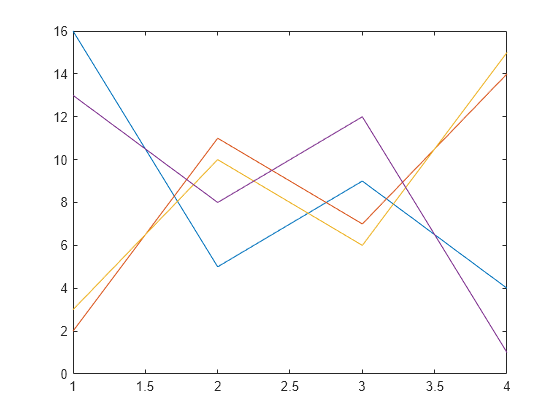
Thank you for any direction/advice!
Garth
댓글 수: 1

Gareth
2018년 12월 17일
Hi Garth,
There is a simple solution for what you are trying to do:
ds = datastore(pwd);
mydata = ds.readall;
This creates a datastore, that can be configured to look for specific file types, e.g. *.csv in a folder. It also has some properties where you can specify how each file should be read. Very similar to the readtable comand that you are already using.
The readall, reads every file and puts it in 1 table.
Hope this helps.
답변 (1개)

Cris LaPierre
2018년 12월 18일
1 개 추천
I would think using the function join should do it. You can combine tables using the rownames, which should be the same in all your files.
댓글 수: 4
Gareth
2018년 12월 18일
Indeed that is also a good point:)

Peter Perkins
2018년 12월 18일
I don't think join is what's needed here. join is essentially a horizontal concatenation-like operation. If "All csv are identically formatted" then I would think you would want a vertical concatenation-like operation. vertcat, in fact. If you use a datastore, readall does that, or read them individually and explicitly vertcat them.

Emilia
2025년 8월 27일
이동: Cris LaPierre
2025년 8월 27일
Hi,
I have in my directiry 173 csv files like this with different filenames (different FTIR spectra). How can I combine them in a single table with a single x= wavelenght (cm-1) and 173 column corresponding to the 173 absorbance spectra titled with name of each single file?
Thanks
Emilia

Cris LaPierre
2025년 8월 27일
이동: Cris LaPierre
2025년 8월 27일
I would use a fileDatastore to load all the data into a single variable. You can see an example of how to use one to do this in this video from the Data Processing with MATLAB specialization on Coursera.
Here is the final code from that example. You can modify this to work for your data.
flightsDataStore = fileDatastore("flights*.csv","ReadFcn",@importFlightsData,"UniformRead",true);
flightsAll = readall(flightsDataStore)
Once complete, all the data from all files matching the pattern "flights*.csv" are loaded into the variable flightsAll.
카테고리
도움말 센터 및 File Exchange에서 Large Files and Big Data에 대해 자세히 알아보기
2018년 12월 17일
2025년 8월 27일
Community Treasure Hunt
Find the treasures in MATLAB Central and discover how the community can help you!
Start Hunting!
Translated by 

