How to create a semicircular pulse function?
이전 댓글 표시
I need to write a function that adds a rectangularPulse, a triangularPulse and a semicircular pulse, but i can't find a way to do this. All the answers I find here plots directly the semicircle, but it doesn't create a function that i can add to others and it isn't a pulse.
Basically, what I'm trying to do is:
syms x
p = 4*rectangularPulse(-4,4,x);
a = (-pi)*triangularPulse(0,2,x);
c = (-1)*semicircularPulse(-4,0,x); %% where -4 is the rising edge of the pulse, 0 is the falling edge and the radius is 2. (|-4+0|/2)
fun = p + a + c;
fplot(fun, [-5 5])
But I still couldn't figure how I'm going to do this semicircularPulse function.
Thank you.
답변 (1개)

Image Analyst
2018년 12월 2일
0 개 추천
댓글 수: 4

Matheus Angelo
2018년 12월 2일
Image Analyst
2018년 12월 2일
Really? OK so I took the FAQ and put in your numbers and it seemed to work fine:
% Define parameters of the arc.
xCenter = -2;
yCenter = 0;
radius = 2;
% Define the angle theta as going from 0 to 180 degrees in 100 steps.
theta = linspace(0, 180, 100);
% Define x and y using "Degrees" version of sin and cos.
x = radius * cosd(theta) + xCenter;
c = radius * sind(theta) + yCenter;
% Now plot the points.
plot(x, c, 'b-', 'LineWidth', 2);
axis equal;
grid on;
xlabel('x', 'FontSize', 20);
ylabel('c', 'FontSize', 20);

Let me see your code so I can tell what you did wrong.
Matheus Angelo
2018년 12월 4일
I did exactly that, but I need to transform the semicircular in a pulse, like the rectangular pulse and the triangular pulse. Basically, I need a function that gives me 0 outside the semicircle, just like this but with a semicircle.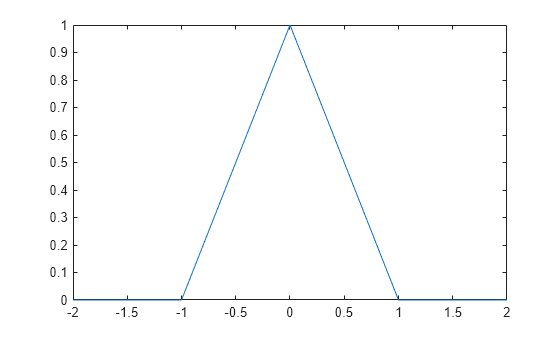
Image Analyst
2018년 12월 4일
I don't have the Symbolic toolbox so all I can do is to do it numerically.
Basically just make a function that ignores the signal and makes an array that is all zero except it's 1 at x=0. Or make two ramps if there are lots of x values.
But your first question didn't seem to say that you wanted to transform the circle into a triangle. It seemed to say you need to create three differently shaped signals and simply add them together. So which is it?
- Create three signals and add together, or
- Make a transform that makes any signal into that triangle?
카테고리
도움말 센터 및 File Exchange에서 Programming에 대해 자세히 알아보기
2018년 12월 2일
2018년 12월 4일
Community Treasure Hunt
Find the treasures in MATLAB Central and discover how the community can help you!
Start Hunting!
Translated by 

