이 번역 페이지는 최신 내용을 담고 있지 않습니다. 최신 내용을 영문으로 보려면 여기를 클릭하십시오.
waypointTrajectory
R2026a웨이포인트 궤적 생성기
설명
waypointTrajectory System object™는 지정된 웨이포인트를 기반으로 궤적을 생성합니다. System object를 생성할 때 각 웨이포인트에서의 도달 시간, 속도, 대지 속도(ground speed)를 지정할 수 있습니다. 또한 각 웨이포인트에서의 방향과 같은 다른 속성을 선택적으로 지정할 수 있습니다. 자세한 내용은 알고리즘 항목을 참조하십시오.
웨이포인트에서 궤적을 생성하려면 다음을 수행하십시오.
waypointTrajectory객체를 만들고 속성을 설정합니다.함수를 호출하는 것처럼 객체를 호출합니다.
System object의 작동 방식에 대해 자세히 알아보려면 System object란? 항목을 참조하십시오.
생성
구문
설명
trajectory = waypointTrajectorytrajectory를 반환합니다.
trajectory = waypointTrajectory(Waypoints,TimeOfArrival)TimeOfArrival 속성을 참조하십시오.
팁
TimeOfArrival 인수를 지정하는 경우 다음 속성을 지정해서는 안 됩니다.
JerkLimitInitialTimeWaitTime
trajectory = waypointTrajectory(Waypoints,GroundSpeed=groundSpeed)GroundSpeed 속성을 참조하십시오.
trajectory = waypointTrajectory(Waypoints,Velocities=velocities)Velocities 속성을 참조하십시오.
trajectory = waypointTrajectory(___,Name=Value)
예: trajectory = waypointTrajectory([10,10,0;20,20,0;20,20,10],[0,0.5,10])은 웨이포인트 [10,10,0]에서 시작하여 0.5초 후 [20,20,0]을 통과하고 10초 후 [20,20,10]을 통과하는 웨이포인트 궤적 System object인 trajectory를 생성합니다.
속성
사용
설명
[는 지정된 생성 인수와 속성을 기반으로 궤적 데이터의 프레임을 출력합니다.position,orientation,velocity,acceleration,angularVelocity] = trajectory()
출력 인수
객체 함수
객체 함수를 사용하려면 System object를 첫 번째 입력 인수로 지정하십시오. 예를 들어 obj라는 System object의 시스템 리소스를 해제하려면 다음 구문을 사용합니다.
release(obj)
예제
trajectory = waypointTrajectory
trajectory =
  waypointTrajectory with properties:

         SampleRate: 100
    SamplesPerFrame: 1
          Waypoints: [2×3 double]
      TimeOfArrival: [2×1 double]
         Velocities: [2×3 double]
             Course: [2×1 double]
        GroundSpeed: [2×1 double]
          ClimbRate: [2×1 double]
        Orientation: [2×1 quaternion]
          AutoPitch: 0
           AutoBank: 0
     ReferenceFrame: 'NED'
waypointInfo를 호출하여 디폴트 웨이포인트와 도착 시간을 검사합니다. 기본적으로 웨이포인트는 1초 동안의 정지 위치를 나타냅니다.
waypointInfo(trajectory)
ans=2×2 table
    TimeOfArrival     Waypoints
    _____________    ___________

          0          0    0    0
          1          0    0    0
정사각형 궤적을 생성하고 웨이포인트 제약 조건, 샘플 레이트, 생성된 궤적 간의 관계를 검토합니다.
정사각형의 꼭짓점을 정의하여 정사각형 궤적을 생성합니다. 각 웨이포인트에서의 방향이 모션 방향을 향하도록 정의합니다. 샘플 레이트를 1Hz로 지정하고 디폴트 SamplesPerFrame 값인 1을 사용하십시오.
waypoints = [0,0,0; ... % Initial position
             0,1,0; ...
             1,1,0; ...
             1,0,0; ...
             0,0,0];    % Final position

toa = 0:4; % time of arrival

orientation = quaternion([0,0,0; ...
                          45,0,0; ...
                          135,0,0; ...
                          225,0,0; ...
                          0,0,0], ...
                          "eulerd","ZYX","frame");

trajectory = waypointTrajectory(waypoints, ...
    TimeOfArrival=toa, ...
    Orientation=orientation, ...
    SampleRate=1);
Figure를 생성하고 플랫폼의 초기 위치를 플로팅합니다.
figure(1)
plot(waypoints(1,1),waypoints(1,2),"b*")
axis([-1,2,-1,2])
axis square
xlabel("X")
ylabel("Y")
title("Position")
grid on
hold on
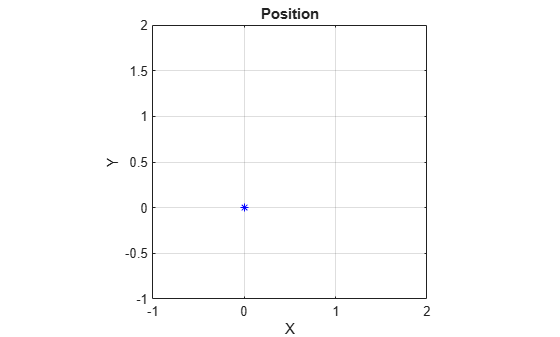
루프에서 궤적을 순차적으로 실행하여 현재 위치와 현재 방향을 출력합니다. 현재 위치를 플로팅하고 방향을 기록합니다. pause를 사용하여 실시간 처리를 모방합니다.
orientationLog = zeros(toa(end)*trajectory.SampleRate,1,"quaternion");
count = 1;
while ~isDone(trajectory)
   [currentPosition,orientationLog(count)] = trajectory();

   plot(currentPosition(1),currentPosition(2),"bo")

   pause(trajectory.SamplesPerFrame/trajectory.SampleRate)
   count = count + 1;
end
hold off
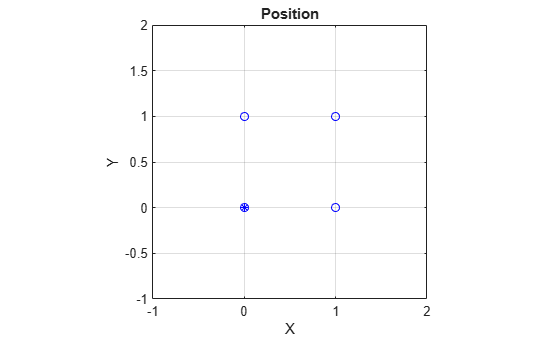
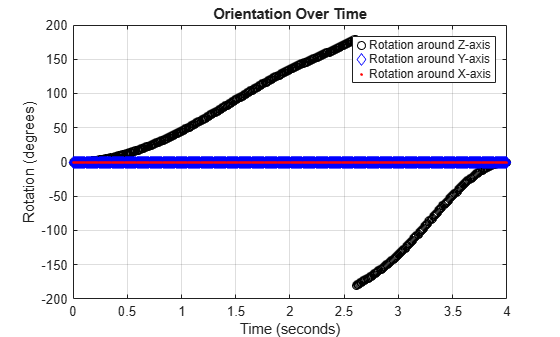
해석하기 쉽도록 방향 쿼터니언을 오일러 각으로 변환한 후 시간 경과에 따른 방향을 플로팅합니다.
figure(2)
eulerAngles = eulerd([orientation(1);orientationLog],"ZYX","frame");
plot(toa,eulerAngles(:,1),"ko", ...
     toa,eulerAngles(:,2),"bd", ...
     toa,eulerAngles(:,3),"r.");
title("Orientation Over Time")
legend("Rotation around Z-axis","Rotation around Y-axis","Rotation around X-axis")
xlabel("Time (seconds)")
ylabel("Rotation (degrees)")
grid on
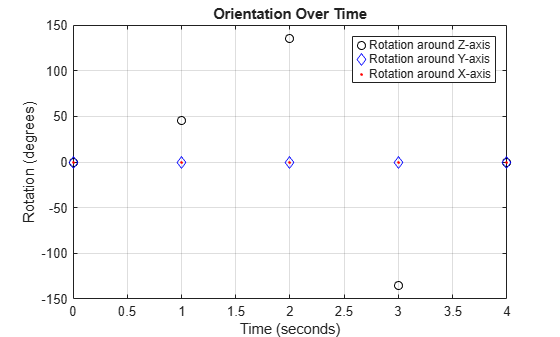
지금까지 궤적 객체는 생성 시 지정한 웨이포인트만 출력했습니다. 웨이포인트 사이를 보간하기 위해, 샘플 레이트를 웨이포인트의 도달 시간보다 빠른 레이트로 증가시킵니다. trajectory 샘플 레이트를 100Hz로 설정하고 reset을 호출합니다.
trajectory.SampleRate = 100;
reset(trajectory)
Figure를 생성하고 플랫폼의 초기 위치를 플로팅합니다. 루프에서 궤적을 순차적으로 실행하여 현재 위치와 현재 방향을 출력합니다. 현재 위치를 플로팅하고 방향을 기록합니다. pause를 사용하여 실시간 처리를 모방합니다.
figure(1)
plot(waypoints(1,1),waypoints(1,2),"b*")
title("Position")
axis([-1,2,-1,2])
axis square
xlabel("X")
ylabel("Y")
grid on
hold on

orientationLog = zeros(toa(end)*trajectory.SampleRate,1,"quaternion");
count = 1;
while ~isDone(trajectory)
   [currentPosition,orientationLog(count)] = trajectory();

   plot(currentPosition(1),currentPosition(2),"bo")

   pause(trajectory.SamplesPerFrame/trajectory.SampleRate)
   count = count + 1;
end
hold off
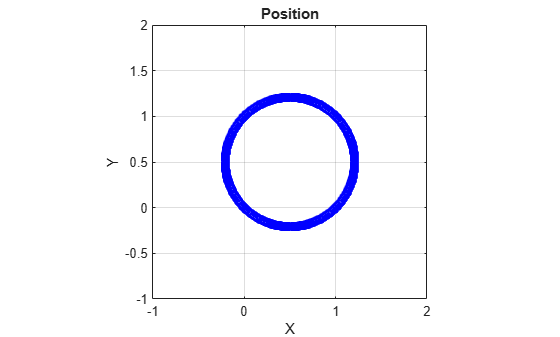
궤적 출력이 이제 원형으로 표시됩니다. 이는 보간 시 waypointTrajectory System object™가 가속도와 각속도를 최소화하기 때문이며, 결과적으로 대부분의 시나리오에서 더 부드럽고 사실적인 모션이 생성됩니다.
해석하기 쉽도록 방향 쿼터니언을 오일러 각으로 변환한 후 시간 경과에 따른 방향을 플로팅합니다. 방향도 보간됩니다.
figure(2)
eulerAngles = eulerd([orientation(1);orientationLog],"ZYX","frame");
t = 0:1/trajectory.SampleRate:4;
plot(t,eulerAngles(:,1),"ko", ...
     t,eulerAngles(:,2),"bd", ...
     t,eulerAngles(:,3),"r.");
title("Orientation Over Time")
legend("Rotation around Z-axis","Rotation around Y-axis","Rotation around X-axis")
xlabel("Time (seconds)")
ylabel("Rotation (degrees)")
grid on
waypointTrajectory 알고리즘은 부드러운 궤적을 생성하기 위해 웨이포인트를 보간합니다. 정사각형 궤적으로 되돌리기 위해, 특히 급격한 변화 구간 주변에 더 많은 웨이포인트를 제공합니다. 대응하는 시간, 웨이포인트, 방향을 추적하기 위해 모든 궤적 정보를 하나의 행렬에 지정합니다.
               % Time, Waypoint, Orientation
trajectoryInfo = [0,   0,0,0,    0,0,0; ... % Initial position
                  0.1, 0,0.1,0,  0,0,0; ...

                  0.9, 0,0.9,0,  0,0,0; ...
                  1,   0,1,0,    45,0,0; ...
                  1.1, 0.1,1,0,  90,0,0; ...

                  1.9, 0.9,1,0,  90,0,0; ...
                  2,   1,1,0,    135,0,0; ...
                  2.1, 1,0.9,0,  180,0,0; ...

                  2.9, 1,0.1,0,  180,0,0; ...
                  3,   1,0,0,    225,0,0; ...
                  3.1, 0.9,0,0,  270,0,0; ...

                  3.9, 0.1,0,0,  270,0,0; ...
                  4,   0,0,0,    270,0,0];    % Final position

trajectory = waypointTrajectory(trajectoryInfo(:,2:4), ...
    TimeOfArrival=trajectoryInfo(:,1), ...
    Orientation=quaternion(trajectoryInfo(:,5:end),"eulerd","ZYX","frame"), ...
    SampleRate=100);
Figure를 생성하고 플랫폼의 초기 위치를 플로팅합니다. 루프에서 궤적을 순차적으로 실행하여 현재 위치와 현재 방향을 출력합니다. 현재 위치를 플로팅하고 방향을 기록합니다. pause를 사용하여 실시간 처리를 모방합니다.
figure(1)
plot(waypoints(1,1),waypoints(1,2),"b*")
title("Position")
axis([-1,2,-1,2])
axis square
xlabel("X")
ylabel("Y")
grid on
hold on

orientationLog = zeros(toa(end)*trajectory.SampleRate,1,"quaternion");
count = 1;
while ~isDone(trajectory)
   [currentPosition,orientationLog(count)] = trajectory();

   plot(currentPosition(1),currentPosition(2),"bo")

   pause(trajectory.SamplesPerFrame/trajectory.SampleRate)
   count = count+1;
end
hold off
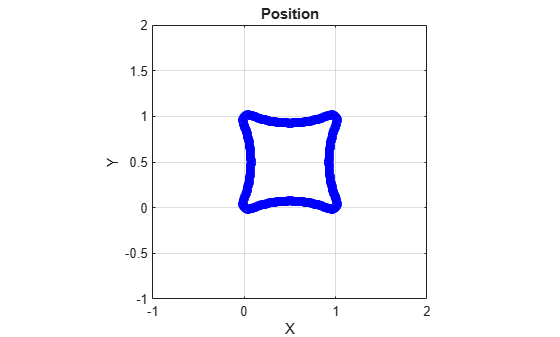
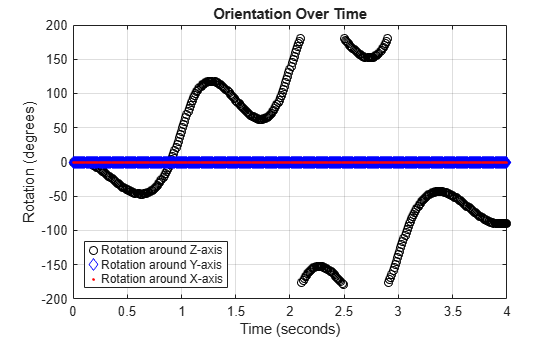
이제 궤적 출력이 특히 웨이포인트가 지정된 꼭짓점 주변에서 더 정사각형 형태로 나타납니다.
해석하기 쉽도록 방향 쿼터니언을 오일러 각으로 변환한 후 시간 경과에 따른 방향을 플로팅합니다.
figure(2)
eulerAngles = eulerd([orientation(1);orientationLog],"ZYX","frame");
t = 0:1/trajectory.SampleRate:4;
eulerAngles = plot(t,eulerAngles(:,1),"ko", ...
                   t,eulerAngles(:,2),"bd", ...
                   t,eulerAngles(:,3),"r.");
title("Orientation Over Time")
legend("Rotation around Z-axis", ...
       "Rotation around Y-axis", ...
       "Rotation around X-axis", ...
       "Location", "SouthWest")
xlabel("Time (seconds)")
ylabel("Rotation (degrees)")
grid on
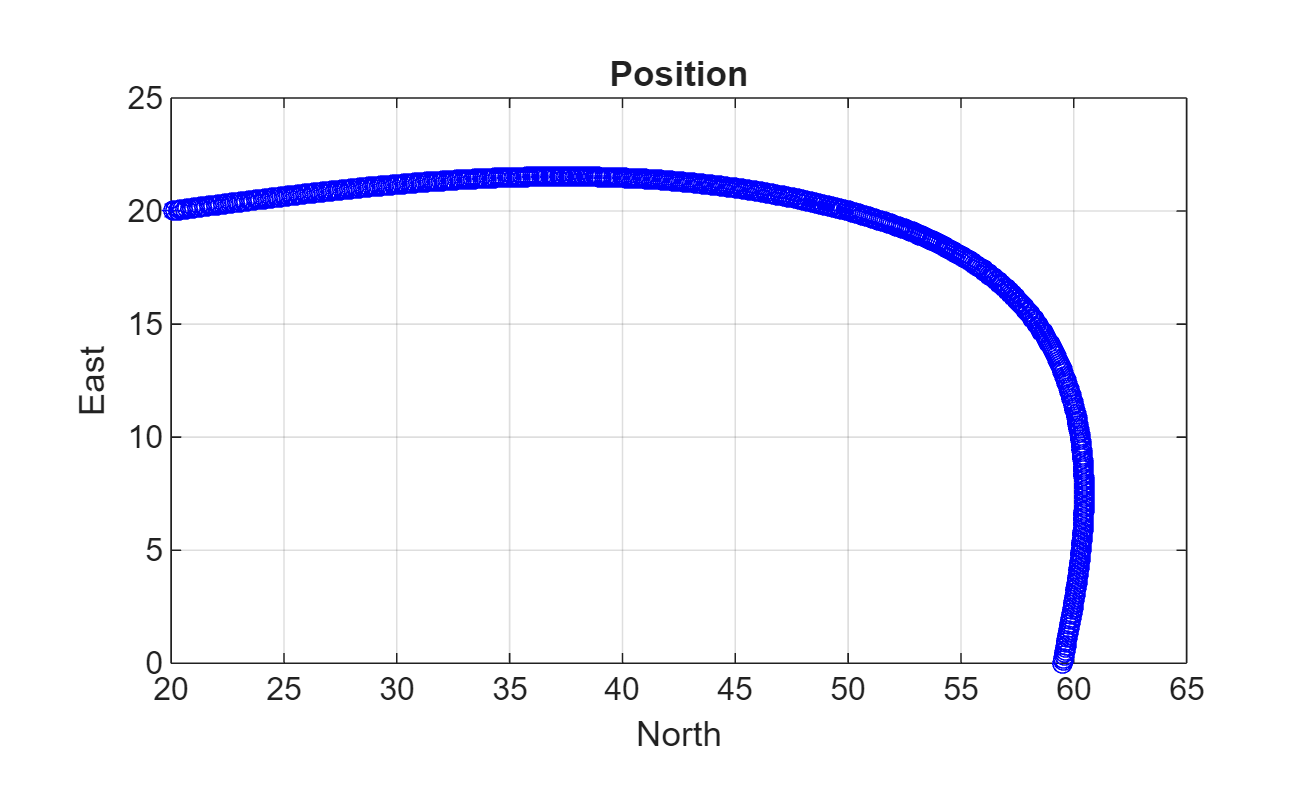
이 예제에서는 waypointTrajectory System object™를 사용하여 호 궤적을 생성하는 방법을 보여줍니다. waypointTrajectory는 지정된 웨이포인트를 통과하는 경로를 생성하며, 이때 가속도와 각속도가 최소화되도록 합니다. 호 궤적을 생성한 후에는, 해당 궤적이 사전 설정된 경계 내에 있도록 제한합니다.
호 궤적 생성하기
호 궤적에 대한 웨이포인트, 도달 시간, 방향으로 구성된 제약 조건 행렬을 정의합니다. 생성된 궤적은 지정된 시간에 지정된 방향으로 웨이포인트를 통과합니다. waypointTrajectory System object는 쿼터니언 또는 회전 행렬을 사용하여 방향을 지정해야 합니다. Orientation 속성을 지정할 때 제약 조건 행렬에 저장된 오일러 각을 쿼터니언으로 변환합니다.
% Arrival, Waypoints, Orientation
constraints = [0,    20,20,0,    90,0,0;
               3,    50,20,0,    90,0,0;
               4,    58,15.5,0,  162,0,0;
               5.5,  59.5,0,0    180,0,0];

trajectory = waypointTrajectory(constraints(:,2:4), ...
    TimeOfArrival=constraints(:,1), ...
    Orientation=quaternion(constraints(:,5:7),"eulerd","ZYX","frame"));
trajectory에 대해 waypointInfo를 호출하여 지정된 제약 조건으로 구성된 테이블을 반환합니다. 이 테이블에는 생성 속성인 Waypoints, TimeOfArrival, Orientation이 변수로 포함되어 있습니다. 이 테이블은 플로팅할 때 인덱싱하기에 편리합니다.
tInfo = waypointInfo(trajectory)
tInfo=4×3 table
         0         20         20    0    1×1 quaternion
         3         50         20    0    1×1 quaternion
         4         58    15.5000    0    1×1 quaternion
    5.5000    59.5000          0    0    1×1 quaternion
궤적 객체는 각 호출마다 현재 위치, 속도, 가속도, 각속도를 출력합니다. 루프에서 trajectory를 호출하고 시간 경과에 따른 위치를 플로팅합니다. 다른 출력값을 캐시합니다.
figure(1)
plot(tInfo.Waypoints(1,1),tInfo.Waypoints(1,2),"b*")
title("Position")
axis([20,65,0,25])
xlabel("North")
ylabel("East")
grid on
daspect([1 1 1])
hold on

orient = zeros(tInfo.TimeOfArrival(end)*trajectory.SampleRate,1,"quaternion");
vel = zeros(tInfo.TimeOfArrival(end)*trajectory.SampleRate,3);
acc = vel;
angVel = vel;

count = 1;
while ~isDone(trajectory)
   [pos,orient(count),vel(count,:),acc(count,:),angVel(count,:)] = trajectory();

   plot(pos(1),pos(2),"bo")

   pause(trajectory.SamplesPerFrame/trajectory.SampleRate)
   count = count + 1;
end
시간 경과에 따른 방향, 속도, 가속도, 각속도를 검사합니다. waypointTrajectory System object™는 지정된 제약 조건을 만족하면서 가속도와 각속도가 최소화되도록 통과하는 경로를 생성합니다.
figure(2)
timeVector = 0:(1/trajectory.SampleRate):tInfo.TimeOfArrival(end);
eulerAngles = eulerd([tInfo.Orientation{1};orient],"ZYX","frame");
plot(timeVector,eulerAngles(:,1), ...
     timeVector,eulerAngles(:,2), ...
     timeVector,eulerAngles(:,3));
title("Orientation Over Time")
legend("Rotation around Z-axis", ...
       "Rotation around Y-axis", ...
       "Rotation around X-axis", ...
       "Location","southwest")
xlabel("Time (seconds)")
ylabel("Rotation (degrees)")
grid on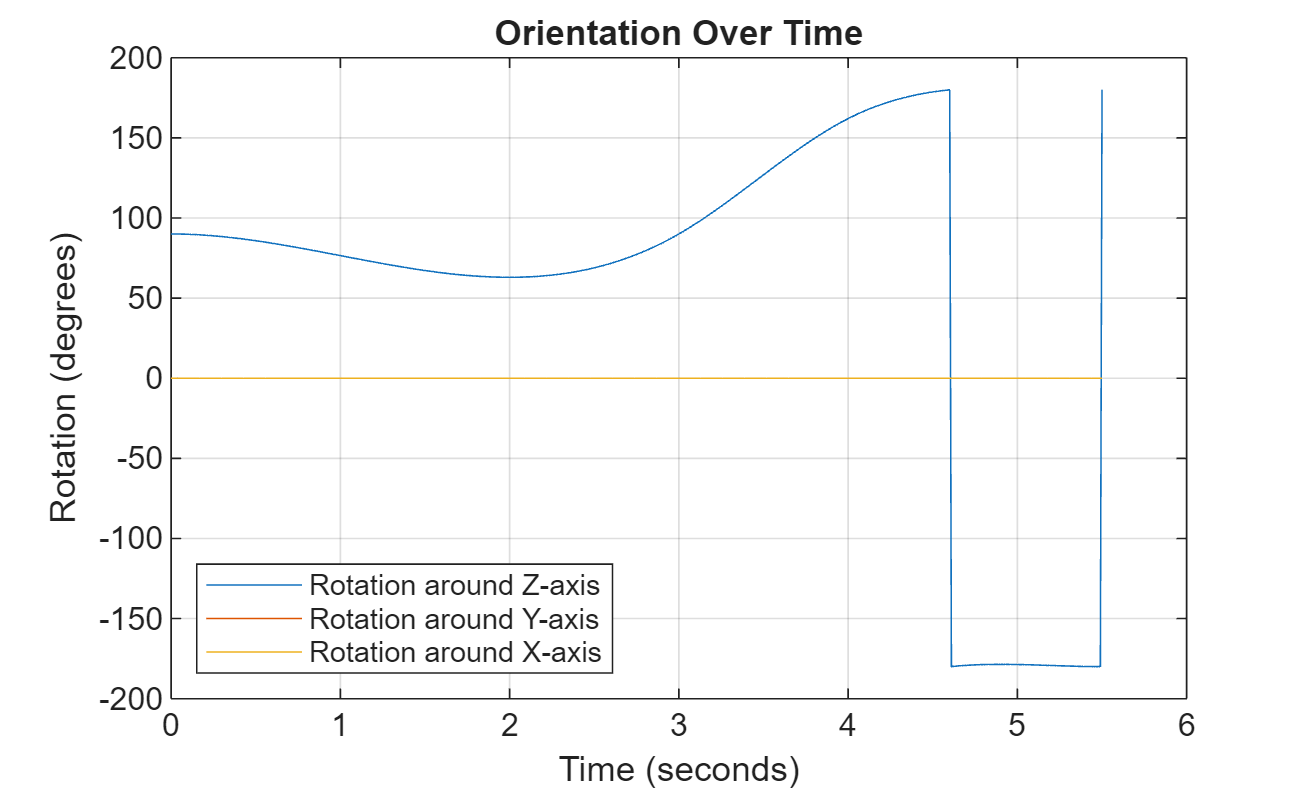
figure(3)
plot(timeVector(2:end),vel(:,1), ...
     timeVector(2:end),vel(:,2), ...
     timeVector(2:end),vel(:,3));
title("Velocity Over Time")
legend("North","East","Down")
xlabel("Time (seconds)")
ylabel("Velocity (m/s)")
grid on
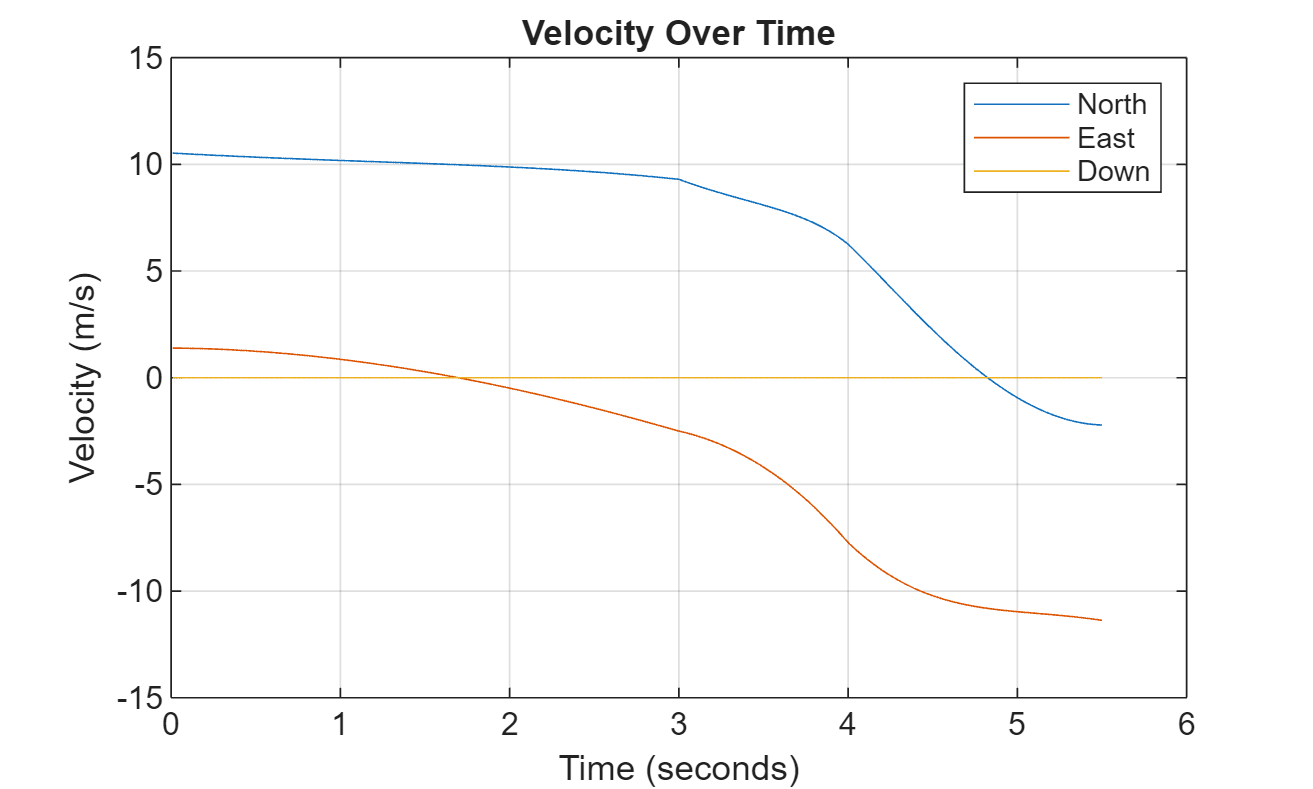
figure(4)
plot(timeVector(2:end),acc(:,1), ...
     timeVector(2:end),acc(:,2), ...
     timeVector(2:end),acc(:,3));
title("Acceleration Over Time")
legend("North","East","Down","Location","southwest")
xlabel("Time (seconds)")
ylabel("Acceleration (m/s^2)")
grid on
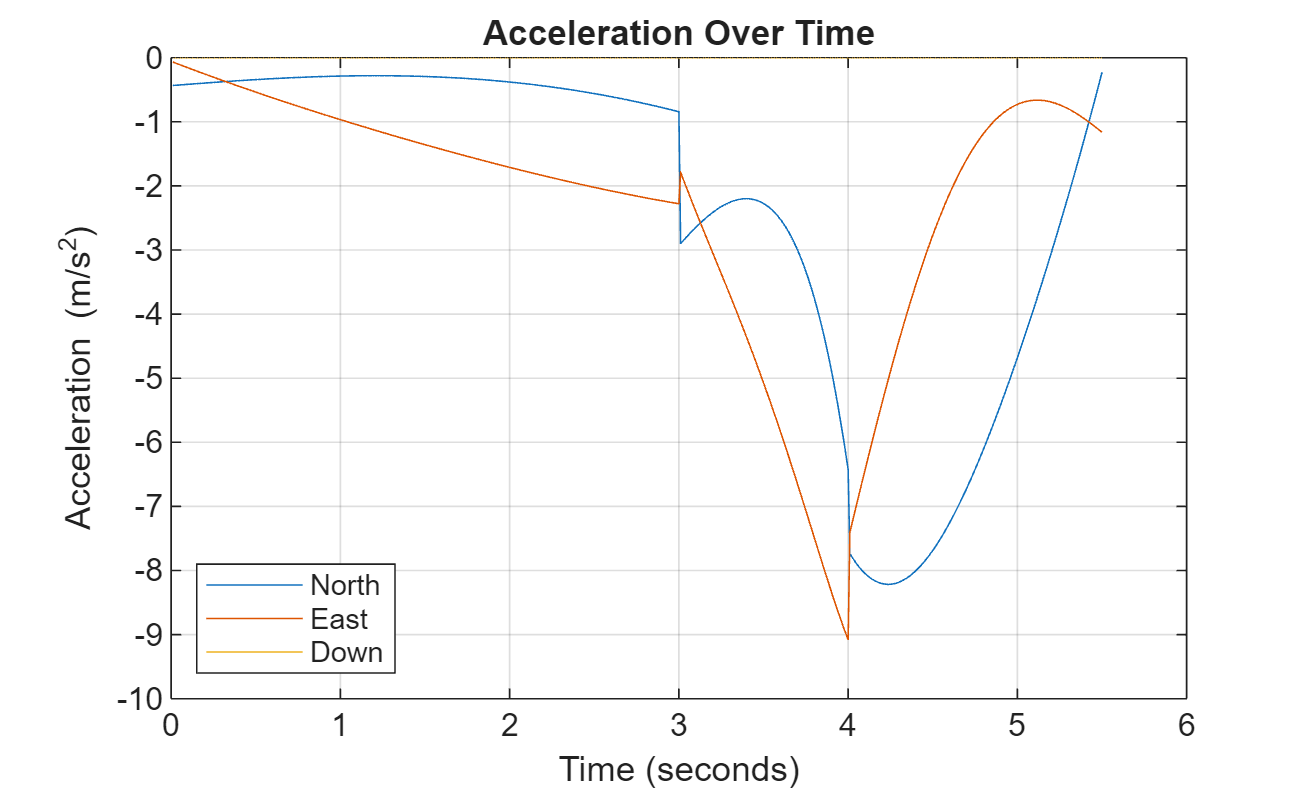
figure(5)
plot(timeVector(2:end),angVel(:,1), ...
     timeVector(2:end),angVel(:,2), ...
     timeVector(2:end),angVel(:,3));
title("Angular Velocity Over Time")
legend("North","East","Down")
xlabel("Time (seconds)")
ylabel("Angular Velocity (rad/s)")
grid on
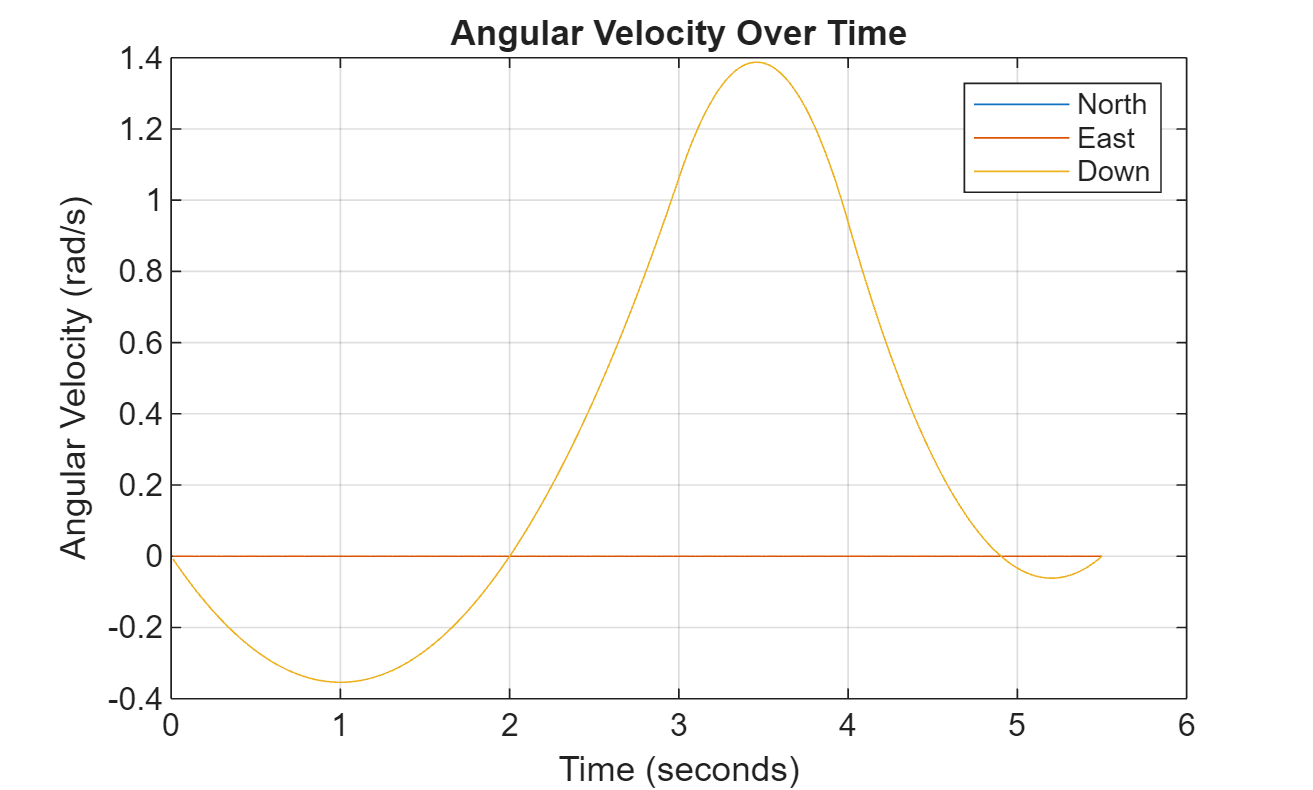
사전 설정된 경계 내로 호 궤적 제한하기
추가 웨이포인트를 지정하여, 지정된 경계 내에 들어오도록 궤적을 생성할 수 있습니다. 호 궤적에 대한 상한 경계와 하한 경계를 생성합니다.
figure(1)
xUpperBound = [(20:50)';50+10*sin(0:0.1:pi/2)';60*ones(11,1)];
yUpperBound = [20.5.*ones(31,1);10.5+10*cos(0:0.1:pi/2)';(10:-1:0)'];

xLowerBound = [(20:49)';50+9*sin(0:0.1:pi/2)';59*ones(11,1)];
yLowerBound = [19.5.*ones(30,1);10.5+9*cos(0:0.1:pi/2)';(10:-1:0)'];

plot(xUpperBound,yUpperBound,"r","LineWidth",2);
plot(xLowerBound,yLowerBound,"r","LineWidth",2)
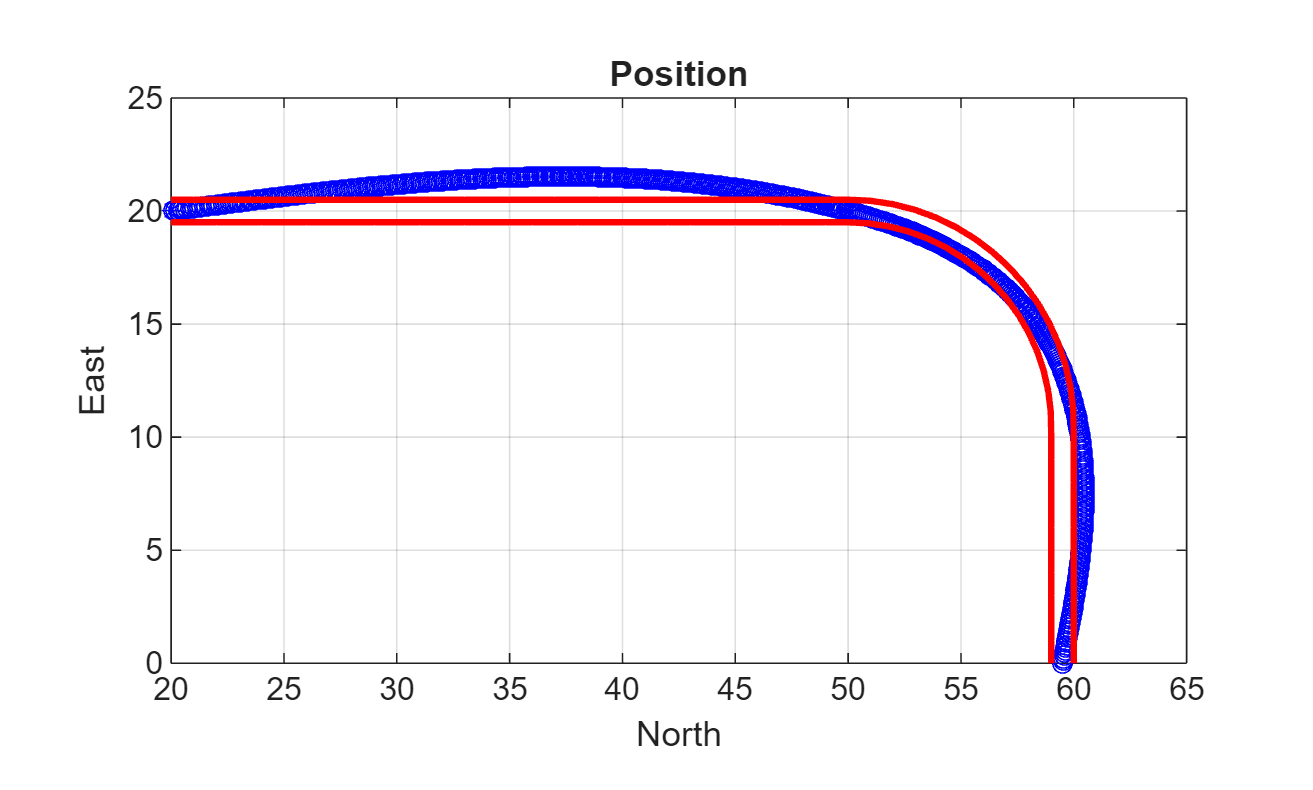
경계 내에 궤적을 생성하기 위해 웨이포인트를 더 추가합니다. waypointTrajectory System object™를 새로 만든 다음 루프에서 이를 호출하여 생성된 궤적을 플로팅합니다. trajectory 객체에서 출력되는 방향, 속도, 가속도, 각속도를 캐시합니다.
            % Time,  Waypoint,     Orientation
constraints = [0,    20,20,0,      90,0,0;
               1.5,  35,20,0,      90,0,0;
               2.5   45,20,0,      90,0,0;
               3,    50,20,0,      90,0,0;
               3.3,  53,19.5,0,    108,0,0;
               3.6,  55.5,18.25,0, 126,0,0;
               3.9,  57.5,16,0,    144,0,0;
               4.2,  59,14,0,      162,0,0;
               4.5,  59.5,10,0     180,0,0;
               5,    59.5,5,0      180,0,0;
               5.5,  59.5,0,0      180,0,0];

trajectory = waypointTrajectory(constraints(:,2:4), ...
    TimeOfArrival=constraints(:,1), ...
    Orientation=quaternion(constraints(:,5:7),"eulerd","ZYX","frame"));
tInfo = waypointInfo(trajectory);

figure(1)
plot(tInfo.Waypoints(1,1),tInfo.Waypoints(1,2),"b*")

count = 1;
while ~isDone(trajectory)
   [pos,orient(count),vel(count,:),acc(count,:),angVel(count,:)] = trajectory();

   plot(pos(1),pos(2),"gd")

   pause(trajectory.SamplesPerFrame/trajectory.SampleRate)
   count = count + 1;
end
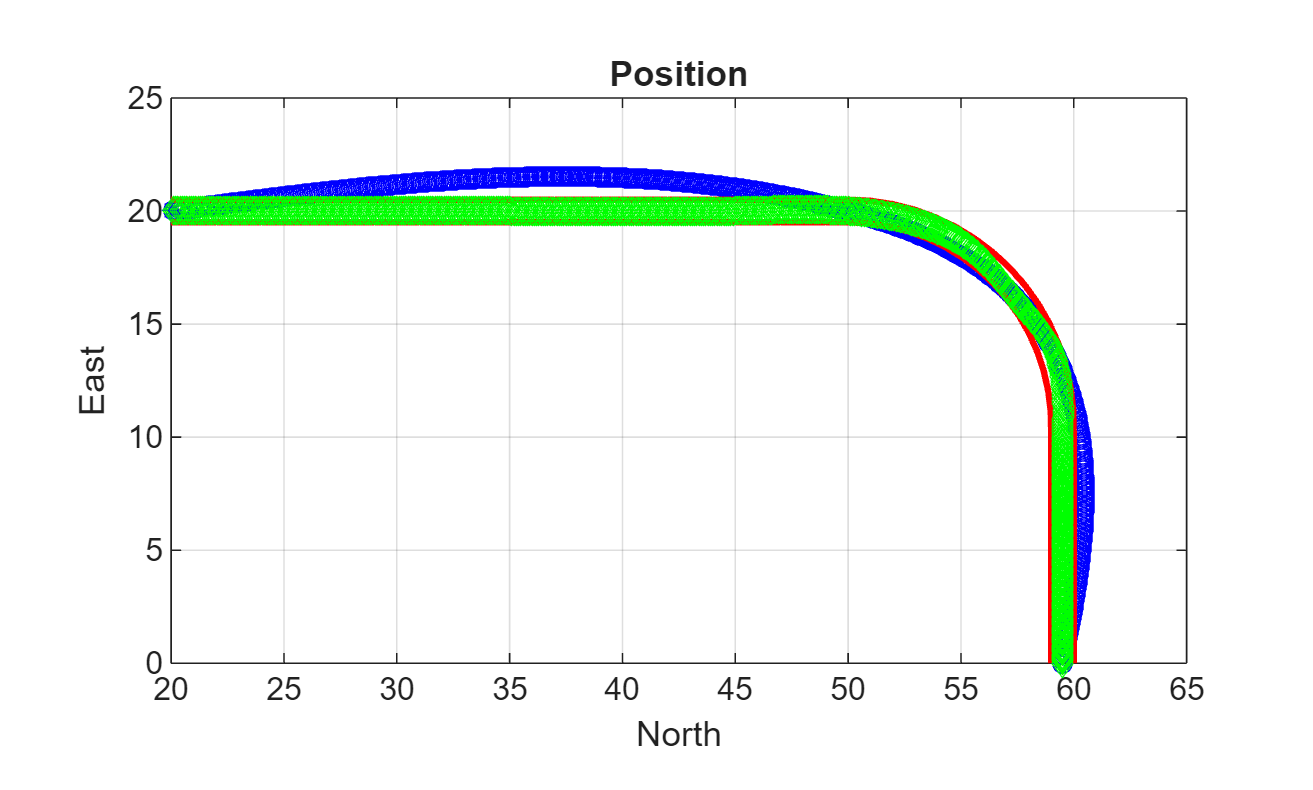
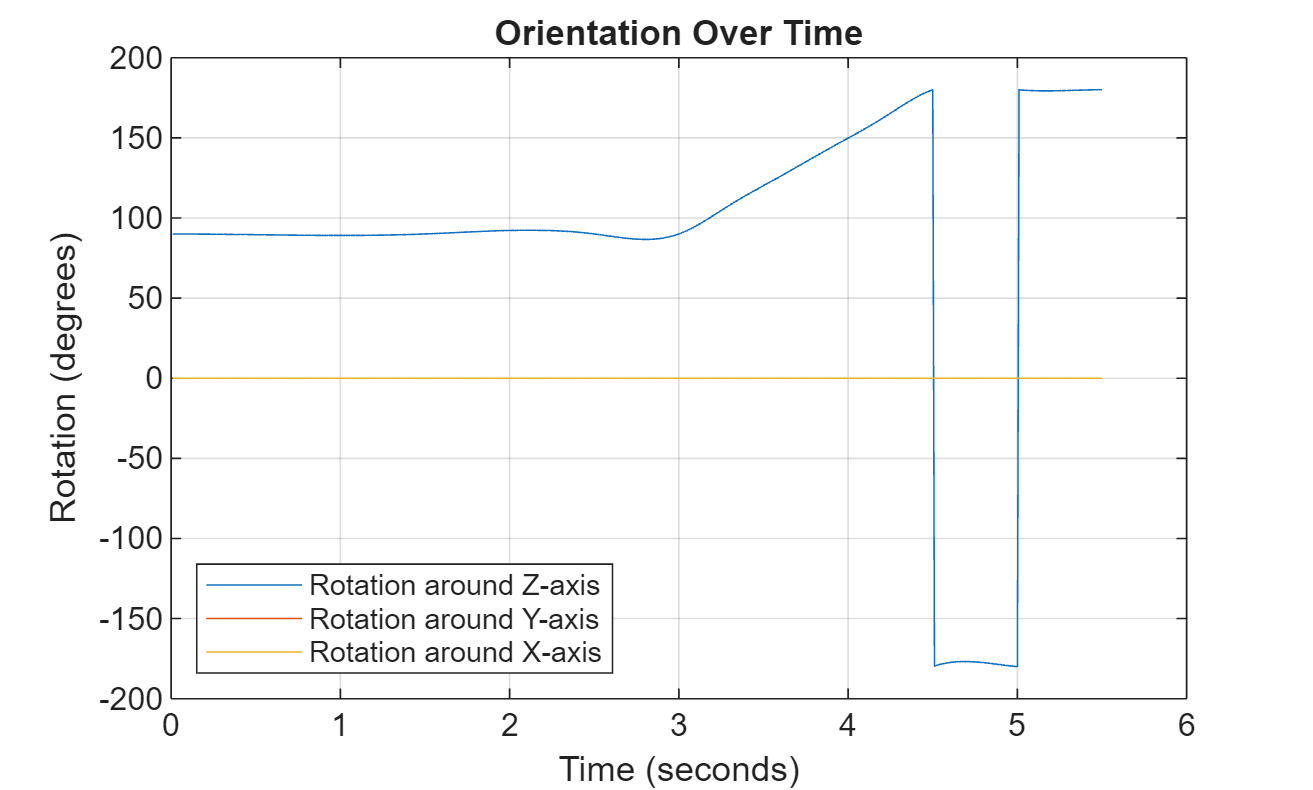
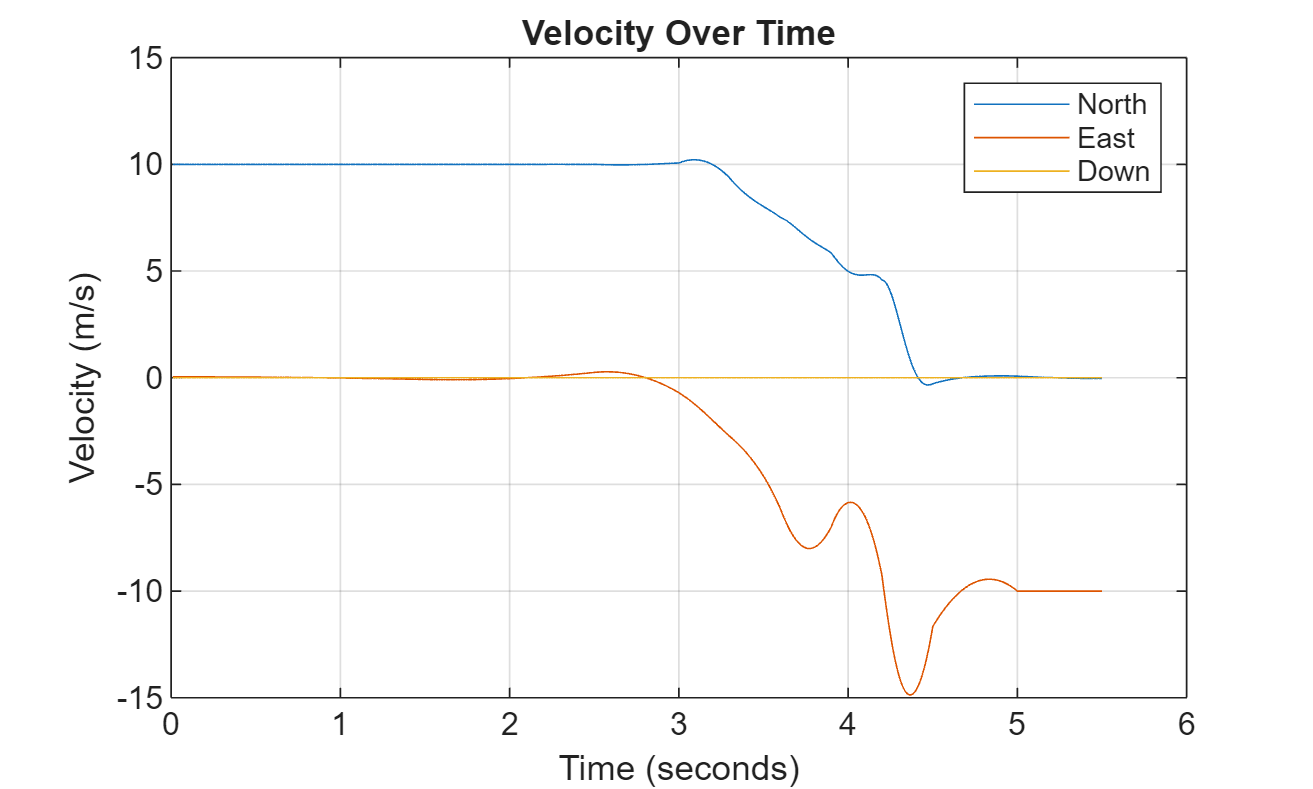
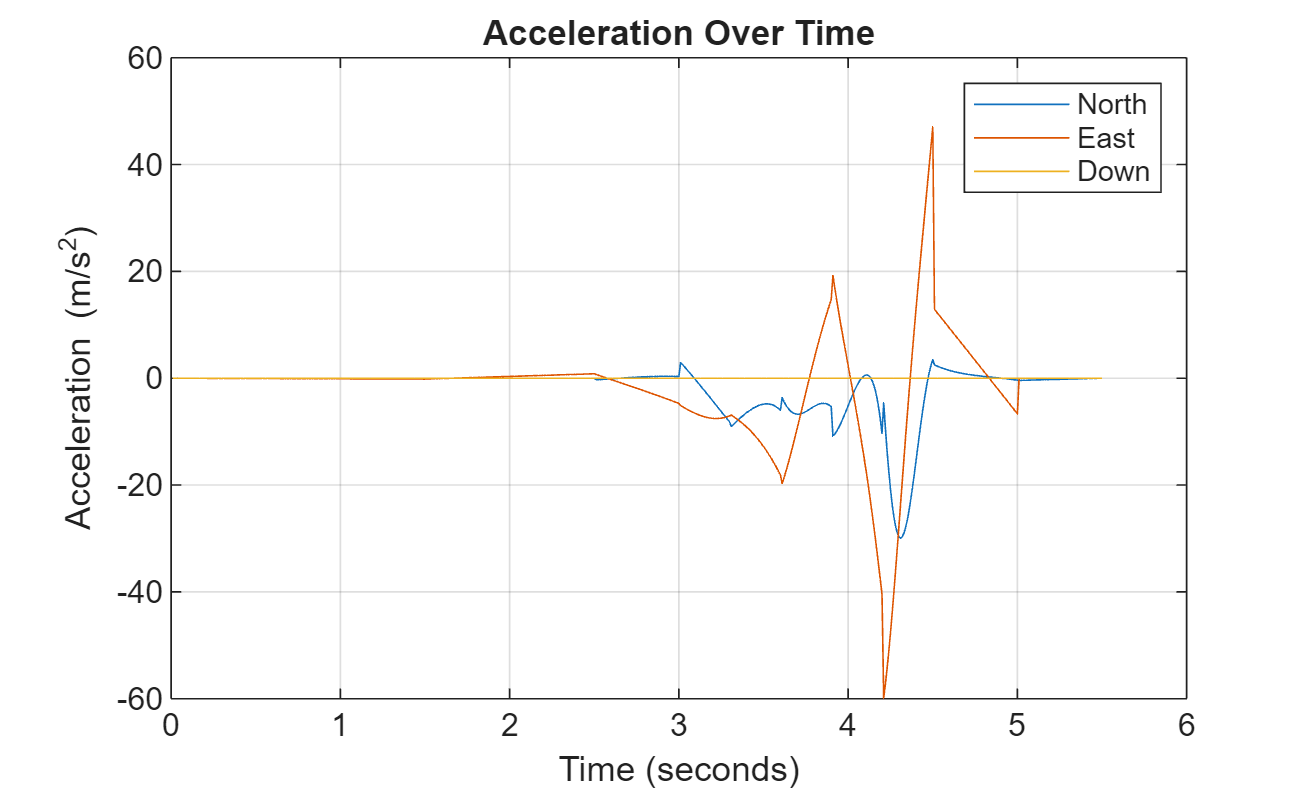
이제 생성된 궤적이 지정된 경계 내에 들어옵니다. 생성된 궤적의 방향, 속도, 가속도, 각속도를 시각화합니다.
figure(2)
timeVector = 0:(1/trajectory.SampleRate):tInfo.TimeOfArrival(end);
eulerAngles = eulerd(orient,"ZYX","frame");
plot(timeVector(2:end),eulerAngles(:,1), ...
     timeVector(2:end),eulerAngles(:,2), ...
     timeVector(2:end),eulerAngles(:,3));
title("Orientation Over Time")
legend("Rotation around Z-axis", ...
       "Rotation around Y-axis", ...
       "Rotation around X-axis", ...
       "Location","southwest")
xlabel("Time (seconds)")
ylabel("Rotation (degrees)")
grid on
figure(3)
plot(timeVector(2:end),vel(:,1), ...
     timeVector(2:end),vel(:,2), ...
     timeVector(2:end),vel(:,3));
title("Velocity Over Time")
legend("North","East","Down")
xlabel("Time (seconds)")
ylabel("Velocity (m/s)")
grid on
figure(4)
plot(timeVector(2:end),acc(:,1), ...
     timeVector(2:end),acc(:,2), ...
     timeVector(2:end),acc(:,3));
title("Acceleration Over Time")
legend("North","East","Down")
xlabel("Time (seconds)")
ylabel("Acceleration (m/s^2)")
grid on
figure(5)
plot(timeVector(2:end),angVel(:,1), ...
     timeVector(2:end),angVel(:,2), ...
     timeVector(2:end),angVel(:,3));
title("Angular Velocity Over Time")
legend("North","East","Down")
xlabel("Time (seconds)")
ylabel("Angular Velocity (rad/s)")
grid on
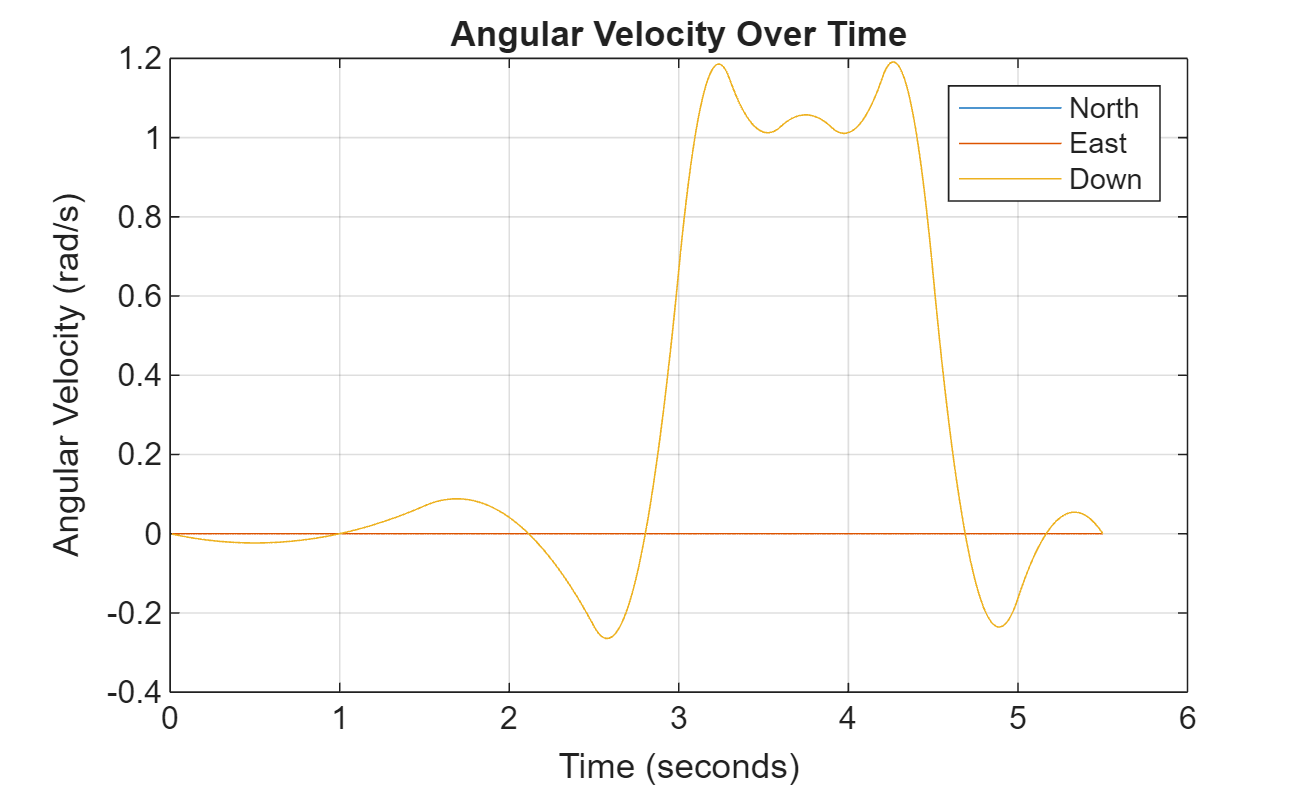
유의할 점은, 생성된 궤적이 이제 공간적 경계 내에는 들어오지만, 웨이포인트가 과도하게 지정되었기 때문에 궤적의 가속도와 각속도가 더 불규칙하게 변화한다는 것입니다.
아래와 같은 경주 트랙 궤적을 가정합니다.
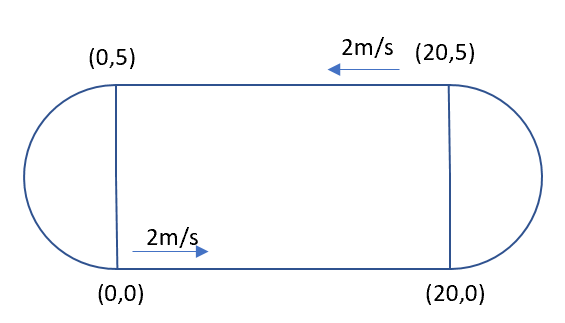
이 궤적의 4개 코너 점은 각각 (0,0,0), (20,0,0), (20,5,0), (0,5,0)입니다(단위: 미터). 따라서 루프의 웨이포인트를 다음과 같이 지정합니다.
wps = [0 0 0;
      20 0 0;
      20 5 0;
      0  5 0;
      0  0 0];
궤적이 2m/s의 일정한 속도를 가지므로 5개 웨이포인트에서의 속도는 다음과 같습니다.
vels = [2 0 0;
        2 0 0;
       -2 0 0;
       -2 0 0;
        2 0 0];
5개 웨이포인트에 대한 도달 시간은 다음과 같습니다.
t = cumsum([0 20/2 5*pi/2/2 20/2 5*pi/2/2]');
5개 웨이포인트에서의 궤적의 방향은 다음과 같습니다.
eulerAngs = [0 0 0;
             0 0 0;
           180 0 0;
           180 0 0;
             0 0 0]; % Angles in degrees.
% Convert Euler angles to quaternions.
quats = quaternion(eulerAngs,"eulerd","ZYX","frame");
궤적 선을 부드럽게 하기 위해 샘플 레이트를 100으로 지정합니다.
fs = 100;
waypointTrajectory를 생성합니다.
traj = waypointTrajectory(wps,SampleRate=fs, ...
        Velocities=vels,...
        TimeOfArrival=t,...
        Orientation=quats);
궤적을 샘플링하고 플로팅합니다.
[pos, orient, vel, acc, angvel] = traj();
i = 1;

spf = traj.SamplesPerFrame;
while ~isDone(traj)
    idx = (i+1):(i+spf);
    [pos(idx,:), orient(idx,:), ...
        vel(idx,:), acc(idx,:), angvel(idx,:)] = traj();
    i = i+spf;
end
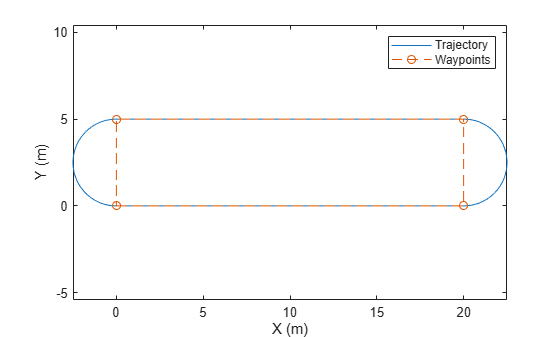
궤적과 지정된 웨이포인트를 플로팅합니다.
plot(pos(:,1),pos(:,2), wps(:,1),wps(:,2), "--o")
xlabel("X (m)")
ylabel("Y (m)")
zlabel("Z (m)")
legend({"Trajectory", "Waypoints"})
axis equal
두 웨이포인트를 연결하는 waypointTrajectory 객체를 만듭니다. 두 웨이포인트에서 궤적의 속도는 각각 0와 10입니다. 저크 제한을 0.5로 제한하여 사다리꼴 가속도 프로파일을 활성화합니다.
waypoints = [0  0  0;
            10 50 10];
speeds = [0 10];
jerkLimit = 0.5;
trajectory = waypointTrajectory(waypoints,GroundSpeed=speeds,JerkLimit=jerkLimit);
TimeOfArrival 속성을 쿼리하여 궤적의 초기 시간과 최종 시간을 구합니다. 궤적을 샘플링할 타임스탬프를 만듭니다.
t0 = trajectory.TimeOfArrival(1);
tf = trajectory.TimeOfArrival(end);
sampleTimes = linspace(t0,tf,100);
lookupPose 객체 함수를 사용하여 이러한 샘플링된 타임스탬프에서 위치, 속도, 가속도 정보를 가져옵니다.
[position,~,velocity,acceleration,~] = lookupPose(trajectory,sampleTimes);
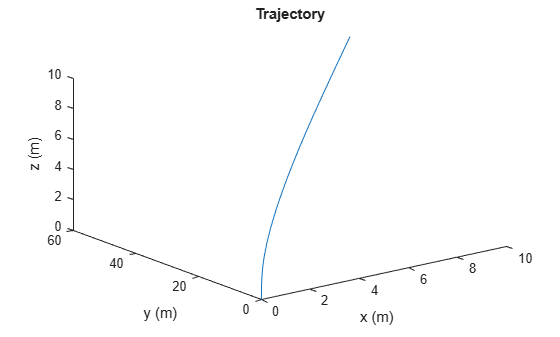
궤적을 플로팅합니다.
figure()
plot3(position(:,1),position(:,2),position(:,3))
xlabel("x (m)")
ylabel("y (m)")
zlabel("z (m)")
title("Trajectory")
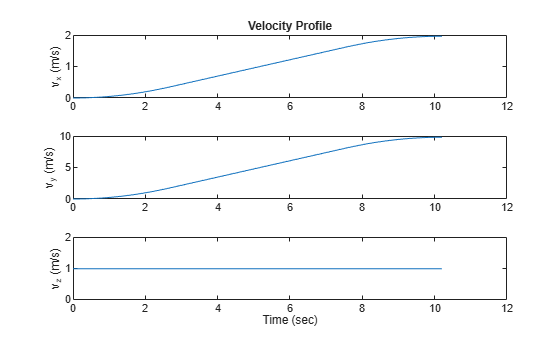
속도 프로파일을 플로팅합니다.
figure()
subplot(3,1,1)
plot(sampleTimes,velocity(:,1));
ylabel("v_x (m/s)")
title("Velocity Profile")
subplot(3,1,2)
plot(sampleTimes,velocity(:,2));
ylabel("v_y (m/s)")
subplot(3,1,3)
plot(sampleTimes,velocity(:,3));
ylabel("v_z (m/s)")
xlabel("Time (sec)")
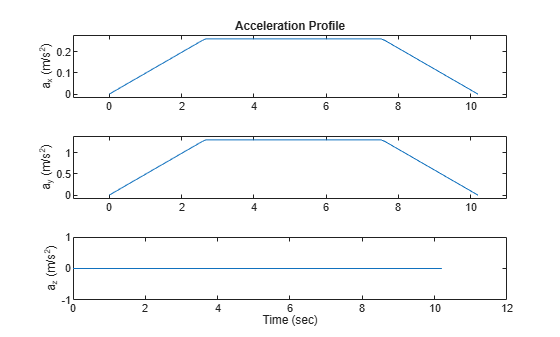
가속도 프로파일을 플로팅합니다. 결과를 보면, 평면 모션의 가속도 프로파일이 사다리꼴 형태입니다.
figure()
subplot(3,1,1)
plot(sampleTimes,acceleration(:,1));
axis padded
ylabel("a_x (m/s^2)")
title("Acceleration Profile")
subplot(3,1,2)
plot(sampleTimes,acceleration(:,2));
ylabel("a_y (m/s^2)")
axis padded
subplot(3,1,3)
plot(sampleTimes,acceleration(:,3));
ylabel("a_z (m/s^2)")
xlabel("Time (sec)")
알고리즘
waypointTrajectory System object는 웨이포인트를 부드럽게 통과하는 궤적을 정의합니다. 이 궤적은 궤적 기준 프레임에서 중력 방향이 일정하다는 가정을 바탕으로 웨이포인트들을 보간하여 연결합니다. 일반적으로 waypointTrajectory를 사용하여 수백 킬로미터 이내의 거리 범위에서 플랫폼이나 이동체의 궤적을 모델링할 수 있습니다.
궤적의 평면 경로(x-y 평면 투영)는 조각별 클로소이드 곡선으로 구성됩니다. 2개의 연속된 웨이포인트 사이 곡선의 곡률은, 그 사이의 곡선 길이에 대해 선형으로 변화합니다. 진로가 Course 속성을 통해 명시적으로 지정되거나 Velocities 속성을 통해 암묵적으로 지정된 경우를 제외하고는, 각 웨이포인트에서의 진로 접선 방향은 곡률의 불연속성을 최소화하도록 선택됩니다. 경로가 정해지면, 객체는 3차 에르미트 보간을 사용하여, 시간과 평면 이동 거리의 함수로서 경로 전반에 걸친 이동체의 위치를 계산합니다. JerkLimit 속성이 지정된 경우, 객체는 두 웨이포인트 사이의 각 구간에 대해 수평 사다리꼴 가속도 프로파일을 생성합니다. 사다리꼴 가속도 프로파일은 다음의 세 하위 구간으로 구성됩니다.
저크 크기가 일정한 하위 구간
가속도 크기가 일정한 하위 구간
저크 크기가 일정한 하위 구간
이후 궤적의 법선 성분(z 성분)은, ClimbRate 속성이나 Velocities 속성의 세 번째 열을 통해 상승률이 명시적으로 지정되어 있지 않는 한, 형태 보존 조각별 스플라인(PCHIP)을 충족하도록 선택됩니다. 선택한 ReferenceFrame에 따라 상승률의 부호를 선택합니다.
'ENU' 기준 프레임을 선택한 경우, 양의 상승률을 지정하면 z 값이 증가합니다.
'NED' 기준 프레임을 선택한 경우, 양의 상승률을 지정하면 z 값이 감소합니다.
경로를 따라가는 이동체의 방향은 다음 두 가지 주요 방법으로 정의할 수 있습니다.
Orientation속성이 지정된 경우, 객체는 조각별 3차 쿼터니언 스플라인을 사용하여 시간 함수로서 경로를 따라가는 방향을 계산합니다.Orientation속성이 지정되지 않은 경우, 이동체의 요(yaw)는 항상 경로의 방향에 맞춰 정렬됩니다. 롤과 피치는 각각AutoBank속성값과AutoPitch속성값에 의해 결정됩니다.AutoBankAutoPitch설명 falsefalse이동체가 항상 수평입니다(피치와 롤이 0임). 이는 일반적으로 대형 선박에 사용됩니다. falsetrue이동체의 피치가 경로 방향에 맞춰 정렬되며 롤은 항상 0으로 유지됩니다. 이는 일반적으로 지상 이동체에 사용됩니다. truefalse중력을 포함한 순 가속도 방향에 로컬 z축이 정렬되도록 이동체의 피치와 롤이 선택됩니다. 이는 일반적으로 회전익 항공기에 사용됩니다. truetrue중력을 포함한 순 가속도 방향에 로컬 횡방향 평면(local transverse plane)이 정렬되도록 이동체의 롤이 선택됩니다. 이동체의 피치는 경로 방향에 맞춰 정렬됩니다. 이는 일반적으로 2륜 이동체와 고정익 항공기에 사용됩니다.

