Functions Editor
R2026bVisualize and author component functions in software architectures
Description
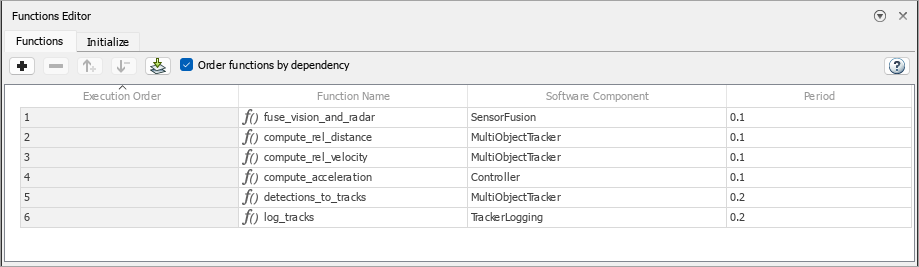
The Functions Editor allows you to author functions in the architecture level for inline components and schedule component initialization for reference components. You can then implement Simulink® behaviors for your authored functions.
Use the Functions Editor to:
Author and visualize functions.
Add and delete functions and function groups.
Change the execution order of the functions.
Change the name of a function.
Change the period of a function.
Implement behaviors for functions.
Add custom properties to functions using stereotypes.
Order component initialization.
Open the Functions Editor
System Composer™ toolstrip: Navigate to Modeling > Functions Editor.
Examples
Parameters
Add a function to a software component by clicking Add function .
Remove a function from a software component by clicking Remove function .
Increase the execution order of a function by clicking .
This option is only available if Order functions by dependency is unchecked.
Decrease the execution order of a function by clicking .
This option is only available if Order functions by dependency is unchecked.
Create a function group containing the functions selected in the Functions
Editor by clicking Group functions
 .
.
This option is only available if two or more functions of the same period are selected in the Functions Editor.
Remove all functions from function group selected in the Functions
Editor by clicking Ungroup function group
 .
.
This option is only available if one or more function groups are selected in the Functions Editor.
Create a new function group containing the functions of the same period by clicking Group functions by period .
You can automatically create function groups based on their period. This functionality is available for functions of software components.
Note
This option is only available if two or more functions of the same period are in the software architecture.
Update the software architecture diagram to refresh the functions in the
Functions Editor by clicking Update diagram
 .
.
Select this check box to order functions in the Functions Editor by dependency.
You can order functions automatically based on their data
dependencies. This functionality is available for functions from behavior models. To enable
automatic sorting, select the Order functions by dependency
check box or enable OrderFunctionsByDependency on the architecture
model.
Programmatic Use
More About
Version History
Introduced in R2021bSee Also
systemcomposer.arch.Function | systemcomposer.interface.ServiceInterface | systemcomposer.interface.FunctionElement | systemcomposer.interface.FunctionArgument | addFunction | decreaseExecutionOrder | increaseExecutionOrder | addServiceInterface | setFunctionPrototype | getFunctionArgument | createFunctionGroup | add | remove | ungroup

