frestimateOptions
R2026bOptions for frequency response estimation
Description
Use frestimateOptions to create an option set for
the frestimate function.
Creation
Description
options = frestimateOptionsoptions, with default settings.
Pass this object to the function
frestimate to use these options
for frequency response estimation.
options = frestimateOptions(PropertyName=Value)frestimateOptions(UseParallel="off")
disables parallel computing.
Properties
Examples
Open model.
mdl = "scdspeed_ctrlloop";
open_system(mdl)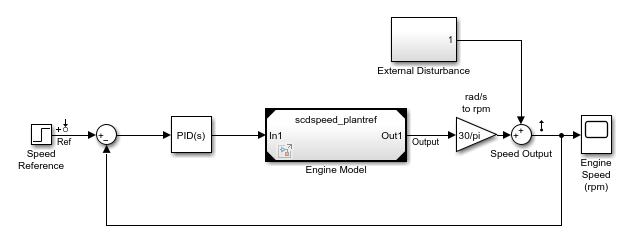
Convert referenced subsystem to normal mode.
set_param("scdspeed_ctrlloop/Engine Model","SimulationMode","Normal");
Obtain input/output points from the model and create sinestream input signal.
io = getlinio(mdl);
in = frest.Sinestream( ...
    Frequency=logspace(1,2,10), ...
    NumPeriods=30,...
    SettlingPeriods=25);
Identify time-varying sources in the model.
srcblks = frest.findSources(mdl)
srcblks =
  1×4 BlockPath array with properties:

    SubPath
    isLoadingModel
    isSavingModel
Create option set for estimation and specify the time-varying source blocks.
opts = frestimateOptions(BlocksToHoldConstant=srcblks);
Estimate the frequency response.
[sysest,simout] = frestimate(mdl,io,in,opts);
To demonstrate a dependency on a file that is not in the current working folder, move the model files to a temporary folder and return the path to that folder. The pathdepSetup helper function also adds the temporary folder to the MATLAB® search path.
tempPath = pathdepSetup;
Open the Simulink® model.
mdl = 'scdpathdep';
open_system(mdl)
Obtain the model dependency path.
dirs = frest.findDepend(mdl)
dirs = 1×1 cell array
    {'C:/myTempFiles/tpda2d7c67_2b14_432a_846b_eebf94cbdadb'}
The resulting path is on the local drive C:/.
If you are using remote workers, specify that all workers can access your local drive. For example, this command converts all references to the C drive to an equivalent network address that is accessible to remote workers.
dirs = regexprep(dirs,'C:/','\\\\hostname\\C$\\')
Enable parallel computing and specify the model path dependencies.
options = frestimateOptions(...
    'UseParallel','on',...
    'ParallelPathDependencies',dirs);
You can now use these options for frequency response estimation using parallel computing.
io = getlinio(mdl);
in = frest.Sinestream('SimulationOrder','OneAtATime');
frd = frestimate(mdl,io,in,options);
Starting parallel pool (parpool) using the 'Processes' profile ...
04-Nov-2025 09:47:36: Job Queued. Waiting for parallel pool job with ID 1 to start ...
04-Nov-2025 09:48:38: Job Queued. Waiting for parallel pool job with ID 1 to start ...
Connected to parallel pool with 4 workers.
After estimating the frequency response, you can close the model.
bdclose(mdl)
Return the model files to the current working folder and remove the temporary folder from the path.
pathdepCleanup(tempPath)
Alternatives
You can enable parallel computing for all models with no path dependencies. To do so, in the MATLAB preferences dialog box, click Simulink® Control Design™. Then, select the Use the parallel pool when you use the "frestimate" command option. This global setting persists from session to session until you change this option.
When you select this option and use the frestimate
command, you do not need to provide an
frestimateOptions object.
If your model has path dependencies, you must create your own frequency
response options object that specifies the path dependencies. Use the
ParallelPathDependencies option before beginning
the estimation.

