generate
R2026bClass: sigwin.kaiser
Namespace: sigwin
Generates Kaiser window
Syntax
win = generate(H)
Description
win = generate(H) returns the values of
the Kaiser window object as a double-precision column vector.
Examples
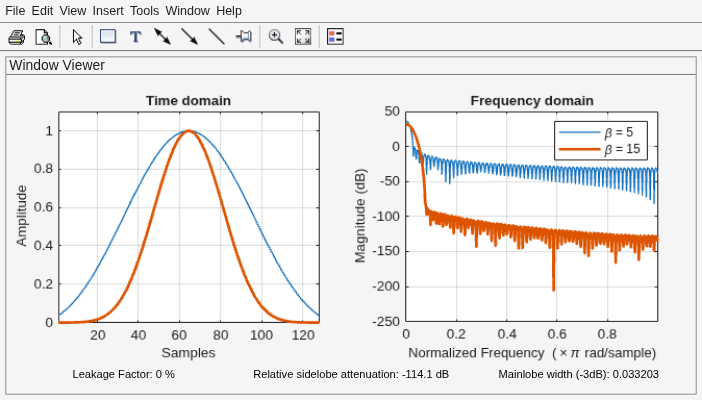
Generate two Kaiser windows of length N = 64:
The first window has an attenuation parameter β = 5.
The second window has β = 15.
Display the two windows.
H05 = sigwin.kaiser(128,5);
H15 = sigwin.kaiser(128,15);

wvt = wvtool(H05,H15);
legend(wvt.CurrentAxes,'\beta = 5','\beta = 15')
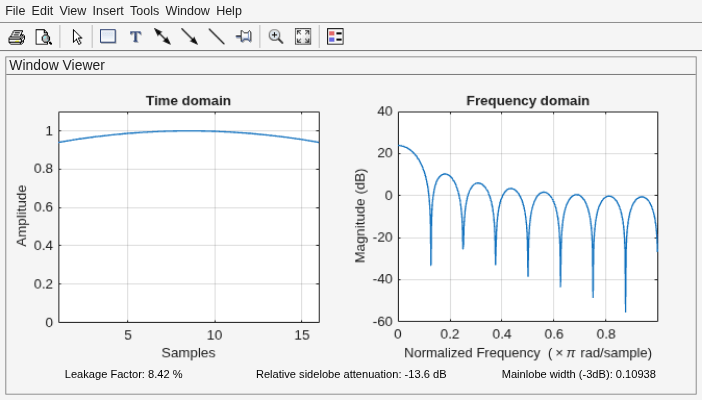
Generate a Kaiser window with length N = 16 and the default β = 1/2. Return its values as a column vector. Show information about the window object. Display the window.
H = sigwin.kaiser(16);

win = generate(H)
win = 16×1

    0.9403
    0.9550
    0.9677
    0.9783
    0.9868
    0.9933
    0.9976
    0.9997
    0.9997
    0.9976
    0.9933
    0.9868
    0.9783
    0.9677
    0.9550
      ⋮
wininfo = info(H)
wininfo = 4×13 char array
    'Kaiser Window'
    '-------------'
    'Length  : 16 '
    'Beta    : 0.5'
wvtool(H)