sigwin.kaiser Class
R2026bNamespace: sigwin
Construct Kaiser window object
Description
Note
The use of sigwin.kaiser is not recommended.
Use kaiser instead.
sigwin.kaiser creates a handle to a Kaiser
window object for use in spectral analysis and FIR filtering by the
window method. Object methods enable workspace import and ASCII file
export of the window values.
The following equation defines the Kaiser window of length N:
where x is linearly spaced N-point
vector and is the modified zeroth-order
Bessel function of the first kind. is
the attenuation parameter.
Construction
H = sigwin.kaiser returns a Kaiser window
object H of length 64 and attenuation parameter beta of
0.5.
H = sigwin.kaiser( returns
a Kaiser window object Length)H of length Length and
attenuation parameter beta of 0.5. Length requires
a positive integer. Entering a positive noninteger value for Length rounds
the length to the nearest integer. Entering a 1 for Length results
in a window with a single value of 1.
H = sigwin.kaiser( returns
a Kaiser window object with real-valued attenuation parameter Length,Beta)beta.
Properties
| Kaiser window length. The window length requires a positive
integer. Entering a positive noninteger value for |
| Attenuation parameter. |
Methods
| generate | Generates Kaiser window |
| info | Display information about Kaiser window object |
| winwrite | Save Kaiser window in ASCII file |
Copy Semantics
Handle. To learn how copy semantics affect your use of the class, see Copying Objects in the MATLAB® Programming Fundamentals documentation.
Examples
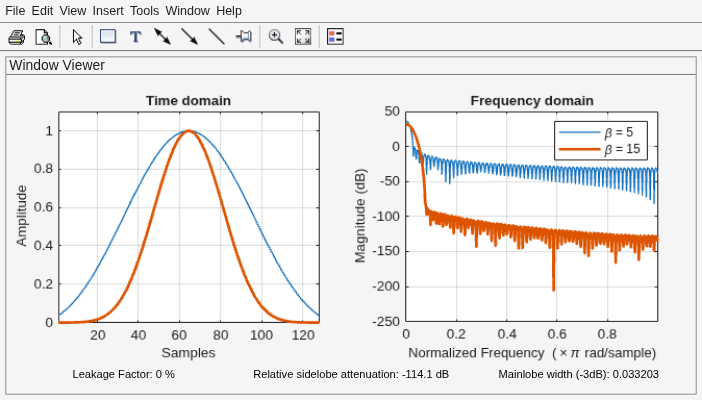
Generate two Kaiser windows of length N = 64:
The first window has an attenuation parameter β = 5.
The second window has β = 15.
Display the two windows.
H05 = sigwin.kaiser(128,5);
H15 = sigwin.kaiser(128,15);

wvt = wvtool(H05,H15);
legend(wvt.CurrentAxes,'\beta = 5','\beta = 15')
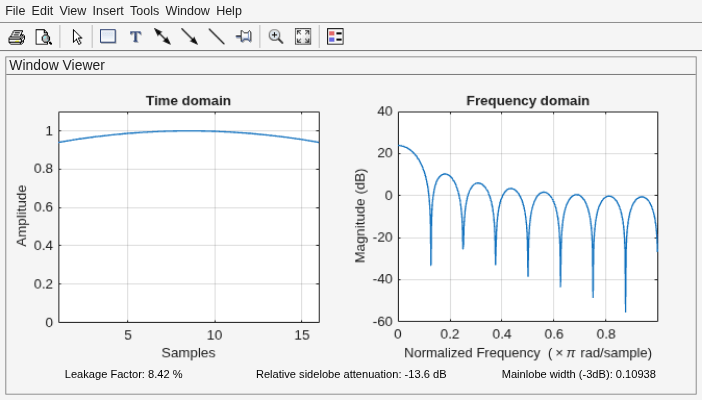
Generate a Kaiser window with length N = 16 and the default β = 1/2. Return its values as a column vector. Show information about the window object. Display the window.
H = sigwin.kaiser(16);

win = generate(H)
win = 16×1

    0.9403
    0.9550
    0.9677
    0.9783
    0.9868
    0.9933
    0.9976
    0.9997
    0.9997
    0.9976
    0.9933
    0.9868
    0.9783
    0.9677
    0.9550
      ⋮
wininfo = info(H)
wininfo = 4×13 char array
    'Kaiser Window'
    '-------------'
    'Length  : 16 '
    'Beta    : 0.5'
wvtool(H)
References
Oppenheim, Alan V., and Ronald W. Schafer. Discrete-Time Signal Processing. Upper Saddle River, NJ: Prentice Hall, 1989.

