Complex Highpass FIR
R2026bDesign complex highpass finite impulse response filter
Description
A highpass filter attenuates the energy of an input signal below a specified frequency threshold. A finite impulse response (FIR) filter computes an output signal as a running weighted average of input samples. A complex filter is characterized by complex-valued coefficients and processes the input signal along positive and negative frequencies.
To design a Complex Highpass FIR filter, specify combinations of the parameters in the diagram. Click a parameter for more information.
Signal Processing Toolbox™ provides different ways to design complex highpass FIR filters:
designfiltfunction — Design a complex highpass FIR filter at the command line or in a script. Use"complexhighpassfir"as the first argument when you call the function.For an example, see Design Complex Highpass FIR Filter Using designfilt.
Filter Designer app — Design a complex highpass FIR filter interactively. Export your design to the MATLAB® workspace or to a file.
For an example, see Design Complex Highpass FIR Filter Using Filter Designer.
All of these methods return digitalFilter objects. If you
have a DSP System Toolbox™ license, you can generate your design as a filter System object™ and include additional design options.
For other ways to design complex highpass FIR filters using MATLAB, see cfirpm.
Examples
To design the filter at the command line or in a script, use the designfilt function with "complexhighpassfir" as the first argument. Use name-value arguments to specify your design further.
d = designfilt("complexhighpassfir", ... % Response type SampleRate=2000, ... % Sample rate FilterOrder=30, ... % Filter order PassbandFrequency1=-450, ... % Frequency constraints PassbandFrequency2=650, ... TransitionWidth=100, ... PassbandWeight1=2, ... % Design method options StopbandWeight=1, ... PassbandWeight2=2); filterAnalyzer(d)
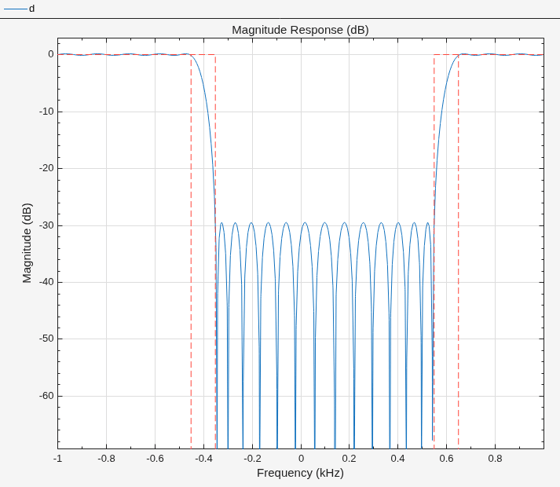
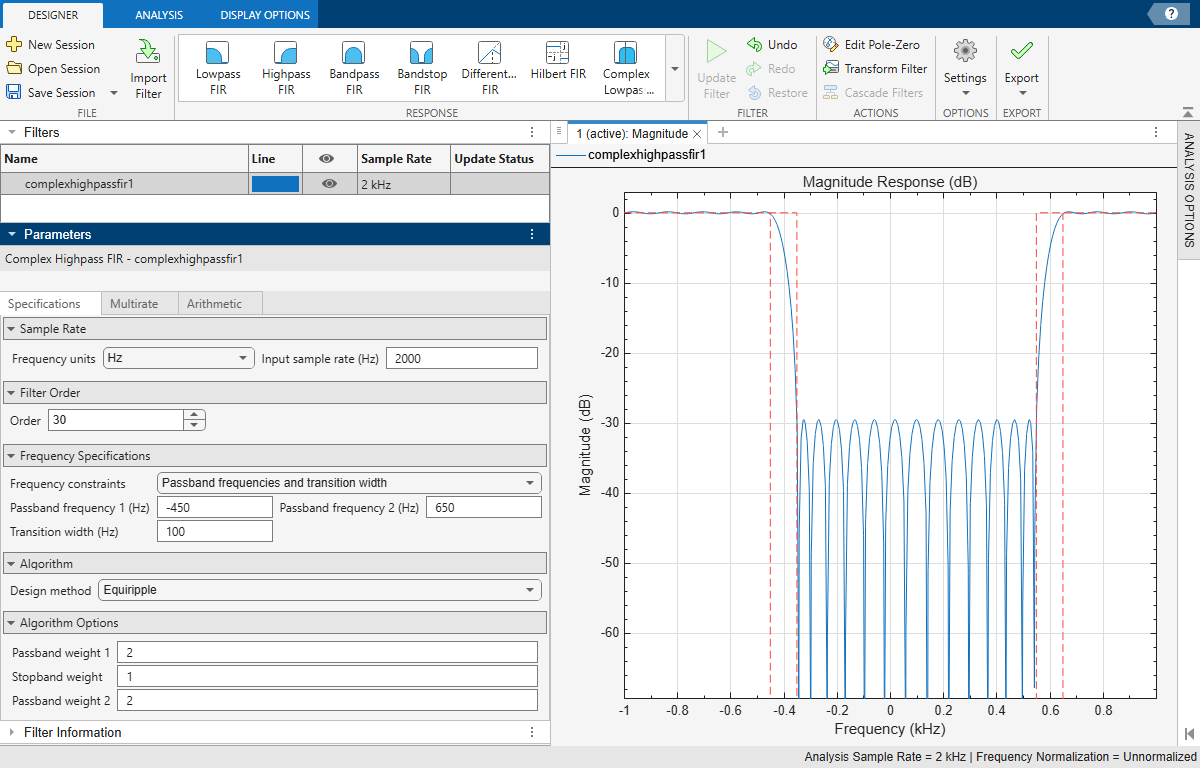
To design the filter using the Filter Designer app:
In the Response gallery of the Designer tab in the app toolstrip, select Complex Highpass FIR.
Specify the filter using the options in the Filter Parameters table:
In Sample Rate, specify Frequency units as
Hzand Input sample rate (Hz) as2000.Under Filter Order, specify the Order as
30.Under Frequency Specifications, specify:
Passband frequency 1 as
-450HzPassband frequency 2 as
650HzTransition width as
100Hz
Under Algorithm, select
Equiripple. Under Algorithm Options, specify:Passband weight 1 as
2Stopband weight as
1Passband weight 2 as
2
In the Filter section of the Designer tab, click Update Filter.
Export code to create your digital filter. On the toolstrip, click Export and select
Generate MATLAB function>Digital Filter Object. The code appears in the editor.function designedFilter = complexhighpassfir1filt designedFilter = designfilt('complexhighpassfir', ... 'FilterOrder',30,'PassbandFrequency1',-450, ... 'PassbandFrequency2',650,'TransitionWidth',100, ... 'SampleRate',2000,'PassbandWeight1',2, ... 'PassbandWeight2',2); end
Parameters
Design Method
Specify the algorithm to design the filter. The available design methods correlate with the set of design specifications that you choose.
Design the filter using the Parks-McClellan algorithm. Equiripple filters have a frequency response that minimizes the maximum ripple magnitude over all bands.
designfilt Function | Filter Designer App |
|---|---|
Specify
| In the Algorithm section of the filter
parameters panel, set Design method to
|
The equiripple design method supports these design parameter combinations.
| Filter Order | Frequency Specifications | Magnitude Specifications | Design Method Options | DSP System Toolbox License Required |
|---|---|---|---|---|
|
| N/A |
| |
|
| N/A |
|
Sample Rate
The sample rate you specify sets the Nyquist frequency for the filter. If you specify a sample rate Fs in hertz, the Nyquist frequency is Fs/2. If you work with normalized frequencies, the Nyquist frequency is 1.
Specify the filter sample rate as a positive scalar expressed in hertz.
designfilt Function | Filter Designer App |
|---|---|
| In the Sample Rate section of the filter parameters panel:
|
Filter Order
Specify the filter order N as a positive integer. Some design methods let you specify the order. Others generate minimum-order designs, which are the shortest filters that satisfy the specified constraints.
designfilt Function | Filter Designer App |
|---|---|
| In the Filter Order section of the filter parameters panel:
|
Frequency Specifications
The lower passband frequency is the highest frequency in the lower passband region.
Specify the lower passband frequency as a negative scalar whose absolute value is smaller than the Nyquist frequency. If you specify a sample rate Fs in hertz, the Nyquist frequency is Fs/2. If you work with normalized frequencies, the Nyquist frequency is 1.
designfilt Function | Filter Designer App |
|---|---|
|
|
The lower stopband frequency is the lowest frequency in the stopband region.
Specify the lower stopband frequency as a negative scalar whose absolute value is smaller than the Nyquist frequency. If you specify a sample rate Fs in hertz, the Nyquist frequency is Fs/2. If you work with normalized frequencies, the Nyquist frequency is 1.
designfilt Function | Filter Designer App |
|---|---|
|
|
The higher stopband frequency is the highest frequency in the stopband region.
Specify the higher stopband frequency as a positive scalar smaller than the Nyquist frequency. If you specify a sample rate Fs in hertz, the Nyquist frequency is Fs/2. If you work with normalized frequencies, the Nyquist frequency is 1.
designfilt Function | Filter Designer App |
|---|---|
|
|
The higher passband frequency is the lowest frequency in the higher passband region.
Specify the higher passband frequency as a positive scalar smaller than the Nyquist frequency. If you specify a sample rate Fs in hertz, the Nyquist frequency is Fs/2. If you work with normalized frequencies, the Nyquist frequency is 1.
designfilt Function | Filter Designer App |
|---|---|
|
|
The transition band separates the stopband region from either passband region.
Specify the width of the transition band as a positive scalar smaller than the Nyquist frequency. If you specify a sample rate Fs in hertz, the Nyquist frequency is Fs/2. If you work with normalized frequencies, the Nyquist frequency is 1.
designfilt Function | Filter Designer App |
|---|---|
|
|
Design Method Options
Basic Options
Lower passband optimization weight for an Equiripple design, specified as a positive scalar.
Weights let you specify the relative importance of the passband ripple and the stopband attenuation in a filter design. By default, the passband and the stopbands are equally weighted, each with unit weight. By increasing a passband weight, you can decrease the passband ripple at the expense of decreasing the stopband attenuation.
designfilt Function | Filter Designer App |
|---|---|
|
|
Stopband optimization weight for an Equiripple design, specified as a positive scalar.
Weights let you specify the relative importance of the passband ripple and the stopband attenuation in a filter design. By default, the passband and the stopbands are equally weighted, each with unit weight. By increasing the stopband weight, you can increase the attenuation of the stopband at the expense of increasing passband ripple.
designfilt Function | Filter Designer App |
|---|---|
|
|
Higher passband optimization weight for an Equiripple design, specified as a positive scalar.
Weights let you specify the relative importance of the passband ripple and the stopband attenuation in a filter design. By default, the passband and the stopbands are equally weighted, each with unit weight. By increasing a passband weight, you can decrease the passband ripple at the expense of decreasing the stopband attenuation.
designfilt Function | Filter Designer App |
|---|---|
|
|
See Also
Apps
Functions
Live Editor Tasks
MATLAB Command
You clicked a link that corresponds to this MATLAB command:
Run the command by entering it in the MATLAB Command Window. Web browsers do not support MATLAB commands.
웹사이트 선택
번역된 콘텐츠를 보고 지역별 이벤트와 혜택을 살펴보려면 웹사이트를 선택하십시오. 현재 계신 지역에 따라 다음 웹사이트를 권장합니다:
또한 다음 목록에서 웹사이트를 선택하실 수도 있습니다.
사이트 성능 최적화 방법
최고의 사이트 성능을 위해 중국 사이트(중국어 또는 영어)를 선택하십시오. 현재 계신 지역에서는 다른 국가의 MathWorks 사이트 방문이 최적화되지 않았습니다.
미주
- América Latina (Español)
- Canada (English)
- United States (English)
유럽
- Belgium (English)
- Denmark (English)
- Deutschland (Deutsch)
- España (Español)
- Finland (English)
- France (Français)
- Ireland (English)
- Italia (Italiano)
- Luxembourg (English)
- Netherlands (English)
- Norway (English)
- Österreich (Deutsch)
- Portugal (English)
- Sweden (English)
- Switzerland
- United Kingdom (English)