상수 경계 조건을 갖는 PDE 풀기
R2026b이 예제에서는 스칼라 PDE와 연립 PDE(연립편미분방정식)에 다양한 상수 경계 조건 지정을 적용하는 방법을 보여줍니다.
지오메트리
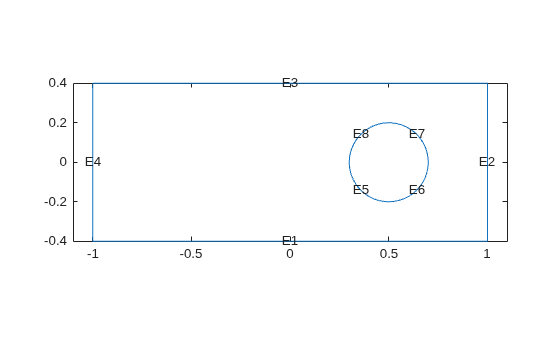
모든 지정 방법에서 동일한 2차원 지오메트리를 사용하며, 이는 원형 구멍이 있는 사각형입니다.
% Rectangle is code 3, 4 sides,
% followed by x-coordinates and then y-coordinates
R1 = [3,4,-1,1,1,-1,-.4,-.4,.4,.4]';
% Circle is code 1, center (.5,0), radius .2
C1 = [1,.5,0,.2]';
% Pad C1 with zeros to enable concatenation with R1
C1 = [C1;zeros(length(R1)-length(C1),1)];
geom = [R1,C1];

% Names for the two geometric objects
ns = (char('R1','C1'))';

% Set formula
sf = 'R1 - C1';

% Create geometry
g = decsg(geom,sf,ns);

% Create geometry model
model = createpde;

% Include the geometry in the model
% and view the geometry
geometryFromEdges(model,g);
pdegplot(model,EdgeLabels="on")
xlim([-1.1 1.1])
axis equal
스칼라 문제
모서리 4에는 값이 32인 디리클레(Dirichlet) 조건이 있고, 모서리 2에는 값이 72인 디리클레 조건이 있으며, 그 외 모든 모서리에는 q = 0, g = -1인 노이만(Neumann) 경계 조건이 있다고 가정하겠습니다.
applyBoundaryCondition(model,"dirichlet", ...
                       Edge=4,u=32);
applyBoundaryCondition(model,"dirichlet", ...
                       Edge=2,u=72);
applyBoundaryCondition(model,"neumann", ...
                       Edge=[1,3,5:8],g=-1);
이로써 경계 조건 지정이 완료됩니다.
이러한 경계 조건에서 c = 1, a = 0, f = 10을 사용하여 타원 PDE를 풉니다. 사각형의 짧은 변 길이가 0.8이므로, 메시가 너무 성기지 않도록 최대 메시 크기를 Hmax = 0.1로 지정합니다.
specifyCoefficients(model,m=0,d=0,c=1,a=0,f=10);
generateMesh(model,Hmax=0.1);
results = solvepde(model);
u = results.NodalSolution;
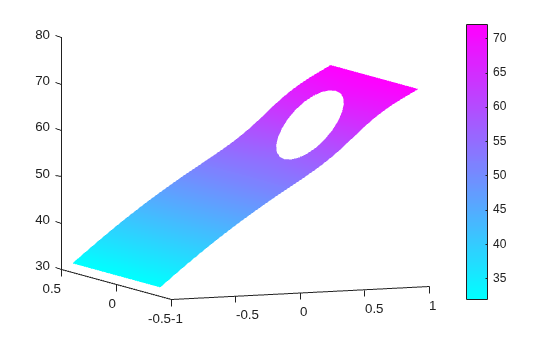
pdeplot(model,XYData=u,ZData=u)
view(-23,8)
연립 PDE
시스템(연립 PDE)에서 N = 2라고 가정하겠습니다.
모서리 2에 값이 [72,32]인 디리클레 조건이 있습니다.
모서리 4에 값이 [32,72]인 디리클레 조건이 있습니다.
모서리 1에 첫 번째 컴포넌트에 대해 값이 52인 디리클레 조건이 있고,두 번째 컴포넌트에 대해
q = 0,g = -1인 노이만 조건이 있습니다.모서리 3에
q = [1,2;3,4]및g = [5,-6]인 노이만 경계 조건이 있습니다.원형 모서리(모서리 5~8)에서
q = 0및g = 0입니다.
model = createpde(2);
geometryFromEdges(model,g);

applyBoundaryCondition(model,"dirichlet", ...
                       Edge=2,u=[72,32]);
applyBoundaryCondition(model,"dirichlet", ...
                       Edge=4,u=[32,72]);
applyBoundaryCondition(model,"mixed", ...
                       Edge=1,u=52, ...
                       EquationIndex=1,g=[0,-1]);
Q2 = [1,2;3,4];
G2 = [5,-6];
applyBoundaryCondition(model,"neumann", ...
                       Edge=3,q=Q2,g=G2);

% The next step is optional,
% because it sets "g" to its default value
applyBoundaryCondition(model,"neumann", ...
                       Edge=5:8,g=[0,0]);
이로써 경계 조건 지정이 완료됩니다.
이러한 경계 조건에서 c = 1, a = 0, f = [10;-10]을 사용하여 타원 PDE를 풉니다. 사각형의 짧은 변 길이가 0.8이므로, 메시가 너무 성기지 않도록 최대 메시 크기를 Hmax = 0.1로 지정합니다.
specifyCoefficients(model,m=0,d=0,c=1,a=0,f=[10;-10]);
generateMesh(model,Hmax=0.1);
results = solvepde(model);
u = results.NodalSolution;
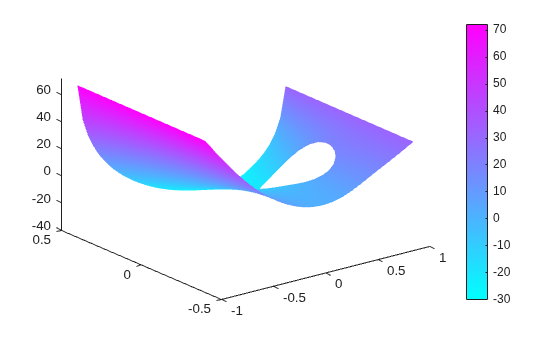
pdeplot(model,XYData=u(:,2),ZData=u(:,2))