이 페이지는 기계 번역을 사용하여 번역되었습니다. 영어 원문을 보려면 여기를 클릭하십시오.
Basler ToF blaze-101 카메라에서 포인트 클라우드를 수집하고 확인하기
R2026b이 예제는 GenICam™ 규격을 준수하는 Basler ToF blaze-101 카메라에서 포인트 클라우드를 수집하고 시각화하는 방법을 보여줍니다.
요구 사항
이 예제를 실행하려면 다음 추가 기능이 필요합니다.
Image Acquisition Toolbox™
GenICam™ 인터페이스용 Image Acquisition Toolbox 지원 패키지
카메라에 연결
gentl 어댑터를 사용하여 videoinput 객체를 생성합니다. 이 예제에서는 첫 번째 장치와 Coord3D_ABC32f 픽셀 형식을 선택하여 Basler ToF blaze-101 카메라로부터 3D 포인트 클라우드를 수집합니다. imaqhwinfo를 사용하면 사용 가능한 모든 기기를 확인할 수 있습니다.
hwlist= imaqhwinfo("gentl")hwlist = struct with fields:
AdaptorDllName: 'Z:\77\user.examples26a\runnable\matlab\toolbox\imaq\supportpackages\gentl\adaptor\win64\mwgentlimaq.dll'
AdaptorDllVersion: '26.1 (R2026a)'
AdaptorName: 'gentl'
DeviceIDs: {[1]}
DeviceInfo: [1×1 struct]
hwlist.DeviceInfo
ans = struct with fields:
             DefaultFormat: 'Mono16'
       DeviceFileSupported: 0
                DeviceName: 'blz1'
                  DeviceID: 1
     VideoInputConstructor: 'videoinput('gentl', 1)'
    VideoDeviceConstructor: 'imaq.VideoDevice('gentl', 1)'
          SupportedFormats: {'Confidence16'  'Coord3D_ABC32f'  'Coord3D_C16'  'Mono16'}
vid = videoinput("gentl", 1, "Coord3D_ABC32f")
Summary of Video Input Object Using 'blz1'.

   Acquisition Source(s):  Stream0 is available.

  Acquisition Parameters:  'Stream0' is the current selected source.
                           10 frames per trigger using the selected source.
                           'Coord3D_ABC32f' video data to be logged upon START.
                           Grabbing first of every 1 frame(s).
                           Log data to 'memory' on trigger.

      Trigger Parameters:  1 'immediate' trigger(s) on START.

                  Status:  Waiting for START.
                           0 frames acquired since starting.
                           0 frames available for GETDATA.
카메라 설정
비디오 소스 객체를 가져옵니다.
src = getselectedsource(vid);
Range 컴포넌트를 사용하여 레인지 맵에 액세스하도록 카메라를 설정하고, 다른 모든 컴포넌트는 비활성화하십시오.
src.ComponentSelector = "Intensity";
src.ComponentEnable = "False";
src.ComponentSelector = "Confidence";
src.ComponentEnable = "False";
src.ComponentSelector = "Range";
src.ComponentEnable = "True";
카메라의 최소 심도를 설정하십시오.
src.DepthMin = 0;
미리보기 시작
preview(vid)
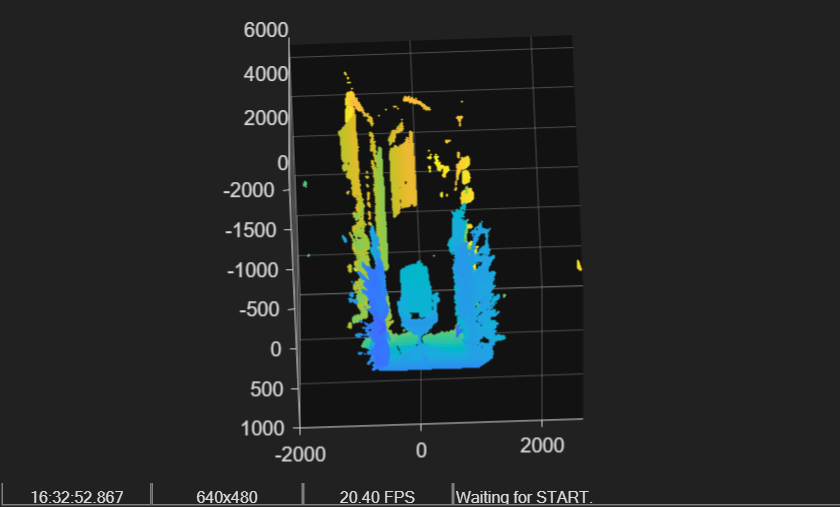
포인트 클라우드 20개 수집하기
FramesPerTrigger 속성을 설정하여 20개의 포인트 클라우드를 수집합니다.
vid.FramesPerTrigger = 20;
포인트 클라우드 데이터 수집을 시작하고, 총 20개의 포인트 클라우드가 모두 수집될 때까지 기다립니다.
start(vid)
wait(vid)
getdata를 사용하여 수집된 모든 포인트 클라우드를 MATLAB® 작업 공간으로 가져옵니다.
data = getdata(vid);
getdata의 출력 결과는 20개의 정렬된 포인트 클라우드로, 다음과 같은 차원을 가진 4차원 행렬로 표현됩니다:
높이 × 너비 × 3 × 수집한 프레임 수
size(data)
ans = 1×4

    480    640    3    20
pcplayer로 수집된 데이터 보기
X, Y, Z 축의 한계값을 구하시오. 이것들이 pcplayer의 입력 인수입니다.
xLimits = [min(data(:,:,1,:), [], "all") max(data(:,:,1,:), [], "all")]
xLimits = 1×2 single row vector
103 ×

    -1.8105    2.6844
yLimits = [min(data(:,:,2,:), [], "all") max(data(:,:,2,:), [], "all")]
yLimits = 1×2 single row vector
103 ×

    -2.2322    0.9077
zLimits = [min(data(:,:,3,:), [], "all") max(data(:,:,3,:), [], "all")]
zLimits = 1×2 single row vector
103 ×

    0    4.9998
pcplayer 객체를 생성합니다.
player = pcplayer(xLimits, yLimits, zLimits);
수집한 데이터로 pointCloud 객체를 생성하고, 20개의 프레임을 모두 반복 재생하여 확인합니다.
for i = 1:20
    ptCloud = pointCloud(data(:,:,:,i));
    if isOpen(player)
        view(player, ptCloud);
    end
end
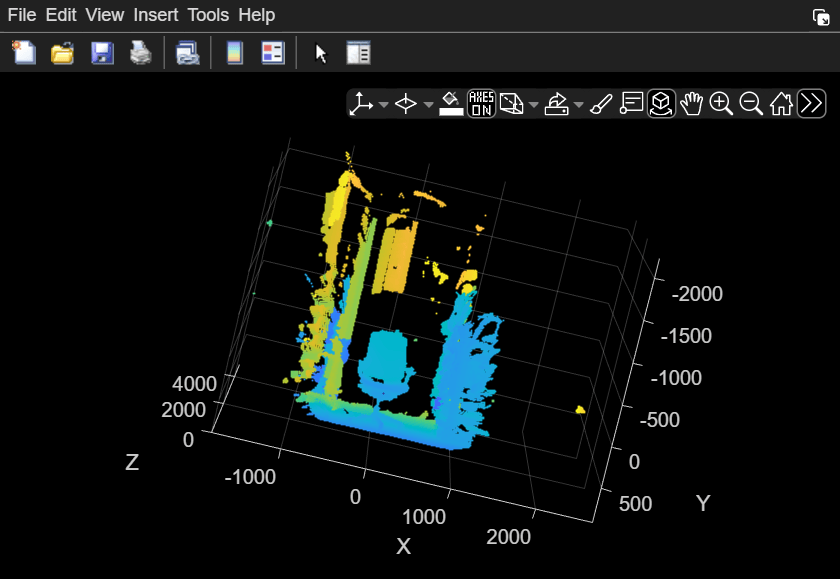
루프에 의해 생성된 가장 최근의 pointCloud 객체를 표시합니다.
ptCloud
ptCloud =
  pointCloud with properties:

     Location: [480×640×3 single]
        Count: 307200
      XLimits: [-1.8096e+03 2.6844e+03]
      YLimits: [-2.1540e+03 900.5122]
      ZLimits: [0 4.9998e+03]
        Color: []
       Normal: []
    Intensity: []
정리
delete(vid)
clear vid src
참고 항목
함수
pcplayer(Point Cloud Toolbox) |pointCloud(Point Cloud Toolbox)

