Generate Test Report
R2026bThe Automated Driving Toolbox™ Test Suite for Euro NCAP® Protocols support package provides options to evaluate various Euro NCAP® test performance metrics.
Note that you must set up, configure, and simulate the driving test bench before you log signals for a Euro NCAP test metric assessment. For more information, see Set Up and Configure Driving Test Bench to Simulate Scenario Variants. Additionally, if you have assessment results for your Euro NCAP test, you can leverage that information to create Euro NCAP reports.
After you set up and configure the driving test bench, you can simulate and log signals for
Euro NCAP test metric assessment. Each generated scenario undergoes tests that adhere to the
Euro NCAP assessment protocol specifications. To calculate the Euro NCAP assessment scores, use the euroAssessment
object. You can perform these operations using the euroAssessment object:
To create an empty assessment table for a Euro NCAP test scenario, use the
assessmentTableobject function. You can run the driving simulation test bench to update the assessment table. Alternatively, if you have assessment results for your Euro NCAP test, you can leverage that information to update the assessment table.To obtain scores for a Euro NCAP test, use the
ncapScoreobject function.To generate a report from the assessment results of a Euro NCAP test scenario, use the
ncapReportobject function.To export the Euro NCAP test scenario assessment results to a file with an extension such as
.pngor.pdf, use theexportReportobject function.
This figure shows an example of a report generated for the Euro NCAP Safety Assist Tests for AEB CCRm scenario.
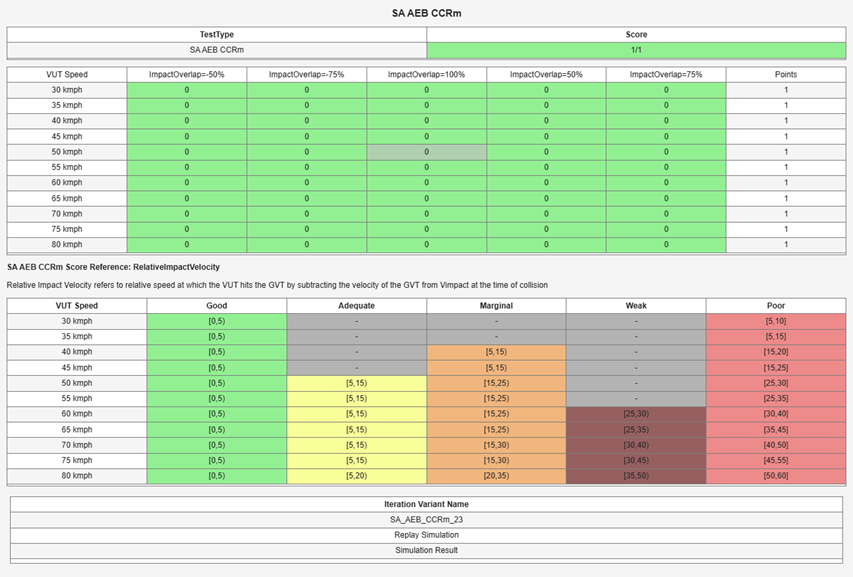
For more information on how to execute tests, analyze, and visualize the metrics across all Euro NCAP Safety Assist Tests for AEB Car-to-Car scenarios, see the Euro NCAP Testing with RoadRunner Scenario example.

