TrainingInfo
Description
Neural network training information including validation and loss information.
Creation
Create a TrainingInfo object using the second output of the trainnet.
Properties
Information about training iterations, returned as a table.
The table contains these variables:
Iteration— Iteration numberLoss— Training lossMetrics specified by the
Metricstraining option.
If you train with a stochastic solver (SGDM, Adam, or RMSProp), then the table has these additional variables:
Epoch— Epoch numberLearnRate— Learning rate
If you train with the L-BFGS solver, then the table has these additional variables:
GradientNorm— Norm of the gradientsStepNorm— Norm of the steps
Data Types: table
Information about validation iterations, returned as a table.
The table contains these variables:
Iteration— Iteration numberLoss— Training lossMetrics specified by the
Metricstraining option.
Data Types: table
Iteration that corresponds to the returned network, returned as a positive integer.
Data Types: double
Reason for stopping training, returned as one of these values:
"Max epochs completed"— Training reached the number of epochs specified by theMaxEpochstraining option."Max iterations completed"— Training reached the number of iterations specified by theMaxIterationstraining option."Stopped by OutputFcn"— Function specified by theOutputFcntraining option returned1(true)."Met validation criterion"— Validation loss is not lowest forValidationPatiencetimes."Stopped manually"— Stop button pressed."Error occurred"— The software threw an error."Training loss is NaN"— Training loss isNaN."Gradient tolerance reached"— Norm of the gradients is lower than theGradientTolerancetraining option."Step tolerance reached"— Norm of the steps is lower than theStepTolerancetraining option."Suitable learning rate not found"— Line search unable to find suitable learning rate.
Data Types: string
Examples
Unzip the digit sample data and create an image datastore. The imageDatastore function automatically labels the images based on folder names.
unzip("DigitsData.zip") imds = imageDatastore("DigitsData", ... IncludeSubfolders=true, ... LabelSource="foldernames");
Define the convolutional neural network architecture. Specify the size of the images in the input layer of the network and the number of classes in the final fully connected layer. Each image is 28-by-28-by-1 pixels.
inputSize = [28 28 1];
numClasses = numel(categories(imds.Labels));
layers = [
imageInputLayer(inputSize)
convolution2dLayer(5,20)
batchNormalizationLayer
reluLayer
fullyConnectedLayer(numClasses)
softmaxLayer];Specify the training options.
Train for four epochs using the SGDM solver.
Monitor the accuracy metric.
options = trainingOptions("sgdm", ... MaxEpochs=4, ... Metrics="accuracy");
Train the neural network. For classification, use cross-entropy loss. Return the trained network and the training information.
[net,info] = trainnet(imds,layers,"crossentropy",options); Iteration Epoch TimeElapsed LearnRate TrainingLoss TrainingAccuracy
_________ _____ ___________ _________ ____________ ________________
1 1 00:00:03 0.01 2.7615 3.9062
50 1 00:00:11 0.01 0.48724 84.375
100 2 00:00:17 0.01 0.16261 96.094
150 2 00:00:24 0.01 0.10018 96.094
200 3 00:00:29 0.01 0.056833 100
250 4 00:00:34 0.01 0.031866 100
300 4 00:00:40 0.01 0.021502 100
312 4 00:00:42 0.01 0.029409 99.219
Training stopped: Max epochs completed
View the training information.
info
info =
TrainingInfo with properties:
TrainingHistory: [312×5 table]
ValidationHistory: [0×0 table]
OutputNetworkIteration: 312
StopReason: "Max epochs completed"
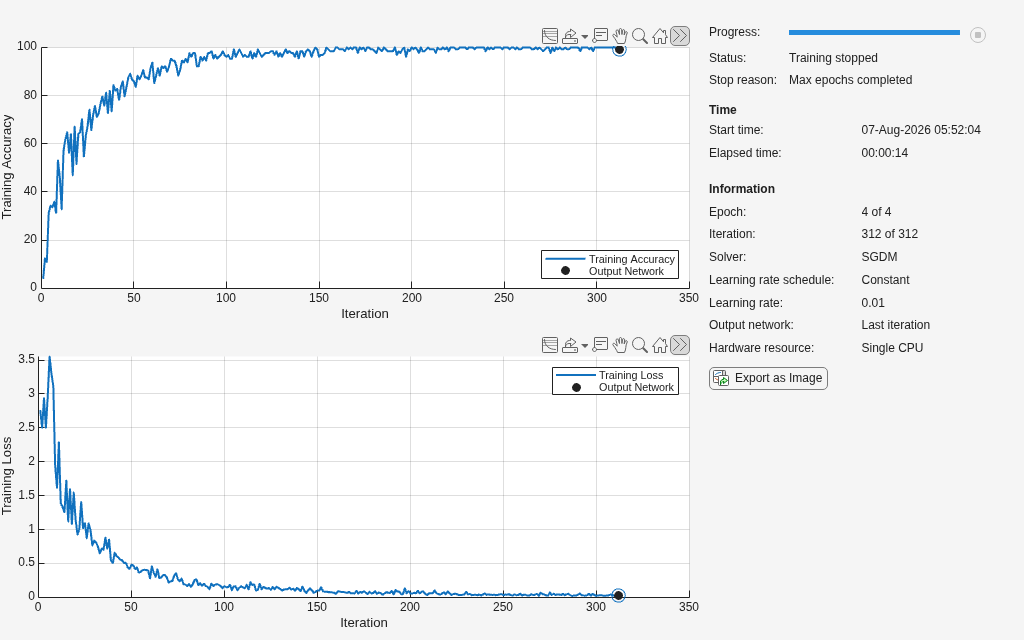
Display the training information in a plot using the show function.
show(info)
Close the plot using the close function.
close(info)
Version History
Introduced in R2023b
MATLAB Command
You clicked a link that corresponds to this MATLAB command:
Run the command by entering it in the MATLAB Command Window. Web browsers do not support MATLAB commands.
웹사이트 선택
번역된 콘텐츠를 보고 지역별 이벤트와 혜택을 살펴보려면 웹사이트를 선택하십시오. 현재 계신 지역에 따라 다음 웹사이트를 권장합니다:
또한 다음 목록에서 웹사이트를 선택하실 수도 있습니다.
사이트 성능 최적화 방법
최고의 사이트 성능을 위해 중국 사이트(중국어 또는 영어)를 선택하십시오. 현재 계신 지역에서는 다른 국가의 MathWorks 사이트 방문이 최적화되지 않았습니다.
미주
- América Latina (Español)
- Canada (English)
- United States (English)
유럽
- Belgium (English)
- Denmark (English)
- Deutschland (Deutsch)
- España (Español)
- Finland (English)
- France (Français)
- Ireland (English)
- Italia (Italiano)
- Luxembourg (English)
- Netherlands (English)
- Norway (English)
- Österreich (Deutsch)
- Portugal (English)
- Sweden (English)
- Switzerland
- United Kingdom (English)