Parameters Service Interface Properties
R2026b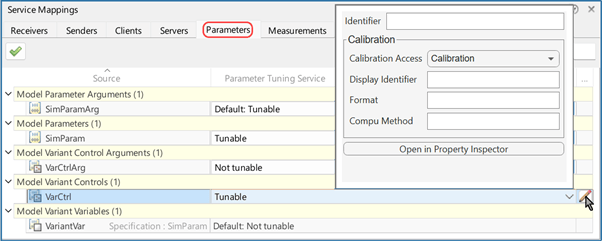
Use the Parameters tab of the Service Mappings editor to map model parameter arguments, model parameters, model variant control arguments, model variant controls, and model variant variables to definitions of parameter tuning service interfaces.
Properties
Use this tab of the Service Mappings editor to map tunable model elements to tuning service interface definitions. In the spreadsheet, there are 5 parent entries that correspond to the 5 types of tunable model elements. Each parent entry has a one-level collapsible child entry set. Each child entry corresponds to a tunable model element of the parent entry type. These are the 5 parent entries:
Model Parameters Arguments
Model Parameters
Model Variant Control Arguments
Model Variant Controls
Model Variant Variables
This property is read-only.
Name of the model element that corresponds to the table entry.
Code
Use the Code section to configure the variables, in the generated model code, that correspond to the tunable model elements you map to service interface definitions.
Determines whether the generated code allows tuning of the corresponding model element. From the list, select one of these:
TunableThe generated code includes code that allows tuning of the corresponding model element.
Not tunableThe generated code does not include code that allows tuning of the corresponding model element.
Default:TunableorDefault:Not tunableUse the predefined default value,
MeasuredorNot tunableto determine if the generated code allows tuning of the corresponding model element. Select this option for model elements that need to use the predefined value regardless of its value, for example, when you need your model behavior to be consistent with other models.
Only applicable when you select Tunable as the
Parameter Tuning Service. In the generated code, the
identifier of the variable that corresponds to the tunable model element, specified as
a text scalar. If you leave the Identifier property empty, the
identifier of the variable is identical to the value of the read only
Source property. the name of the model element.
Access this property from the Property Inspector or from the
dialog box for additional properties. To open the dialog box, click
the pencil icon  at the end of the table entry that corresponds to the model
element whose service interface you need to configure.
at the end of the table entry that corresponds to the model
element whose service interface you need to configure.
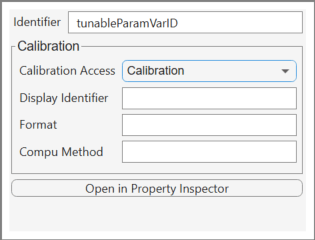
Calibration
Use the Calibration section to configure properties that are used for generating the ASAP2 file. To read more about generated ASAP2 files, see:
Introduction to ASAP2 File (Embedded Coder)
Configure Model Data Elements for ASAP2 File Generation (Embedded Coder)
Access the calibration properties from the Property Inspector or
from the dialog box for additional properties. To open the dialog box, click the pencil icon
at the end of the table entry that corresponds to the model element
whose service interface you need to configure.
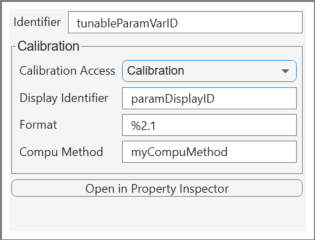
The calibration type for the parameter in the ASAP2 file, specified by selecting
from the list Calibration or
NoCalibration. Select
Calibration to allow the calibration of the corresponding
variable in the calibration tool. Select NoCalibration to
block the option of calibrating it in the tool.
Optional property for the name of the corresponding variable in calibration tool, as indicated in the ASAP2 file. Specified as a text scalar.
The format to use for displaying the corresponding variable in calibration tool,
as indicated in the ASAP2 file, specified as
%,
where length.layoutlength and layout are
integers. Leave the Format property empty to have the calibration
tool use the format of the Compu Method with the corresponding variable.
Conversion method name in the ASAP2 file, specified as a text scalar. The method
is used for converting the ECU-internal value to a physical value for easy
readability. Leave the Compu Method property empty to have the
calibration tool use the default method with the corresponding variable.
Version History
Introduced in R2026b
See Also
Measurements Service Interface Properties | Service Mappings Editor | Generate Calibration Files (Embedded Coder) | Property Inspector
Topics
- Introduction to Calibration and Measurement (Embedded Coder)
- Introduction to ASAP2 File (Embedded Coder)
- Configure Model Parameters with Tuning Service Interface Definitions (Embedded Coder)

