Enable Engine Control Unit Variant
R2026bConfigure ECU Variant
To connect a more advanced engine controller to the mapped engine block, you can enable an engine control unit (ECU) variant. This engine controller uses the driver torque request to calculate the open-loop air, fuel, and spark actuator commands that are required to meet the driver demand.
Click the top level of the configured virtual vehicle model.
Double-click the
Controllerssubsystem.Right-click the
Engine Control Unit (ECU)subsystem and select Block Parameters.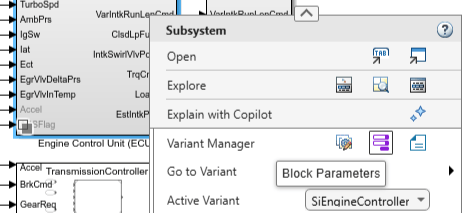
Set Variant choices specifier to one of these options:
For an SI engine, enter
{'SimpleECU','SiEngineController'}.For a CI engine, enter
{'SimpleECU','CiEngineController'}.
Click Apply, and then click OK.
Right-click the
Engine Control Unit (ECU)subsystem and confirm that the active variant isSiEngineControllerfor SI orCiEngineControllerfor CI. If you prefer a simplified controller, you can keep the defaultSimpleECUvariant.Save all model changes.
In the Simulink Toolstrip, on the Simulation tab, in the Simulate section, click Run.

