이 제출물을 팔로우합니다
- 팔로우하는 게시물 피드에서 업데이트를 확인할 수 있습니다
- 정보 수신 기본 설정에 따라 이메일을 받을 수 있습니다
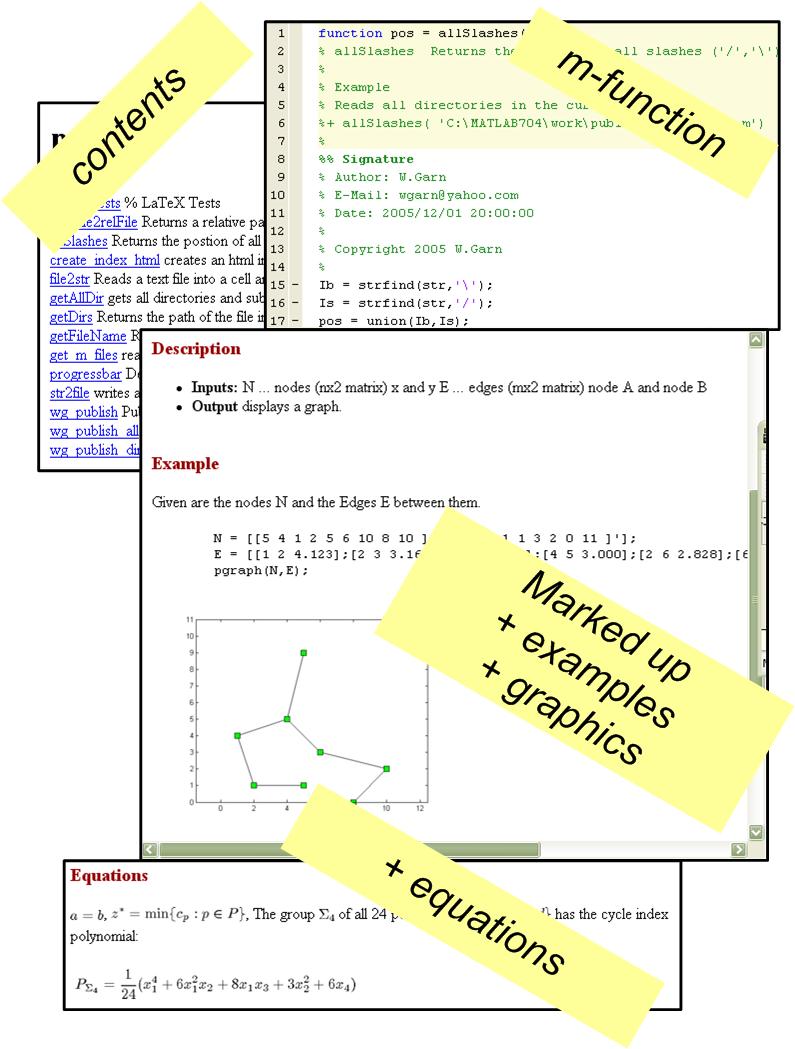
These functions read the comments from the m-function (or script) marks them up. It is based on Matlab's publish function.
It is also possible to inculde examples and simple LaTeX formulas within the help text.
To create the help file for a single Matlab function call:
wg_publish
To create the help for a single directory use:
wg_publish_dir
To create the help for an entire project (including all subdirectories)
simply execute:
wg_publish_all
To generate a corresponding index (contents) page try create_index_html.
In case you like a certain words always highlighted or as headings you can easily add them within wg_publish.
- help/documentation in html, latex, doc, ...
- executes Matlab examples and includes them in the help
- includes graphics
- integrates simple formulas
- creates html index
- cross-referencing
etc.
Notes:
I suggest to also use m2html from Guillaume Flandin and
the publish.m (publish_technics.m) function from Mathworks.
This function was only tested under Windows XP.
There are still a lot of formatting issues to do.
To Do: (Status: 18.1.2006)
+ documentation of subfunctions
+ improve formatting
+ hyperlinks to Matlab internal functions
+ extend Matlab/Latex command set
+ include Navigationbars in html documents (like one in the Matlab toolboxes)
+ collect all generated latex or word documents to only one document
+ combine with m2thml
etc.
인용 양식
Wolfgang Garn (2026). Generate help files from m-files (https://kr.mathworks.com/matlabcentral/fileexchange/9687-generate-help-files-from-m-files), MATLAB Central File Exchange. 검색 날짜: .
도움
도움 받은 파일: PUBLISH_TECHNICS, text2speech - tts, file2str, str2file
도움 준 파일: file2str, str2file, text2speech - tts
| 버전 | 퍼블리시됨 | 릴리스 정보 | Action |
|---|---|---|---|
| 1.0.0.0 |
