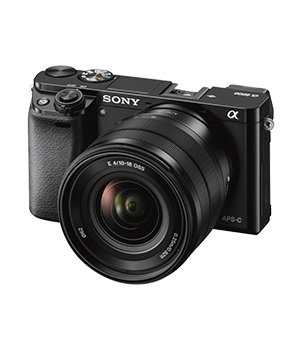
sonyalpha: Control a Sony Alpha Camera

버전 18.812 (2.98 MB) 작성자: Emmanuel Farhi
Control a Sony Alpha Camera
다운로드 수: 266
업데이트 2021/4/7

SONYALPHA A class to control a Sony Alpha Camera (NEX, Alpha, ...) compatible with the Camera Remote API by Sony.
** Usage **
>> camera = sonyalpha;
>> image(camera);
Then you can use the Methods:
- getstatus(camera): get the camera status
- iso: set/get ISO setting
- shutter: set/get shutter speed setting
- mode: set/get the PASM mode
- timer: set/get the self timer
- fnumber: set/get the F/D aperture
- white: set/get the white balance
- image: take a shot and display it
- imread: take a shot and download the image (no display)
- ...

** Connecting the Camera **
Start your camera and use its Remote Control App (e.g. Play Memories App) from the Camera settings. This starts the JSON REST HTTP server, used to control the camera. The Network SSID is shown on the Camera screen. Connect from your PC on that network. The usual associated IP is then 192.168.122.1 (port 8080)
The connection must be a dedicated ad-hoc, e.g. can NOT use an intermediate router. If you are already connected to the Internet, you have to drop your current connection, or use an additional Wifi adapter (e.g. USB-Wifi).

You can also connect the camera via a USB cable when GPhoto is installed.

** Requirements/Installation **
- Matlab, no external toolbox
- A wifi or USB connection
- A Sony Camera
- curl (for wifi)
- ffmpeg (for liveview via Wifi)
- gphoto2 (for USB)
Just copy the files and go into the directory. Then type commands above, once the camera is configured (see above).

** Credits **
https://github.com/micolous/gst-plugins-sonyalpha
https://github.com/Bloodevil/sony_camera_api
(c) E. Farhi, GPL2, 2018.

인용 양식

Emmanuel Farhi (2026). sonyalpha: Control a Sony Alpha Camera (https://github.com/farhi/matlab-sonyalpha), GitHub. 검색 날짜: .

MATLAB 릴리스 호환 정보
개발 환경: R2010a
모든 릴리스와 호환
플랫폼 호환성
Windows macOS Linux
카테고리
Help CenterMATLAB Answers에서 Startup and Shutdown에 대해 자세히 알아보기

GitHub 디폴트 브랜치를 사용하는 버전은 다운로드할 수 없음

버전 게시됨 릴리스 정보
18.812

now can control from USB via GPhoto when installed

1.0.2.0

has now functional GUI from plot/image figure, with menus. Doc update.

1.0.1.0

added icon/picture

1.0.0.0

이 GitHub 애드온의 문제를 보거나 보고하려면 GitHub 리포지토리로 가십시오.