zoomPlot

버전 1.0.0.0 (3.54 KB) 작성자: Kelsey Bower
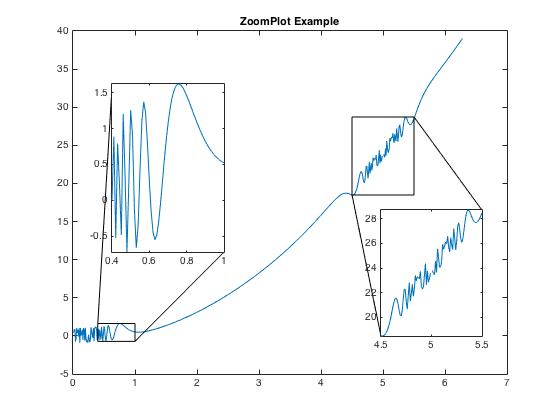
Adds zoomed plot inset to current axes.
다운로드 수: 4.3K
업데이트 날짜: 2016/10/23

라이선스 보기

편집자 메모: This file was selected as MATLAB Central Pick of the Week

Adds a zoomed plot inset to current axes, for use in highlighting a subarea of the current plot.
[p,z] = zoomPlot(x,y,xbounds,pos,vertex) where:
Inputs:
x,y = vectors being plotted
xbounds = [x1 x2] specifies the zoom indices, where x1 is the
first x value displayed in the zoom plot and x2 is the last.
pos = [left, bottom, width, height] specifies the location and
size of the side of the zoom box, relative to the lower-left
corner of the Figure window, in normalized units where (0,0)
is the lower-left corner and (1.0,1.0) is the upper-right.
vertex = toggles connecting lines corresponding to vertices, where 1
corresponds to the top left vertex and continuing clockwise,
4 corresponds to the bottom left vertex. Any/all 4 vertices can
be included.

Outputs:
p = axes handle for larger plot
z = axes handle for zoom plot
Note that the title, labels, and legend of the larger plot should be designated BEFORE placing the zoom plot. Otherwise, zoomPlot returns the handle of the original axes (p), and the title can be changed using "p.Title.String = title_string", etc.

Example:
% x and y data
x = [0; 5; 10; 10.1; 10.25; 10.5; 11.34; 22.83; 43; 119; 257];
y = 2*exp(-1/8*x)+1/3*exp(-2*x)+0.2*rand(length(x),1);
figure
plot(x,y)
hold on

% fit an exponential function to data
f1 = fit(x,y,'exp2');
plot(f1)

% set major axes legend, title, and labels
title('How far does the apple fall?')
xlabel('Distance from tree')
legend('Experimental Data','Multi-Exponential Fit')

% zoomPlot to highlight a portion of the major plot
[p,z] = zoomPlot(x,y,[5 50],[0.33 0.35 0.3 0.55],[1 3]);
hold on
plot(f1)
legend hide

% Forgot to add a title/label/legend to the original plot?
p.YLabel.String = 'Apples';

Kelsey Bower (kelsey.bower@case.edu) 10/20/15

인용 양식

Kelsey Bower (2026). zoomPlot (https://kr.mathworks.com/matlabcentral/fileexchange/59857-zoomplot), MATLAB Central File Exchange. 검색 날짜: .

MATLAB 릴리스 호환 정보
개발 환경: R2015a
모든 릴리스와 호환
플랫폼 호환성
Windows macOS Linux
카테고리
Help CenterMATLAB Answers에서 Annotations에 대해 자세히 알아보기
버전 게시됨 릴리스 정보
1.0.0.0

Fixed an error with plotting connecting lines
Edited description
Edited description
Added example

Added photo