이 제출물을 팔로우합니다
- 팔로우하는 게시물 피드에서 업데이트를 확인할 수 있습니다
- 정보 수신 기본 설정에 따라 이메일을 받을 수 있습니다
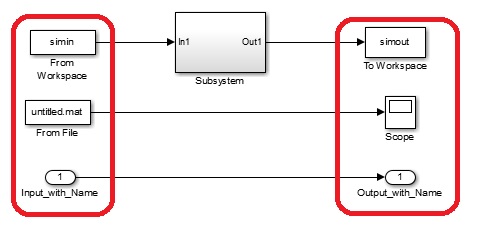
This function helps to identify all parameters and interfaces (in-/outputs) to a Simulink or Stateflow model. It can also be used on Subsystems in a specific model.
I wrote this function because the Matlab Built-In Simulink.MDLInfo did not provide me with all the info I needed.
Furthermore the simple documentation of the parameters used by a certain subsystem is a nice way of extracting a subset of your workspace when sharing part of your model with a colleague.
How to use:
[Parameter, Input, Output, Input_WorkSpace, Output_WorkSpace, Input_FromFile, Output_ToFile] = get_model_interface(modelname)
modelname: either the name of the model or a specific subsystem
(see the following lines how to setup correctly)
model: modelname = 'mymodel'
subsystem: modelname = 'mymodel/mysubsystem'
인용 양식
dbmn (2026). get_model_interface(modelname) (https://kr.mathworks.com/matlabcentral/fileexchange/56864-get_model_interface-modelname), MATLAB Central File Exchange. 검색 날짜: .
