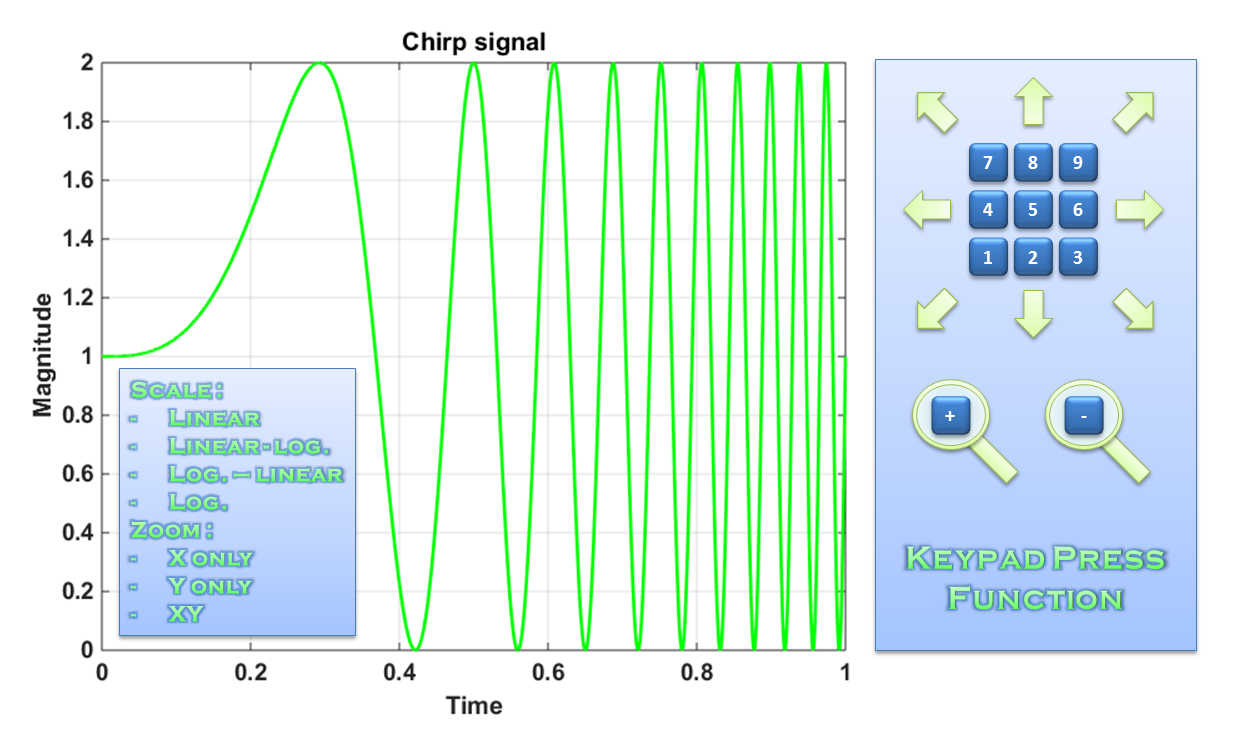
Keypad press function

Shortcuts and menus to graphical utilities (scale, zoom, translation and initialization)

이 제출물을 팔로우합니다

This function consists of a set of figure callbacks adding graphical utilities through keypad and context menus. The created shortcuts allow, in the specified axes, the following operations :
- Keypad press function :
+ zoom : [-] [+]
+ translation : [7] [8] [9] [4] [6] [1] [2] [3]
+ initialization : [5]
- Context menus (right click) :
+ "Scale" :
. "Linear scale"
. "Linear-log. scale"
. "Log.-linear scale"
. "Log. scale"
+ "Zoom" :
. "X only"
. "Y only"
. "XY"

인용 양식

Eric Ogier (2026). Keypad press function (https://kr.mathworks.com/matlabcentral/fileexchange/55937-keypad-press-function), MATLAB Central File Exchange. 검색 날짜: .

카테고리

Help CenterMATLAB Answers에서 Data Exploration에 대해 자세히 알아보기

일반 정보

MATLAB 릴리스 호환 정보

  • 모든 릴리스와 호환

플랫폼 호환성

  • Windows
  • macOS
  • Linux
버전 퍼블리시됨 릴리스 정보 Action
2.1.0.0

Extension to vector axes inputs for double Y axes (see plotyy function).

2.0.0.0

Evolutions :
- possibility to define semilogarithmic scales (with convenient zoom and translation callbacks)
- possibility to define zoom direction (X only or Y only)
Adding of a video demonstration link.
Adding of another plot example (magnitude Bode diagram).

1.0.0.0

Adding of a picture.