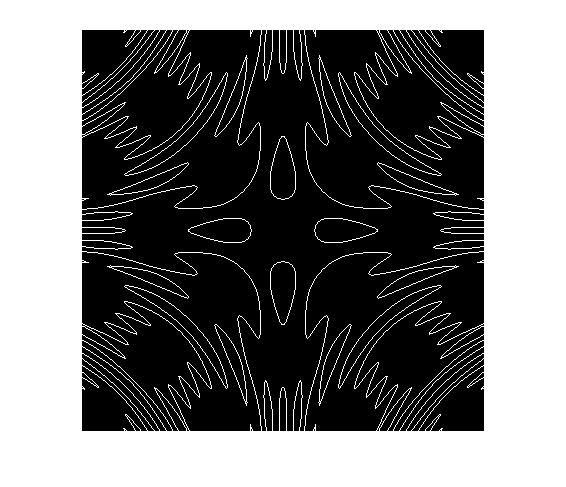
[ img ] = drawImplicitFun( f,xRange,yRange,grid )
This is simple program to plot a implicit function F on IMG
F is a function handle with two variables
IMG is a binary image containing the plot of F=0.
example:
f = @(x,y)cos(x)+cos(y)-cos(x.*y);
img = drawImplicitFun(f,[-10,10],[-10,10],0.05);
figure, imshow(img)
note:
1. The program makes use of the fact that if function f is continuous in [a,b] and f(a)*f(b)<=0, then there exists a point p between [a,b] s.t. f(p)=0. So if there are singularity points, the plot may be wrong. If the zero point is not on the grid, this program may not show all the zero points, e.g. when the function value changes too fast, or the zero point is also a minimum point. But in most cases, this program is OK.
2. Sometimes the image shown by imshow containa unexpected dash lines (which should have been continuous). This may be caused by interpolation methods of imshow. Try to zoom the image.
3. If you want a plot of several implicit functions, just use the OR operator on several images.
인용 양식
Ke Yan (2026). plot 2D implicit function (https://kr.mathworks.com/matlabcentral/fileexchange/44260-plot-2d-implicit-function), MATLAB Central File Exchange. 검색 날짜: .
MATLAB 릴리스 호환 정보
플랫폼 호환성
Windows macOS Linux카테고리
- MATLAB > Graphics > 2-D and 3-D Plots > Line Plots >
태그
| 버전 | 게시됨 | 릴리스 정보 | |
|---|---|---|---|
| 1.0.0.0 |
