
이 제출물을 팔로우합니다
- 팔로우하는 게시물 피드에서 업데이트를 확인할 수 있습니다
- 정보 수신 기본 설정에 따라 이메일을 받을 수 있습니다
Matlab plots can display data-tips but these cannot be interactively moved except to the 4 corners of the data point.
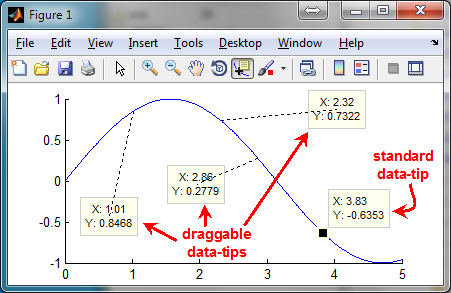
This utility enables the user to interactively drag any newly-created data-tip, anywhere in the Matlab figure. A dashed line connects the dragged data-tip with the original data point.
The new draggable functionality only affects new data-tips, so it can be turned on/off to enable standard and new data-tips to co-exist in the same plot (see screenshot).
Syntax: draggableDataTips(newState)
Examples:
draggableDataTips('on') or draggableDataTips(true) turns the new functionality ON for new data-tips.
draggableDataTips('off') or draggableDataTips(false) turns the new functionality OFF for new data tips.
Warning:
Relies on undocumented functionality.
This utility fails in HG2 (R2014b+) - please don't bug me about it, unless you found a solution...
On HG2 (R2014b+), use Allen's submission: https://www.mathworks.com/matlabcentral/fileexchange/69799-dragdatatip
Technical description:
http://UndocumentedMatlab.com/blog/draggable-plot-data-tips
인용 양식
Yair Altman (2026). Draggable data tips (https://kr.mathworks.com/matlabcentral/fileexchange/44065-draggable-data-tips), MATLAB Central File Exchange. 검색 날짜: .
도움
도움 준 파일: DragDataTip
| 버전 | 퍼블리시됨 | 릴리스 정보 | Action |
|---|---|---|---|
| 1.1.0.1 | No code change; only clarified in the Description section that this utility fails on R2014b or newer. Users of recent Matlab releases should use Allen's submission instead (see comment on 3 Jan 2019). |
||
| 1.1.0.0 | Fixed the bug reported by Aditya on Nov 3, 2013 |
||
| 1.0.0.0 |
