
이 제출물을 팔로우합니다
- 팔로우하는 게시물 피드에서 업데이트를 확인할 수 있습니다
- 정보 수신 기본 설정에 따라 이메일을 받을 수 있습니다
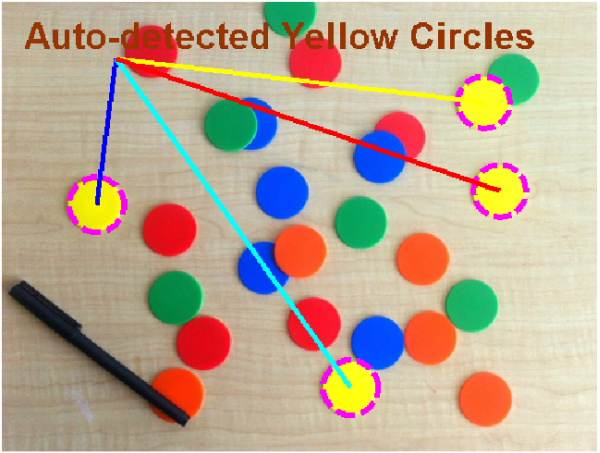
Use insertInImage to embed, or burn, any text or graphics item into an image. You can specify, using a cell array of parameter-value pairs (PVs), or using a structure, any valid properties of the specified object to insert.
The new version works in R2016a +, and is much improved. It now takes cell arrays of function handles (and PV pairs), so avoids multiple calls to insertInImage. Additionally, the new version no longer necessitates the visualization of a temporary figure for screen capture!
In versions prior to R16a, the function may work (back to R2014b), but may resize the image and insert a background region that will require cropping.
SYNTAX: IMGOUT = insertInImage(IMGIN,INSERTIONCOMMAND,PVs)
INPUTS:
BASEIMAGE: an image, or a handle to an image (or parent object containing an image), in which the object is to be embedded. (The image need not be displayed, unless a handle is provided.)
INSERTIONCOMMAND: text, rectangle, line, ellipse, etc. to embed in the image. Internally, insertInImage calls FEVAL; anything that works inside an feval command will workhere. For example, you can insert the string 'TESTING' at [x,y] = [20,30] using feval( @() text('TESTING',20,30]), so the insertionCommand for this would be:
@() text('TESTING',20,30).
TEXT:
@() text(x,y,string)
RECTANGLE:
@() rectangle('position',[x y w h])
LINE:
@() line(x,y)
PVs (OPTIONAL): Cell array or structure of any parameter-value pairs valid for the TYPE of object you wish to insert.(Note that this _may_ include a 'position' parameter, which will overwrite any position set with the insertion command. For example, when you insert a string, PVs can be any Parameter-Value pairs valid for TEXT objects. (See 'Text Properties' for details.)
OUTPUTS:
IMGOUT: output RGB image of the same class as imgin, with embedded text or graphic item(s).
(Thet lines, text, and circles are burned in the image herewith.)
인용 양식
Brett Shoelson (2026). Embed Text and Graphics in an Image (https://kr.mathworks.com/matlabcentral/fileexchange/38721-embed-text-and-graphics-in-an-image), MATLAB Central File Exchange. 검색 날짜: .
도움
도움 받은 파일: createButtonLabel(string,varargin)
| 버전 | 퍼블리시됨 | 릴리스 정보 | Action |
|---|---|---|---|
| 3.0.5 | Now allows specification of resolution as an input parameter. (Default remains unchanged: resolution = get(groot,'ScreenPixelsPerInch'); ). Higher resolution = better graphics. Also, Does NOT require Image Processing Toolbox. |
||
| 3.0.1 | I set the figure's 'invertHardcopy' property to 'off' to avoid unwanted changes of color. |
||
| 3.0.0.1 | Updated license |
||
| 3.0.0.0 | The new version works in R2016a+. (In older versions, images may be resized and require cropping.) It now takes cell arrays of function handles (and PV pairs), and no longer necessitates the visualization of a temporary figure for screen capture! |
||
| 1.0.0.0 |
