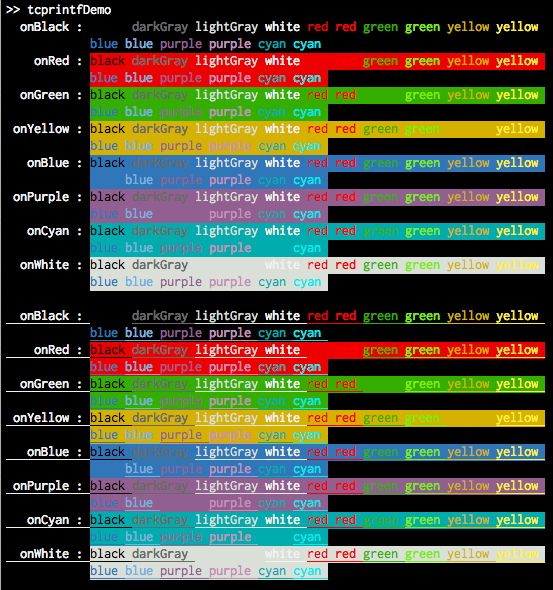
tcprintf : ANSI colored output in terminal

tcprintf provides colored output when using MATLAB from a terminal using ANSI escape codes.

이 제출물을 팔로우합니다

Uses ANSI escape codes to print colored output when using MATLAB
from a terminal. If not running in a terminal, or if called by MATLAB's
datatipinfo function, tcprintf reverts to standard printf. The latter is
desirable if tcprintf is used within an object's disp() method to avoid
seeing the ANSI characters here.

The first argument is an style description that consists of space-separated
words. These words may include:

one of the following colors:
black, red, green, yellow, blue, purple, cyan, darkGray, lightGray, white

one of the following background colors:
onBlack, onRed, onGreen, onYellow, onBlue, onPurple, onCyan, onWhite

and any of the following modifiers:
bright : use the bright (or bold) form of the color, not applicable for
black, darkGray, lightGray, or white
underline : draw an underline under each character
blink : This is a mistake. Please don't use this ever.

Example:
tcprintf('lightGray onRed underline', 'Message: %20s\n', msg);

Author: Dan O'Shea (http://djoshea.com) (c) 2012

Released under the open source BSD license
http://opensource.org/licenses/bsd-license.php

인용 양식

Daniel J O'Shea (2026). tcprintf : ANSI colored output in terminal (https://kr.mathworks.com/matlabcentral/fileexchange/38252-tcprintf-ansi-colored-output-in-terminal), MATLAB Central File Exchange. 검색 날짜: .

카테고리

Help CenterMATLAB Answers에서 Debugging and Improving Code에 대해 자세히 알아보기

일반 정보

MATLAB 릴리스 호환 정보

  • 모든 릴리스와 호환

플랫폼 호환성

  • Windows
  • macOS
  • Linux
버전 퍼블리시됨 릴리스 정보 Action
1.0.0.0