OrthoView3D

MATLAB GUI for exploring 3D datasets through a sleek and simple interface (sample dataset included)

이 제출물을 팔로우합니다

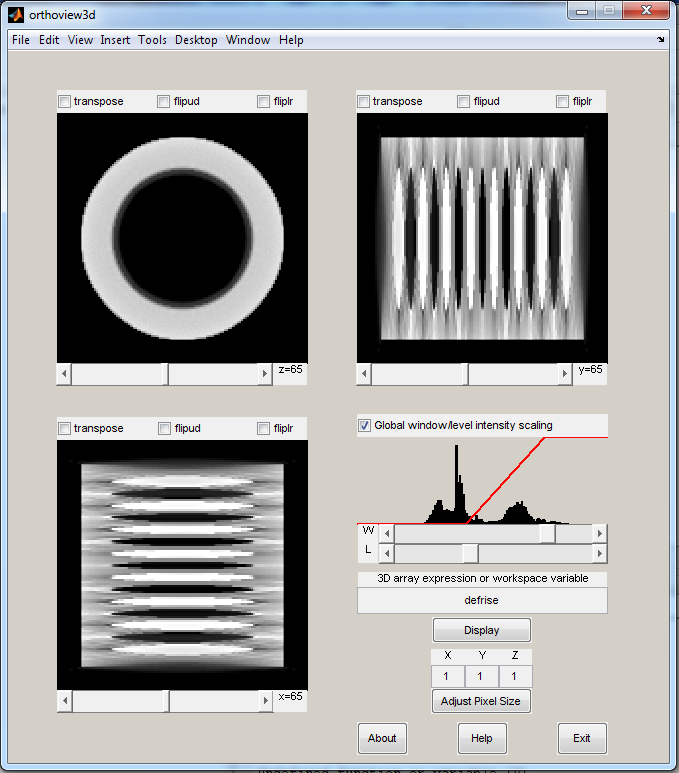
ORTHOVIEW3D GUI for interactive viewing of 3D Volumes
ORTHOVIEW3D is used to view orthographic slices of 3D volumes

Type in an expression that generates a 3D array
then press the Display button

3D expressions such as: rand(50,40,30) or
the name or a 3D array variable in the workspace

Use the scroll bars to change the number of the slice viewed

Use the transpose, flipud, or fliplr to
transpose the view, flip it vertically, or horizontally

Change the Pixel Size values to the volume's physical dimensions
so the aspect ratio is displayed properly
(note: you can use relative values
for example use 1,3,2 instead of 0.5,1.5,1.0
then press "Adjust Pixel Size"

Example:
load defrise
orthoview3d
(Type 'defrise' in the box where 'rand(50,40,30)' appears)
(Press 'Display')

See also: VIEW3D, slice, montage, isosurface

Jered R Wells
02/10/2012
jered [dot] wells [at] gmail [dot] com

Author's Note
This file was adapted from ORTHOVIEW by Ghassan Hamarneh (see ref).
It has been accelerated and simplified for viewing larger volumes.
A simple window/level tool has also been added to supplement the
viewing of medical images with familiar tools.

Acknowledgement to:
http://www.mathworks.de/matlabcentral/fileexchange/2256-orthoview
Ghassan Hamarneh, ghamarneh@yahoo.com

인용 양식

Jered Wells (2026). OrthoView3D (https://kr.mathworks.com/matlabcentral/fileexchange/35037-orthoview3d), MATLAB Central File Exchange. 검색 날짜: .

도움

도움 받은 파일: OrthoView

카테고리

Help CenterMATLAB Answers에서 Image Processing Toolbox에 대해 자세히 알아보기

일반 정보

MATLAB 릴리스 호환 정보

  • 모든 릴리스와 호환

플랫폼 호환성

  • Windows
  • macOS
  • Linux
버전 퍼블리시됨 릴리스 정보 Action
1.2.0.0

Updated summary

1.1.0.0

Corrected errors in pixel size field

1.0.0.0