
ConsoleProgressBar

Console progress bar for long-running operations

이 제출물을 팔로우합니다

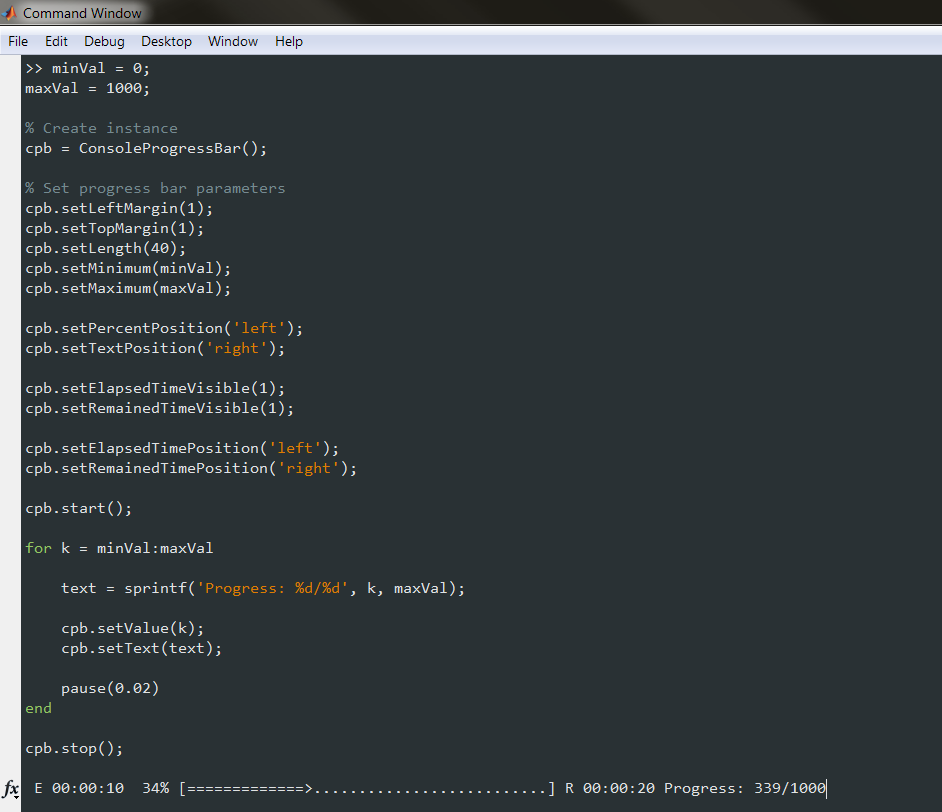
This class creates a console progress bar (status bar) for long-running operations. Visually, it's very similar to the unix command line utilites "pv" and "wget". You can customize the look to your taste.

In addition, it's funny, but it may be useful. Just for fun! :)

Usage example:
% Create Instance
cpb = ConsoleProgressBar();

% Set progress bar parameters
cpb.setLeftMargin(1); % progress bar left margin
cpb.setTopMargin(1); % rows margin

cpb.setLength(40); % progress bar length: [.....]
cpb.setMinimum(0); % minimum value of progress range [min max]
cpb.setMaximum(100); % maximum value of progress range [min max]

cpb.start();

for k = 0:100
userText = sprintf('Progress: [%d/%d]', k, 100);

cpb.setValue(k); % update progress value
cpb.setText(userText) % update user text

pause(0.025)
end

cpb.stop();

인용 양식

Evgeny Pr (2026). ConsoleProgressBar (https://kr.mathworks.com/matlabcentral/fileexchange/30297-consoleprogressbar), MATLAB Central File Exchange. 검색 날짜: .

카테고리

Help CenterMATLAB Answers에서 Environment and Settings에 대해 자세히 알아보기

일반 정보

MATLAB 릴리스 호환 정보

  • 모든 릴리스와 호환

플랫폼 호환성

  • Windows
  • macOS
  • Linux
버전 퍼블리시됨 릴리스 정보 Action
1.1.0.0

- improved performance
- fixed minor bugs

1.0.0.0